EasyManua.ls Logo

Sequential Pro One - Arpeggiator Features

Sequential Pro One
85 pages
Print Icon
To Next Page IconTo Next Page
To Previous Page IconTo Previous Page
Loading...
1-6
PITCH
WHEEL
AND
GLIDE
EST
OE
IIVI
Lullr,
"GIOII*LI
'rnILO.I
XI"
I...
u
LWY*.
-nu*,
mm
1.
am"
mu,.
PaII11*
"ELL.,.
.
'
6
1
,
v*mL
.ts..l
rm.u*,
*bull
mn'
OlCll
IYTI.I*
.CLT.s.
LiO
%
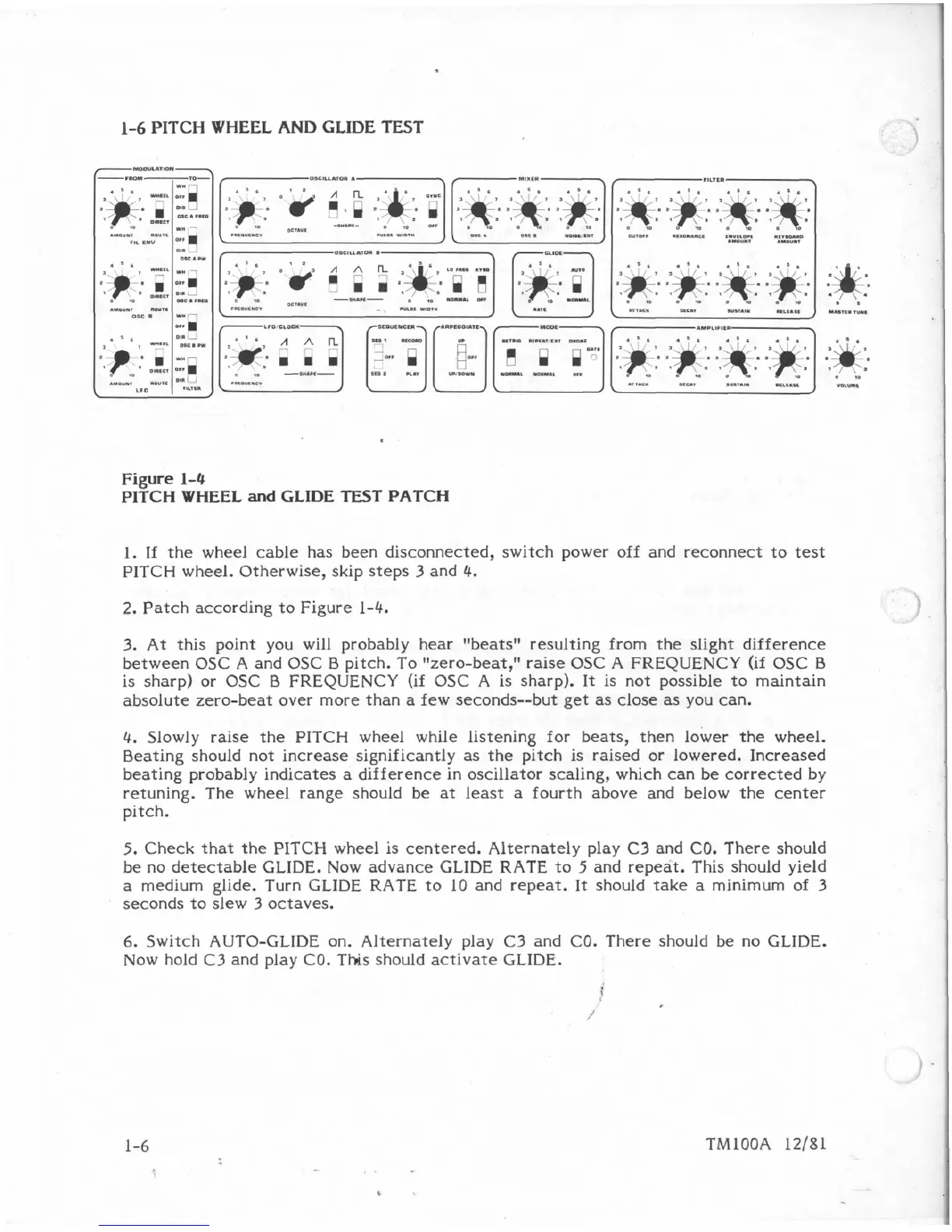
Figure
1-4
PITCH
WHEEL
and
GLIDE
TE5T
PATCH
1.
If
the
wheel
cable
has
been
disconnected,
switch
power
off
and
reconnect
to
test
PITCH
wheel.
Otherwise,
skip
steps
3
and
4.
2.
Patch
according
to
Figure
1-4.
3.
At
this
point
you
will probably
Rear
"beatsM
resulting
from
the
slight
difference
between
OSC
A
and
OSC
E3
pitch.
To
"zero-beat,"
raise
OSC
A
FREQUENCY
(if
OSC
B
is
sharp)
or
OSC
B
FREQUENCY
(if
OSC
A
is
sharp).
It
is
not
possible
to
maintain
absolute
zero-beat
over
more
than
a
few
seconds--but
get
as
close
as
you
can.
4.
Slowly
raise
the
PITCH
wheel
while
listening
for
beats,
then
lower
the
wheel.
Beating
should not
increase
significantly
as
the
pitch
is
raised
or
Powered.
Increased
beating
probably indicates
a
difference
in
oscillator
scaling,
which
can
be
corrected
by
retuning.
The
wheel
range
should
be
at
least
a
fourth
above
and
below
the
center
pitch.
5.
Check
that
the
PITCH
wheel
is centered.
Alternately
play
C3
and CO. There
should
be
no
detectable
GLIDE.
Now
advance
GLIDE
RATE
to
5
and
repeat,
This
should
yield
a
medium
glide.
Turn
GLIDE
RATE
to
10
and
repeat.
It
should
take
a
minimum
of
3
seconds
to
skew
3
octaves.
6.
Switch
AUTO-GLIDE
on.
Alternately
play
C3
and
CO.
There
should
be
no
GLIDE.
Now
hold
C3
and
play
CO.
Tlis
should
activate
GLIDE.

Table of Contents

Other manuals for Sequential Pro One

Related product manuals