EasyManua.ls Logo

Sequential Pro One - Troubleshooting Basic Operation

Sequential Pro One
85 pages
Print Icon
To Next Page IconTo Next Page
To Previous Page IconTo Previous Page
Loading...
9.
The
next
step
requires
increasing
the
AMPLIFIER
RELEASE
time
so
you
can
hear
the
FILTER
RELEASE
time.
Start
with
AMPLIFIER
RELEASE
set
to
about
8.
Set
FILTER
RELEASE
knob
to
6.
This
should
give
about
a
1-sec
release
time.
16. Set
both
the
FILTER
and
AMPLIFIER
RELEASE
knobs
to
10.
Hit
a
key
and
check
that
it
takes
a
minimum
of
15
seconds
for
the
pitch
to
fully
RELEASE.
1-8
AMPLIFIER
TEST
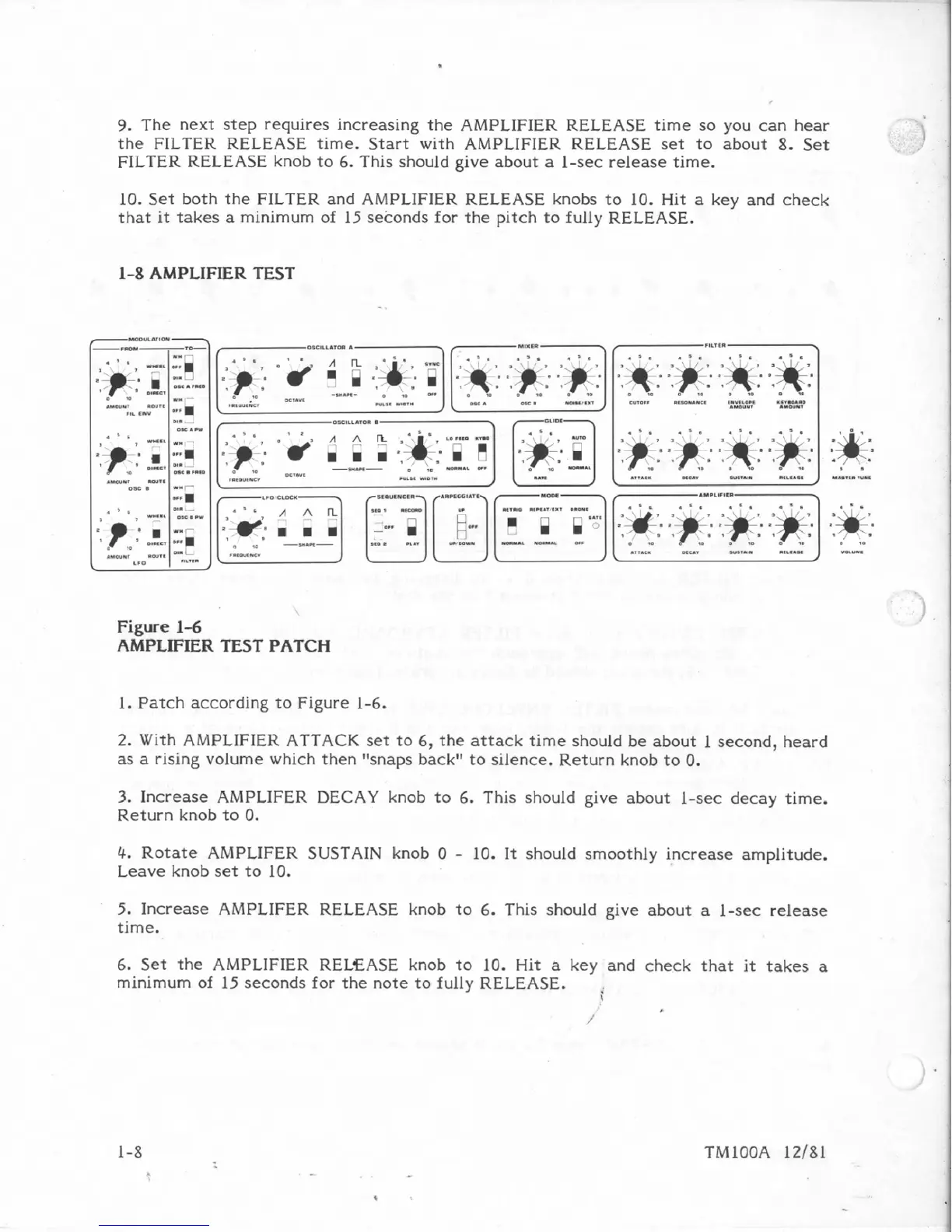
Figure
1-6
AMPLIFIER
TEST
PATCH
1.
Patch
according
to
Figure
1-6.
2.
With
AMPLIFIER
ATTACK
set
to
6,
the
attack
time
should
be
about
1,
second,
heard
as
a
rising
volume
which
then
"snaps
backr9.to
silence.
Return
knob
to
0.
3.
Increase
AMPLIFER
DECAY
knob
to
6.
This
should
give
about
1-sec
decay
time.
Return
knob
to
6.
4,
Rotate
AMPLIFER
SUSTAIN
knob
10
-
10.
It
should
smoothly
increase
amplitude.
Leave
knob
set
to
10.
5.
Increase
AMPLIFER
RELEASE
knob
to
6.
This
should
give
about
a
1-sec
release
time.
6.
Set
the
AMPLIFIER
RELEASE
knob
to
10.
Hit
a
key
and
check
that
it
takes
a
minimum
of
IS
seconds
for
the
note
to
fully
RELEASE.

Table of Contents

Other manuals for Sequential Pro One

Related product manuals