EasyManua.ls Logo

Sequential Pro One - Modulation Destination Test Patch

Sequential Pro One
85 pages
Print Icon
To Next Page IconTo Next Page
To Previous Page IconTo Previous Page
Loading...
6,
If
used,
switch
DRONE
OFF.
Play
slowly
while
adjusting
MOD
EIL
ENV
AMOUNT
knob
O
-
10
to
check
the filter envelope
as
modulation
source.
The
filter
envelope
has
been
patched
in
Figure
1-7
with
1-sec
ATTACK,
DECAY,
and
RELEASE
times.
Applying
this
envelope
to
OSC
A
FREQ
gives
a
frequency
sweep
which
rises
for
1-sec,
decays
at
the
same
rate
to
the
sustain
level
while
the
key
is
held, then
releases
to the
initial
frequency
at
the
same
rate
when
the
key
is
released.
The
range
of
the
sweep
is
increased
as
you
advance
the
FIL
ENV
AMOUNT
knob.
Return
FlL
ENV
AMT
to
0.
7.
Switch
FIL
ENV.
OSC
B
and
LFU
ROUTE
switches
to
WHEEL.
Also
switch
TO
OSC
A
FREQ
from
DIR
to
WH.
Test
the
FEL
ENV,
OSC
B
and
LFO
WHEEL-modulation
sources
as
in
steps
4
through
6
(for
DIRECT
MOD).
The
WHEEL
test results
will
be
the
same
as
the
DIREC-T
results,-cxcept
the
MOD
wheel
is
also
effective
as
an
attenuator
in
series
with
any
of
the
MODULATlON
AMOUNT
knobs.
In
other
words,
the
MOD
wheel
and
the
AMOUNT
knobls)
must
both
be
advanced
to
engage
modulation.
-
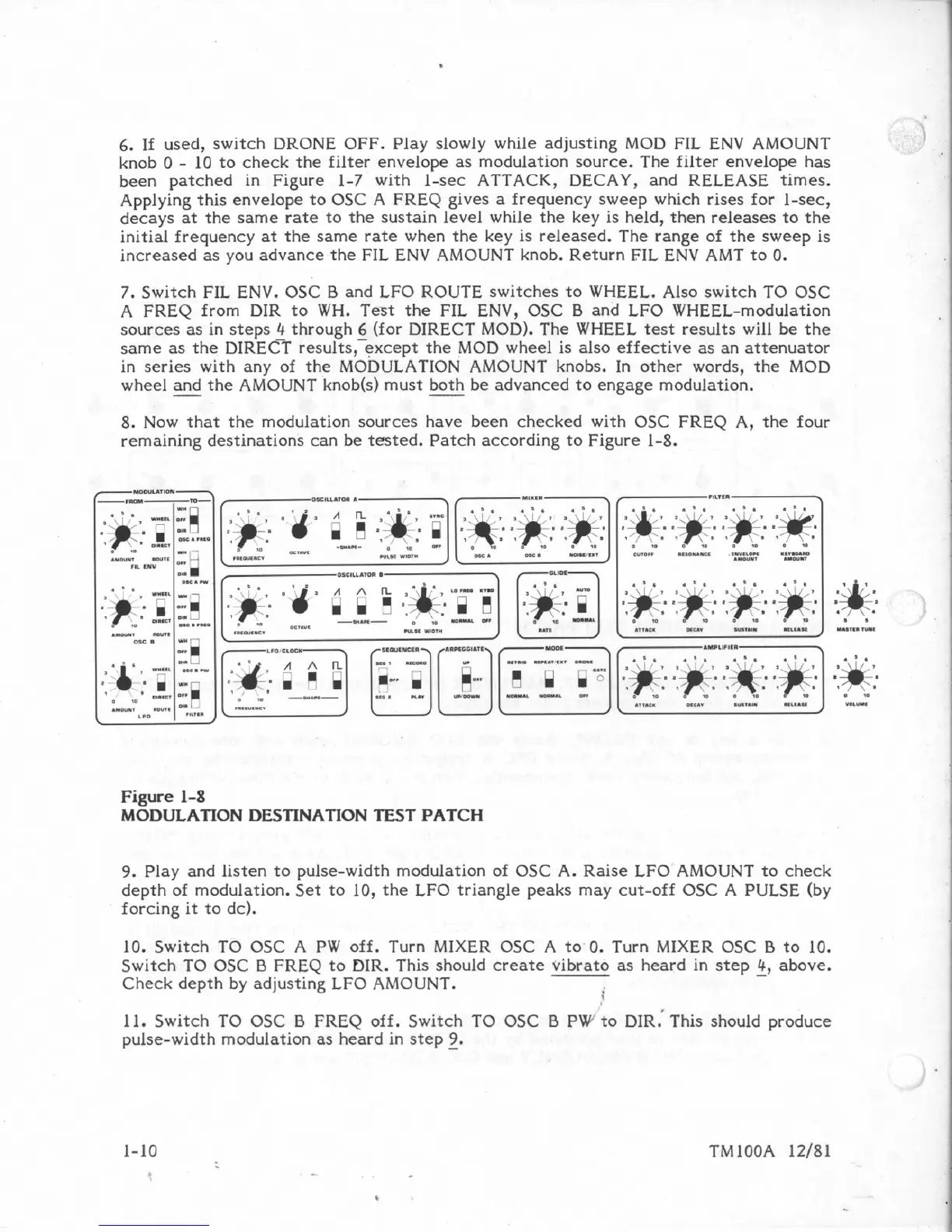
8.
Now
that
the
modulation
sources
have
been
checked
with
OSC
FREQ
A,
the
four
remaining
destinations
can
be
tested.
Patch
according
to
Figure
1-8.
Figure
1-8
MODULATION
DES'FINATION
TEST
PATCH
9.
Play
and
listen
to
pulse-width
modulation
of
OSC
A.
Raise
LFO
AMOUNT
to
check
depth
of
modulation. Set
to
10,
the
LFO
triangle
peaks
may
cut-off
OSC
A
PULSE
(by
forcing
it
to
dc).
10.
Switch
TO
OSC
A
PW
off.
Turn
MIXER
BSC
A
to'
0.
Turn
MIXER
OSC
5
to
10,
Switch
TO
OSC
B
FREQ
to
DIR.
This
should
create
vibrato as
heard
in
step
-
4,
above.
Check
depth by
adjusting
LFO
AMOUNT.
L
11.
Switch
TO
OSC
B
FREQ
off.
Switch
TO
OSC
B
PW
to
DIR.'
This
should
produce
pulse-width
modulation
as
heard in
step
-
9.

Table of Contents

Other manuals for Sequential Pro One

Related product manuals