EasyManua.ls Logo

Sequential Pro One - Front Panel Overview; The Voice Architecture

Sequential Pro One
85 pages
Print Icon
To Next Page IconTo Next Page
To Previous Page IconTo Previous Page
Loading...
1-9
MODULATION
TEST
This
test
checks
the
LFO
waveshapes,
the
three
MODULATION
FROM
AMOUNT
knobs
and
ROUTE
switches,
and
the
five
destination
(TO)
switches.
(The
FIL
ENV
and
OSC
B
modulation
sources
were
tested
above.)
Since
this
test
includes
the
LFO,
don't
use
the
arpeggiator
or
sequencer.
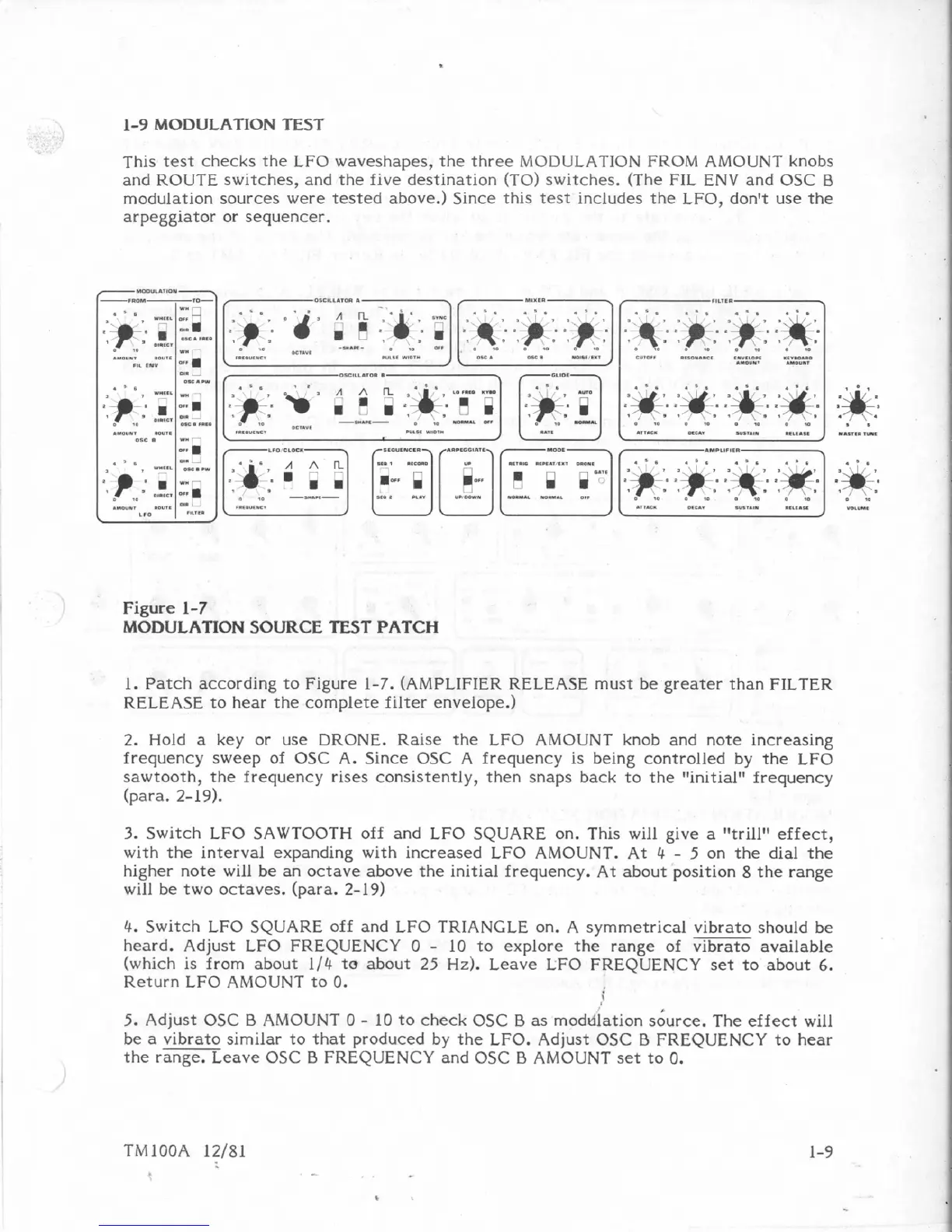
Figure
1-7
MODULATION SOURCE
TEST
PATCH
1.
Patch
according
to
Figure
1-7.
(AMPLIFIER
RELEASE
must
be
greater
than
FILTER
RELEASE
to
hear
the
complete
filter
envelope.)
2.
Hold
a
key
or
use
DRONE.
Raise
the
LFO
AMOUNT
knob
and
note
increasing
frequency
sweep
of
OSC
A.
Since
OSC
A
frequency
is
being
controlled
by
the
LFO
sawtooth,
the
frequency
rises
consistently,
then
snaps
back
to
the t'initial"frequency
[para.
2-19).
3.
Switch
LEO
SAWTOOTH
off
and
LFO
SQUARE
on.
This
will
give
a
futrillM
effect,
with
the
interval
expanding
with
increased
LFO
AMOUNT.
At
4
-
5
on
the
dial
the
higher
note
will
be
an
octave-
above
the
initial
frequency.
At
about
position
8
the
range
will
be
two
octaves,
(para.
2-19)
4.
Switch
LFO
SQUARE
off
and
LEO
TRIANGLE
on.
A
symmetrical vibrato
should
be
heard.
Adjust
LFO
FREQUENCY
O
-
10
to
explore
the
range
of
vibrato
available
(which
is
from
about
1/4
to
about
25
Hz).
Leave
LFO
FREQUENCY
set
to
about
6.
Return
LEO
AMOUNT
to
0.
i
5.
Adjust
OSC
B
AMOUNT
0
-
10
to
check
OSC
0
as
rnoddlation
s6urce.
The
effect
will
be
a
vibrato
similar
to
that
produced
by
the
LFO.
Adjust
OSC
B
FREQUENCY
to
hear
the
range,
Leave
OSC
B
FREQUENCY
and
OSC
B
AMOUNT
set
to
0.

Table of Contents

Other manuals for Sequential Pro One

Related product manuals