EasyManua.ls Logo

Sequential Pro One - Oscillator a Test; OSC a Test Patch

Sequential Pro One
85 pages
Print Icon
To Next Page IconTo Next Page
To Previous Page IconTo Previous Page
Loading...
1-3
OSCILLATOR
A
TEST
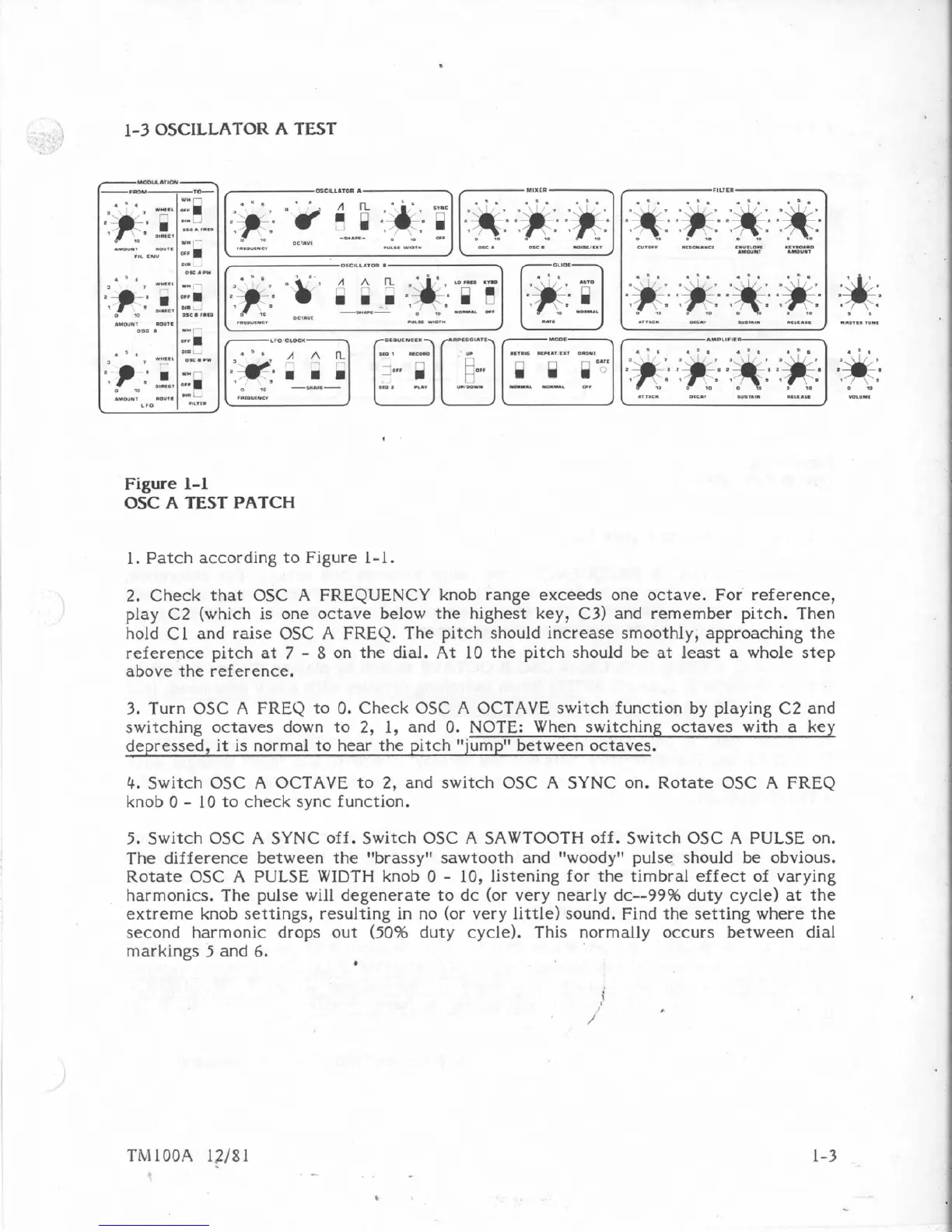
Figure
1-1
OSC
A
TEST
PATCH
1.
Patch
according
to
Figure
1-1.
2.
Check
that
0SC
A
FREQUENCY
knob
range
exceeds
one
octave.
For
reference,
play
C2
(which
is
one
octave
below
the
highest
key,
C3)
and
remember
pitch.
Then
hold
C1
and
raise
OSC
A
FREQ.
The
pitch should
increase
smoothly,
approaching
the
reference
pitch
at
7
-
8
on
the
dial.
At
10
the
pitch
should
be
at
least
a
whole
step
above
the
reference.
3.
Turn
OSC
A
FREO
to
0.
Check
OSC
A
OCTAVE
switch
function
by
playing
C2
and
..
.
switching
octaves
down
to
2,
1,
and
0.
NOTE:
When
switching
octaves
with
a
key
depressed,
it
is
normal
to
hear
the
pitch
"jump"
between
octaves.
'
"
4.
Switch
OSC
A
OCTAVE
to
2,
and
switch
OSC
A
SYNC
on.
Rotate
OSC
A
FREQ
knob
0
-
10
to
check
sync
function.
5.
Switch
OSC
A
SYNC
off.
Switch
OSC
A
SAWTOOTH
off.
Switch
05C
A
PULSE
on.
The
difference
between
the
'Ibrassylr
sawtooth
and
tfwoody"
pulse
should
be
obvious.
Rotate
OSC
A
PULSE
WIDTH
knob
0
-
lo,
listening
for
the
timbral
effect
of
varying
harmonics.
The
pulse
will
degenerate
to
dc
(or
very
nearly
dc--99%
duty
cycle)
at
the
extreme
knob
settings,
resulting
in
no
(or
very
little)
sound.
Find
the
setting
where
the
second
harmonic
drops
out
(50%
duty
cycle).
This
normally
occurs
between
dial
markings
5
and
6.

Table of Contents

Other manuals for Sequential Pro One

Related product manuals