EasyManua.ls Logo

Sequential Pro One - Playing the Pro-One Synthesizer

Sequential Pro One
85 pages
Print Icon
To Next Page IconTo Next Page
To Previous Page IconTo Previous Page
Loading...
1-4
OSCILLATOR
B
lF5T
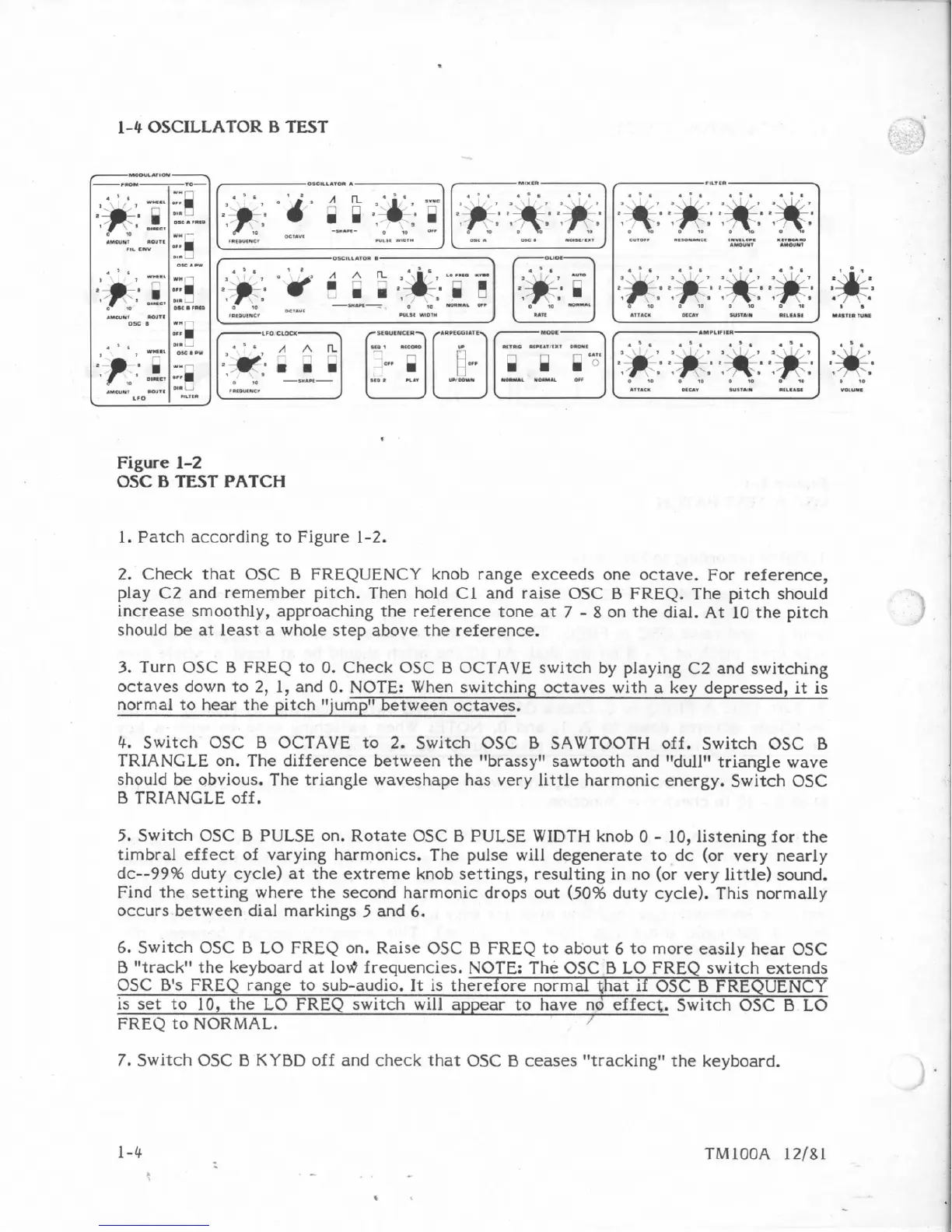
Figure
1-2
OSC
B
TEST
PATCH
1.
Patch
according to Figure
1-2.
2.
Check
that
OSC
B
FREQUENCY
knob
range
exceeds
one
octave.
For
reference,
play
C2
and
remember pitch. Then
hold
C1
and
raise
OSC
B
FREQ.
The
pitch should
increase
smoothly,
approaching
the
reference
tone
at
7
-
8
on
the
dial.
At
10
the
pitch
should
be
at
least
a
whole
step
above
the
reference.
3.
Turn
OSC
B
FKEQ
to
0. Check OSC
B
OCTAVE
switch
by
playing
C2
and
switching
octaves
down
to
2,
1,
and
0.
NOTE:
When
switching
octaves
with
a
key
depressed,
it
is
normal
to
hear
the
pitch
"jump"
between
octaves.
4.
Switch
OSC
B
OCTAVE
to
2.
Switch
OSC
0
SAWTOOTH
off.
Switch
OSC
B
TRIANGLE
on.
The
difference
between
the
''brassy"
sawtooth
and
"dull1'
triangle
wave
should
be
obvious.
The
triangle
waveshape
has
very
little
harmonic
energy.
Switch
OSC
I3
TRIANGLE
off.
5.
Switch
OSC
B
PULSE
on.
Rotate
OSC
B
PULSE
WIDTH
knob
0
-
10,
listening
for
the
timbral
effect
of
varying
harmonics.
The
pulse will
degenerate
to
dc
(or
very
nearly
dc--99%
duty
cycle)
at
the
extreme
knob
settings, resulting
in
no
(or
very
little)
sound.
Find
the
setting
where
the
second
harmonic
drops out
(50%
duty
cycle).
This
normally
occurs
between
dial
markings
5
and
6.
6.
Switch
OSC
B
LO
FREQ
on.
Raise
6SC
B
FREQ
to
about
6
to
more
easily
hear
OSC
B
"track"
the
keyboard
at
lev$
frequencies.
NOTE:
he
OSC
B
LO
FREQ
switch
extends
OSC
B's
FREQ
range
to
sub-audio.
It
is
therefore
normal
qhat
if
OSC
B
FREQUENCY
is
set
to
10,
the
LO
FREQ
switch
will
appear
to
have
nd
effect.
Switch
05C
B
LO
FREQ
to
NORMAL.
/
7.
Switch
OSC
B
KYBD
off
and
check
that
OSC
B
ceases
"tracking"
the
keyboard.

Table of Contents

Other manuals for Sequential Pro One

Related product manuals