7-25
CHAPTER7
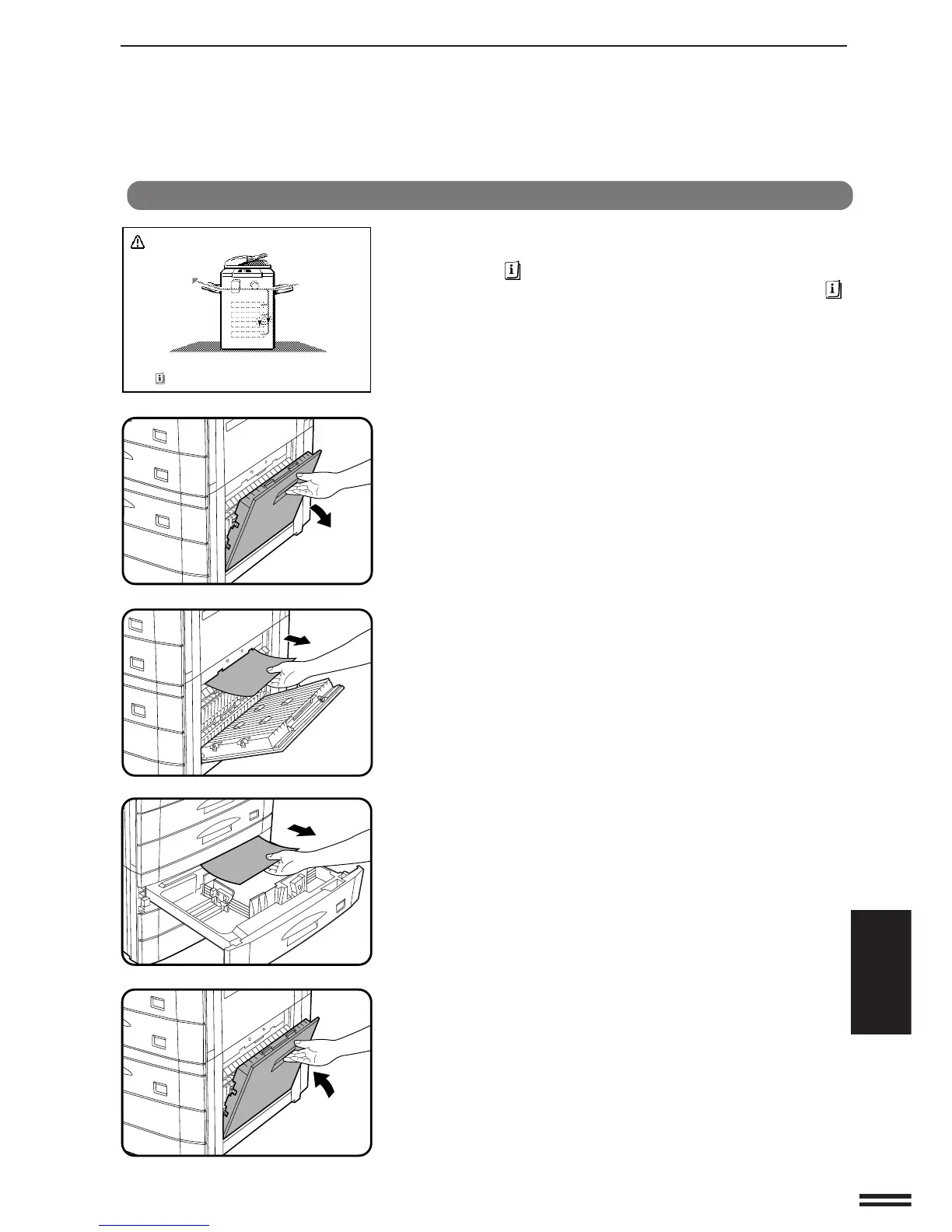
The copier will stop when a misfeed occurs.
The message “A MISFEED HAS OCCURRED. CLEAR INDICATED
AREA. PRESS FOR RECOVERY INSTRUCTIONS.” will appear with
a display of paper misfeed locations. Press the INFORMATION ( )
key for more detailed information as necessary.
1
Open the lower right side cover and remove any misfed
paper.
●
Be sure to perform this step before pulling out the paper drawer.
If not, the paper may be torn as the drawer is opened.
●
Be sure not to tear the misfed paper during removal.
2
Gently lift and pull out the paper drawer. Remove any
misfed paper.
3
Close the paper drawer and the lower right side cover.
●
Confirm that the misfeed display is cleared.
Misfeed removal
A MISFEED HAS OCCURRED.
CLEAR INDICATED AREA.
PRESS FOR RECOVERY INSTRUCTIONS.
OPTIONAL EQUIPMENT
Stand/500-sheet paper drawer (AR-DE7)
STAND/500-SHEET PAPER DRAWER (AR-DE7)



 To Next Page