EasyManua.ls Logo

Sharp AR-505 - Page 62

Sharp AR-505
174 pages
Print Icon
To Next Page IconTo Next Page
To Previous Page IconTo Previous Page
Loading...
3-28
CHAPTER3
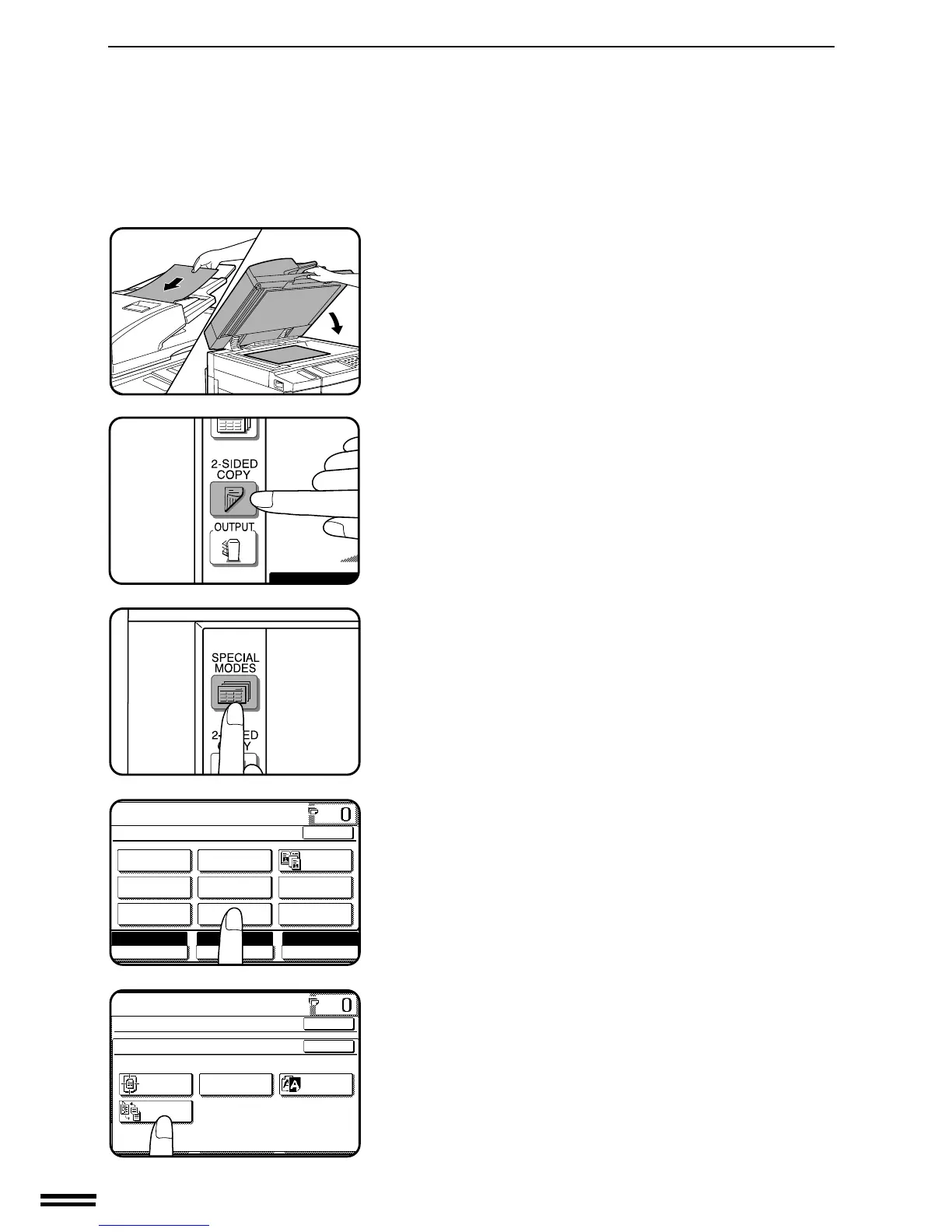
1
Place the originals in the document feeder tray or on the
document glass.
2
Press the 2-SIDED COPY key and select the 1-sided to 2-
sided copy mode.
3
Press the SPECIAL MODES key.
The SPECIAL MODES screen will appear.
4
Press the “IMAGE EDIT” key on the touch panel.
The IMAGE EDIT menu will appear.
5
Press the “BINDING CHANGE” key on the touch panel.
The “BINDING CHANGE” key will be highlighted.
When “BINDING CHANGE” is selected, the 1-sided to 2-sided
copy mode is automatically on.

AUTO
READY TO CO
READY TO COPY.
SPECIAL MODES
MARGIN SHIFT
MULTI SHOT
PAMPHLET COPY
ERASE
COVERS
IMAGE EDIT
TEXT STAMP
TRANSPARENCY
INSERTS
DUAL PAGE
COPY
OK
AUTO AUTO
EXPOSURE PAPER SELECT
100%
COPY RATIO
A4
READY TO COPY.
SPECIAL MODES
IMAGE EDIT
CENTRING
B/W
REVERSE
REPEAT COPY
OK
OK
BINDING
CHANGE
IMAGE EDITING FUNCTIONS
SPECIAL FUNCTIONS Image editing functions

Table of Contents

Related product manuals