69
GENERAL
INFORMATION
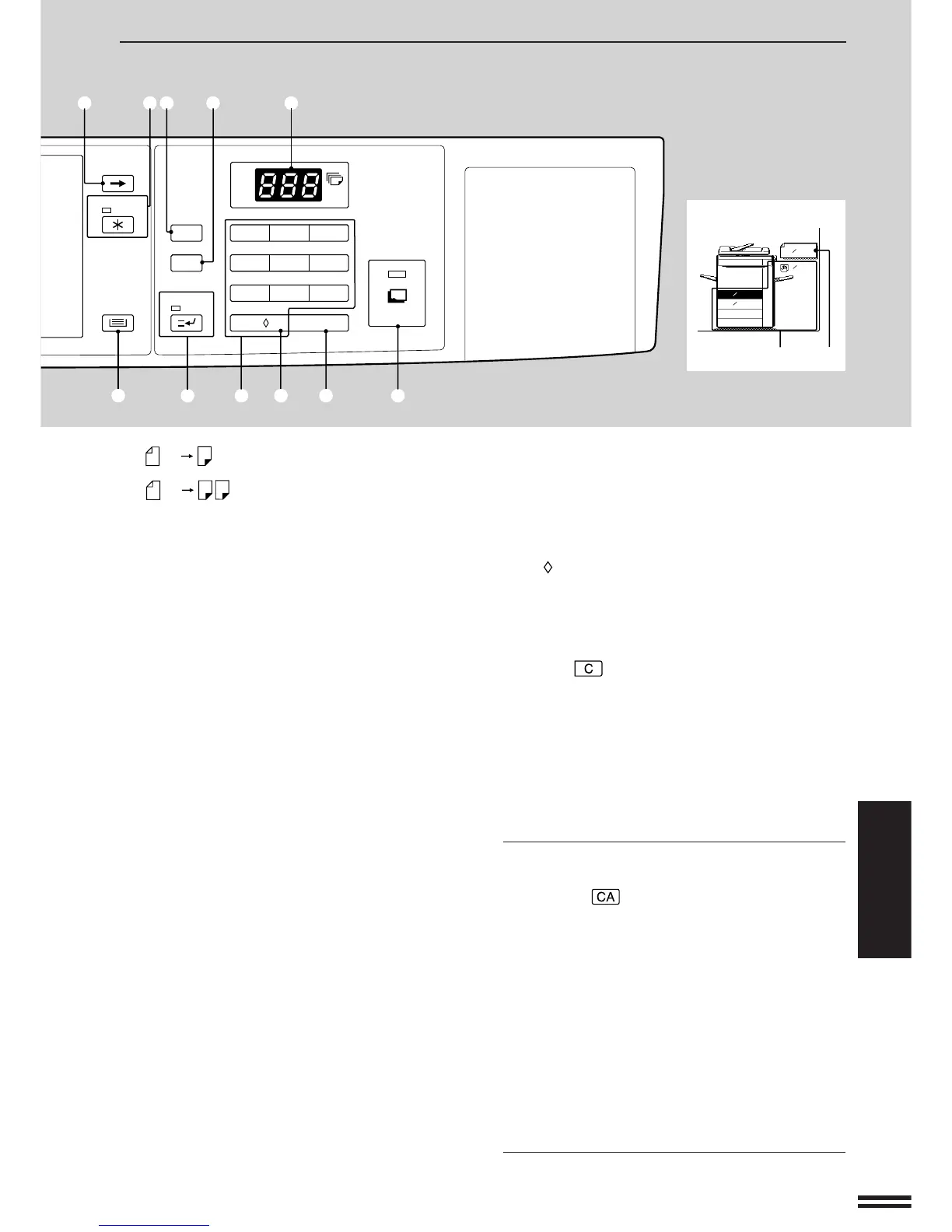
@5 INTERRUPT key and indicator (p.47)
Interrupts a copy run.
@6 10-key pad
Used to set the copy quantity and to make
program selections as indicated by messages.
@7 0/ /AUDIT CLEAR key
Inputs 0 when specifying the copy quantity.
Clears audit account information.
Press during a continuous copy run to display the
number of copies completed in the current run.
@8 Clear ( ) key
Press to clear the copy quantity display, or press
during a copy run to terminate copying. The
copier will stop after copies in progress are
finished.
@9 START key and indicator
Copying is possible when the indicator is on.
Press to start copying.
Initial settings
The copier assumes the initial settings when the
CLEAR ALL ( ) key is pressed and approximately
1 minute (auto clear time) after the last copy is made
in any mode. Except for the paper tray selection, the
copier also assumes the initial settings when it is
turned on.
●
Copy ratio: 100%
●
Automatic exposure
●
Copy quantity: 0
●
All special copier modes are set to off.
●
Tray select: Tray 1 or an optional large capacity
tray (when installed) (At power on, the previously
selected tray will again be selected.)
★ KEY OPERATOR Initial settings can be programmed
as desired. The auto clear time can also be changed.
See pages 119 and 117.
PART LOCATIONS AND FUNCTIONS
: Two-sided copies from two-sided
originals.
: One-sided copies from two-sided
originals.
: Indicates that the number of
originals will be counted.
!8 EXPOSURE keys (p.17)
LIGHT key: Used to adjust the exposure level in
the MANUAL or PHOTO mode to give lighter
copies.
AUTO/MANUAL/PHOTO key: Press to select the
exposure mode: AUTO, MANUAL, or PHOTO.
DARK key: Used to adjust the exposure level in
the MANUAL or PHOTO mode to give darker
copies.
!9 COPY RATIO display
Displays the copy ratios for reductions or
enlargements.
@0 EXPOSURE display
Indicates the selected exposure mode.
@1 AUTO PAPER SELECT display
Paper size matching the original or copy ratio will
be automatically selected when this display
appears.
@2 Paper size display
The sizes of loaded copy paper are displayed and
the selected paper feed location is highlighted.
@3 Original size display
The original paper size is displayed.
@4 TRAY SELECT key
Press to select the desired paper tray.
1
2
1
2
2
PRE-COUNT
ORIGINALS
Part locations and functions
Inch system
2.
3.
11 x 17
AUTO PAPER
SELECT
8x 11R
8x 11
1
2
1
2
1
2
ORIGINAL
8x 14
1.
8x 11
1
2
@2
@3
123
456
7
8
9
C
P
CA
0/
START
PROGRAM
CLEAR ALL
AUDIT CLEAR
SCROLL DISPLAY
TRAY SELECT
INTERRUPT
INFORMATION
!1 !2 !3 !4
!5
@4 @5 @6 @7 @8 @9



 To Next Page