97
OPTIONAL
EQUIPMENT
Misfeed removal
The copier will stop when a misfeed occurs.
The message “A MISFEED HAS OCCURRED. CLEAR INDICATED
AREA. PRESS THE KEY FOR RECOVERY INSTRUCTIONS.”
will appear with a display of paper misfeed locations. Press the
INFORMATION and SCROLL DISPLAY keys for more detailed
information as necessary.
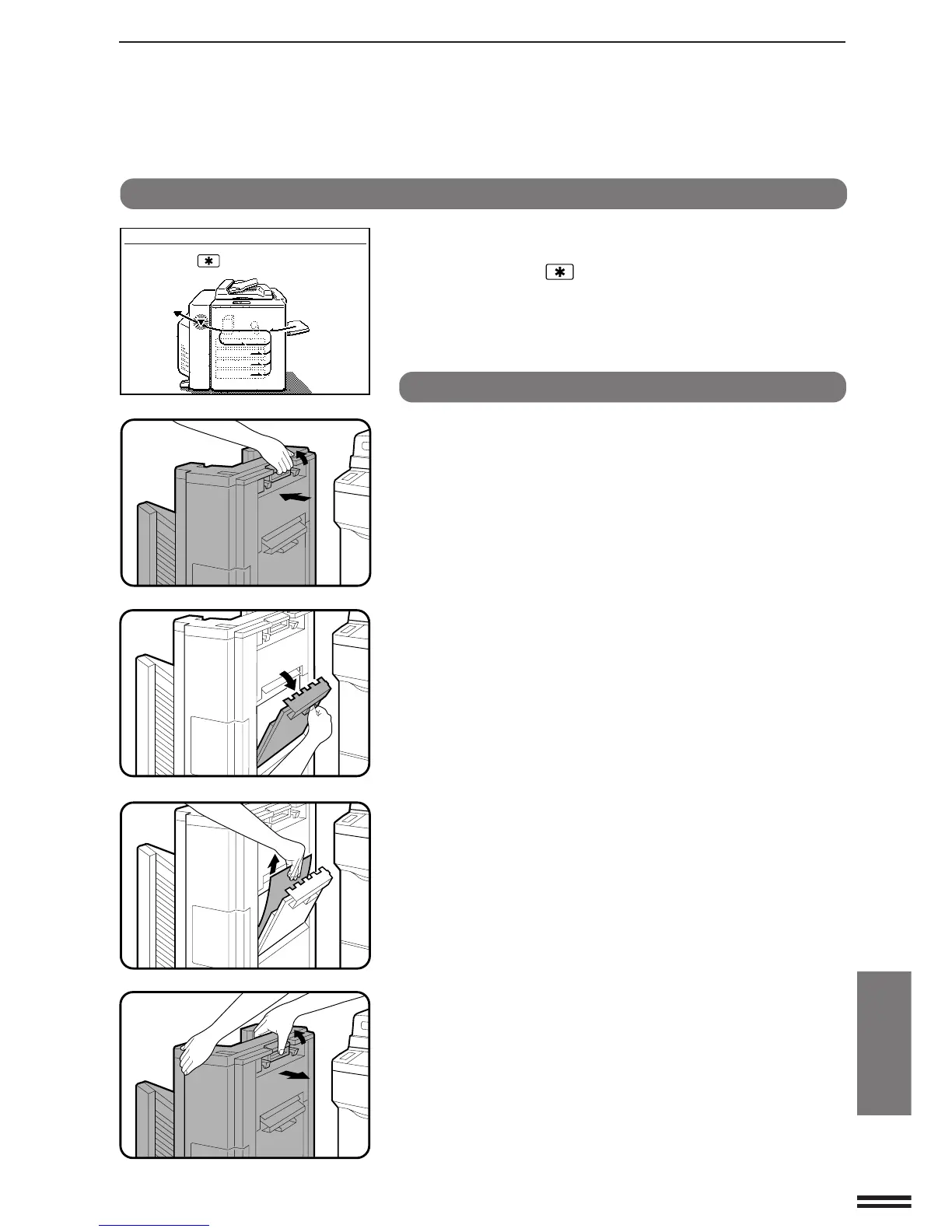
SF-S53N 20-bin staple sorter
1
While holding the sorter release lever, carefully pull the
staple sorter away from the copier.
2
Open the paper guide.
3
Remove the misfed paper and return the paper guide to
its original position.
4
While holding the sorter release lever, push the staple
sorter toward the copier and latch it into place.
●
Confirm that the misfeed display is cleared.
●
If the message indicating a misfeed is still displayed, check the
inside of the copier and remove any remaining misfed paper.
20-BIN STAPLE SORTER (SF-S53N)
A MISFEED HAS OCCURRED.
CLEAR INDICATED AREA.
PRESS THE KEY FOR RECOVERY
INSTRUCTIONS.
20-bin staple sorter (SF-S53N)



 To Next Page