103
OPTIONAL
EQUIPMENT
LARGE CAPACITY TRAY (SF-C52/SF-C52N)
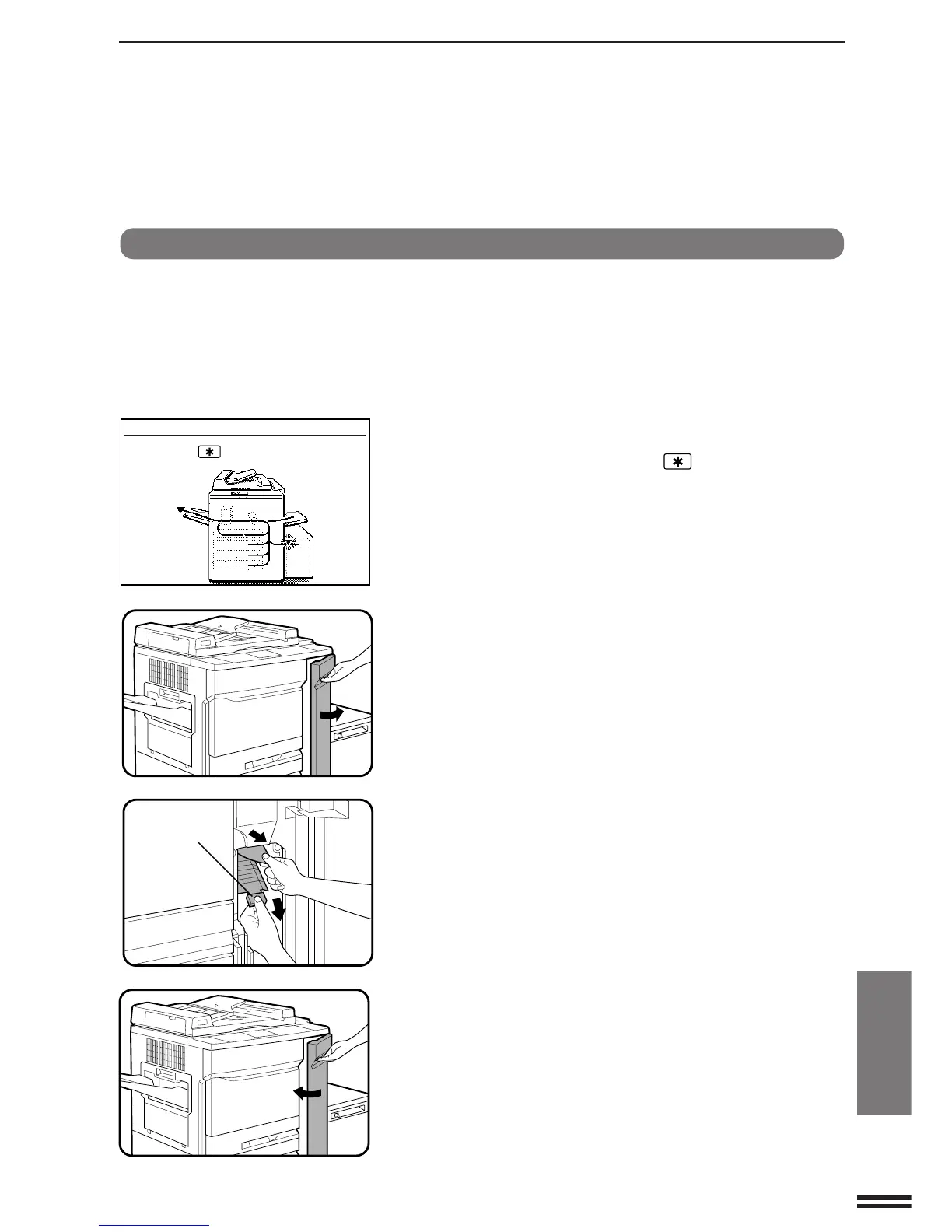
The copier will stop when a misfeed occurs.
The message “A MISFEED HAS OCCURRED. CLEAR
INDICATED AREA. PRESS THE KEY FOR RECOVERY
INSTRUCTIONS.” will appear with a display of paper misfeed
locations. Press the INFORMATION and SCROLL DISPLAY
keys for more detailed information as necessary.
1
Open the right front door.
2
Open the paper guide at the area where paper is fed
from the large capacity tray and remove any misfed
paper.
●
Be careful not to tear the misfed paper during removal.
●
Be sure to perform this step before pulling out the large
capacity tray. If this step is not performed properly, misfed
paper may be torn.
●
If you let go of the paper guide, it will automatically return to its
original position.
3
Close the right front door so that the large capacity tray
can be opened.
A MISFEED HAS OCCURRED.
CLEAR INDICATED AREA.
PRESS THE KEY FOR RECOVERY
INSTRUCTIONS.
Misfeed removal
Paper guide
Large capacity tray (SF-C52/SF-C52N)



 To Next Page