Digital Still Camera
Features
82
3 Press YES to delete all the images.
Notes:
• The protected images cannot be deleted.
Cancel the protection setting to delete the image
(see page 79).
• If a print order is assigned to delete-protected
images and you use the Delete All function, the
print order will be cancelled (the protection
setting will not be cancelled).
• It will take some time to complete deleting all the
stored images.
Caution:
• Do not turn the power off while deleting images.
Slide Show Playback
Available mode: CARD-VCR
It is possible to automatically play back
consecutive still images recorded on a card.
This is useful when confirming the data
recorded on a card.
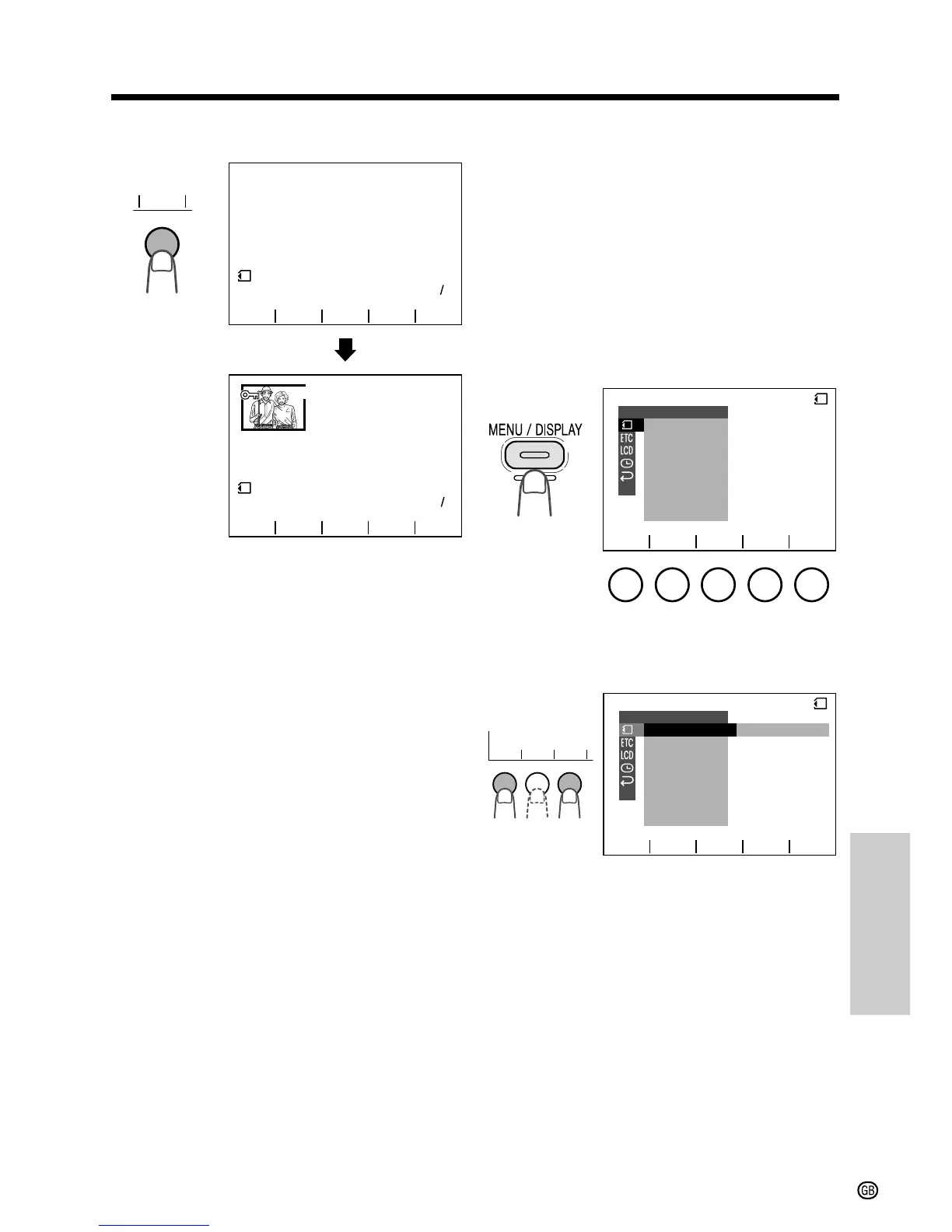
1 Set the camcorder to CARD-VCR mode.
2 Press the MENU/DISPLAY button until
the menu screen appears.
3 Select O, then press SET. Select
“SLIDE SHOW” (1), then press SET
(2).
11
DELETE
DELET ING
ALL
NOW
PAGE
NORMAL
11
PAGE
100 0005-100 000
5
-
PLAYBACKPLAYBACK
54
1 2 3
6
54
1 2 3
6
YES
PB
NO
qw
SL IDE SHO
W
EFFECTPIC.
DELETE
PROTECT
PRI . ORDER
DELETE ALL
PLAYBACK SET
RETURN
EXECUTE
CARD
SET
as
YES
SET
as
1 1 2



 To Next Page