ii
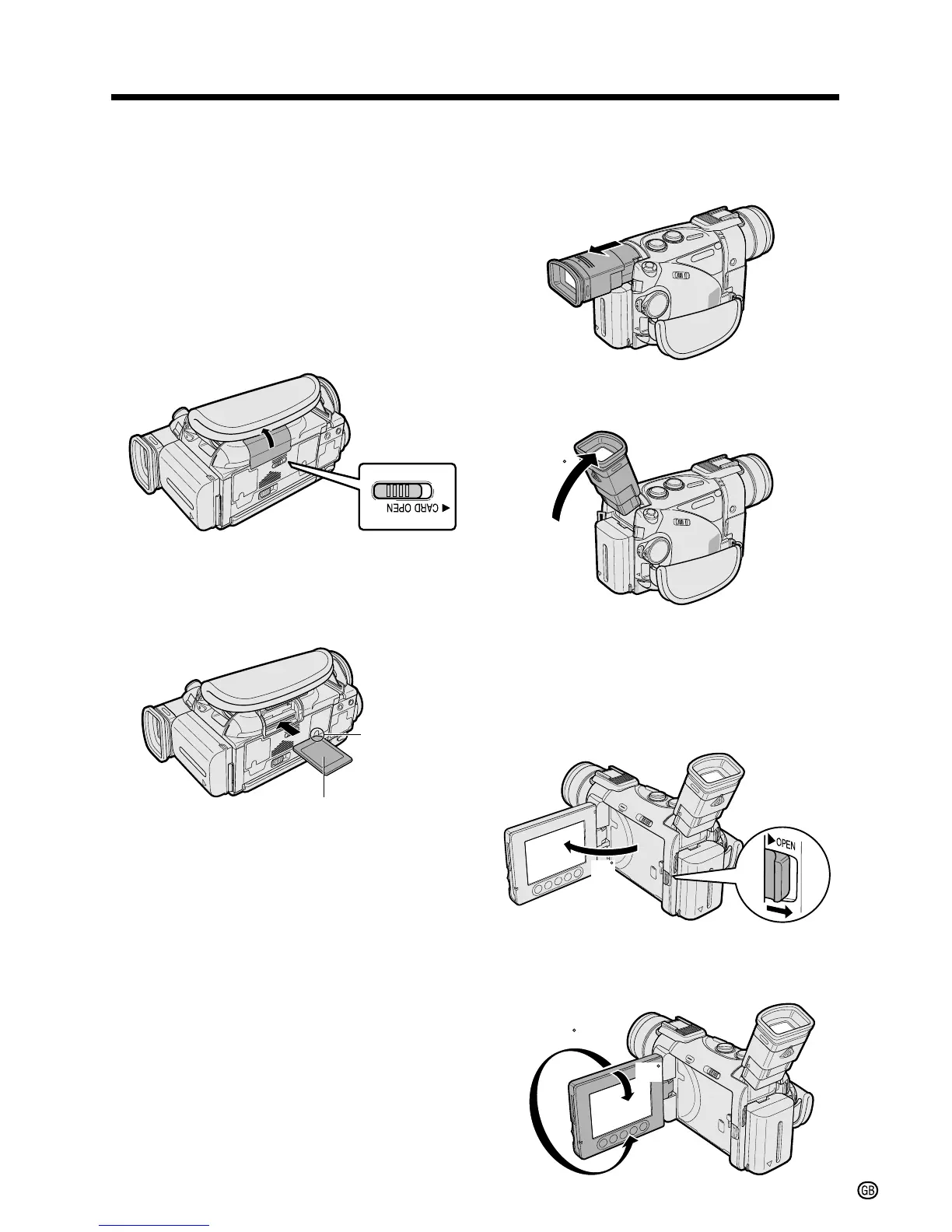
Inserting a Card
This camcorder accepts an SD Memory Card
(commercially available) or a MultiMediaCard
(supplied) for storage of still images.
1 Make sure that the POWER switch is set
to OFF.
2 Hold the camcorder as shown, and slide
the card slot cover release in the
direction of the arrow to open the cover.
3 Insert a card into the slot with the label
facing upwards and the chipped corner
facing the lens, and then push it in as far
as it will go.
4 Close the card slot cover.
Label
Chipped
corner
Using the Viewfinder
1 Pull out the viewfinder completely.
2 Raise the viewfinder to better aim the
camcorder depending on your position.
Using the LCD Monitor
1 Press the LCD monitor OPEN release in
the direction of the arrow (1), and open
the LCD monitor (2).
2 Adjust the LCD monitor to an angle that
allows easy viewing of the on-screen
picture.












 To Next Page