Preparation
Preparation
14
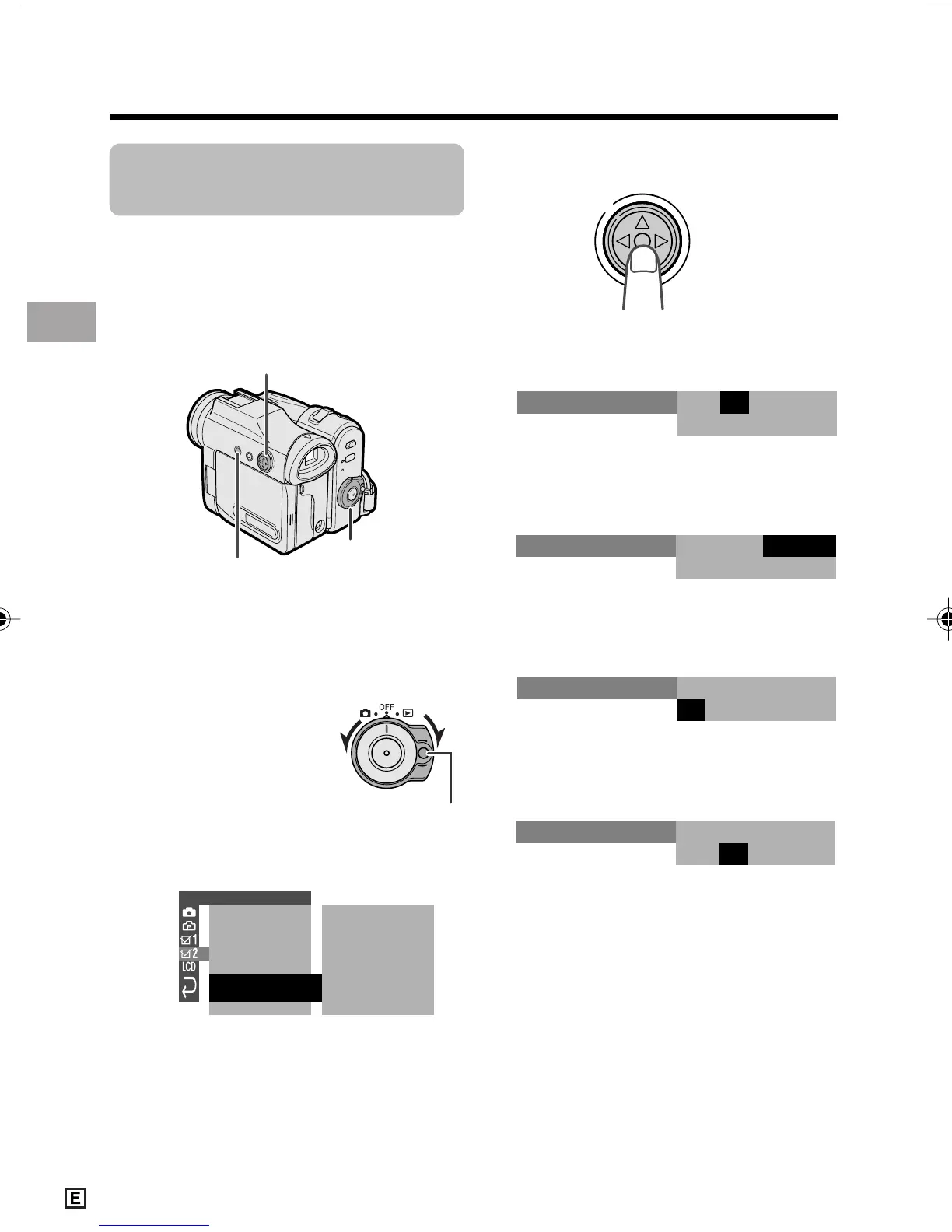
3 Press the centre of the Operation
button.
4 Press m or l to select “2” (day),
then press the centre of the Operation
button.
5 Press m or l to select “6” (month),
then press the centre of the Opera-
tion button.
6 Press m or l to select “2005” (year),
then press the centre of the Operation
button.
7 Press m or l to select “10” (hour),
then press the centre of the Opera-
tion button.
Setting the Date and
Time
Available modes:
All modes
Example: Setting the date to 2 June 2005
(2. 6. 2005) and the time to 10:30 am
(10:30).
Note:
• Before performing the steps below, make
sure that the CR1216 type lithium battery has
been installed (see page 12).
• The example screens shown are for Tape
Camera mode.
1 Hold down the Lock
button and set the
Power switch to v or
w.
2 Press the MENU button to display the
menu screen.
OTHERS 2
DAT E D I SP.
RETURN
T IME CODE OFF
POWER SAVE OFF
OFFTC OUT
SETT ING
12H
24H
24H/
DATE
+
TIME
000:
12004.1.
SETT ING
2.
0 00
:
6 2005.
SETT ING
2.
01 00
:
6 2005.
MENU button
Power switch
Operation button
Lock button
VL-Z950E-E-006-021 04.2.5, 1:31 PM14








 To Next Page