11
5.4 Sub setting mode
Sets Set value lock, Sensor correction, Communication parameters (when C5 option is ordered), etc.
To enter Sub setting mode, press the and keys (in that order) together for 3 seconds in PV/SV
Display Mode.
Use the or key for settings (or selections).
To register the set data, use the key.
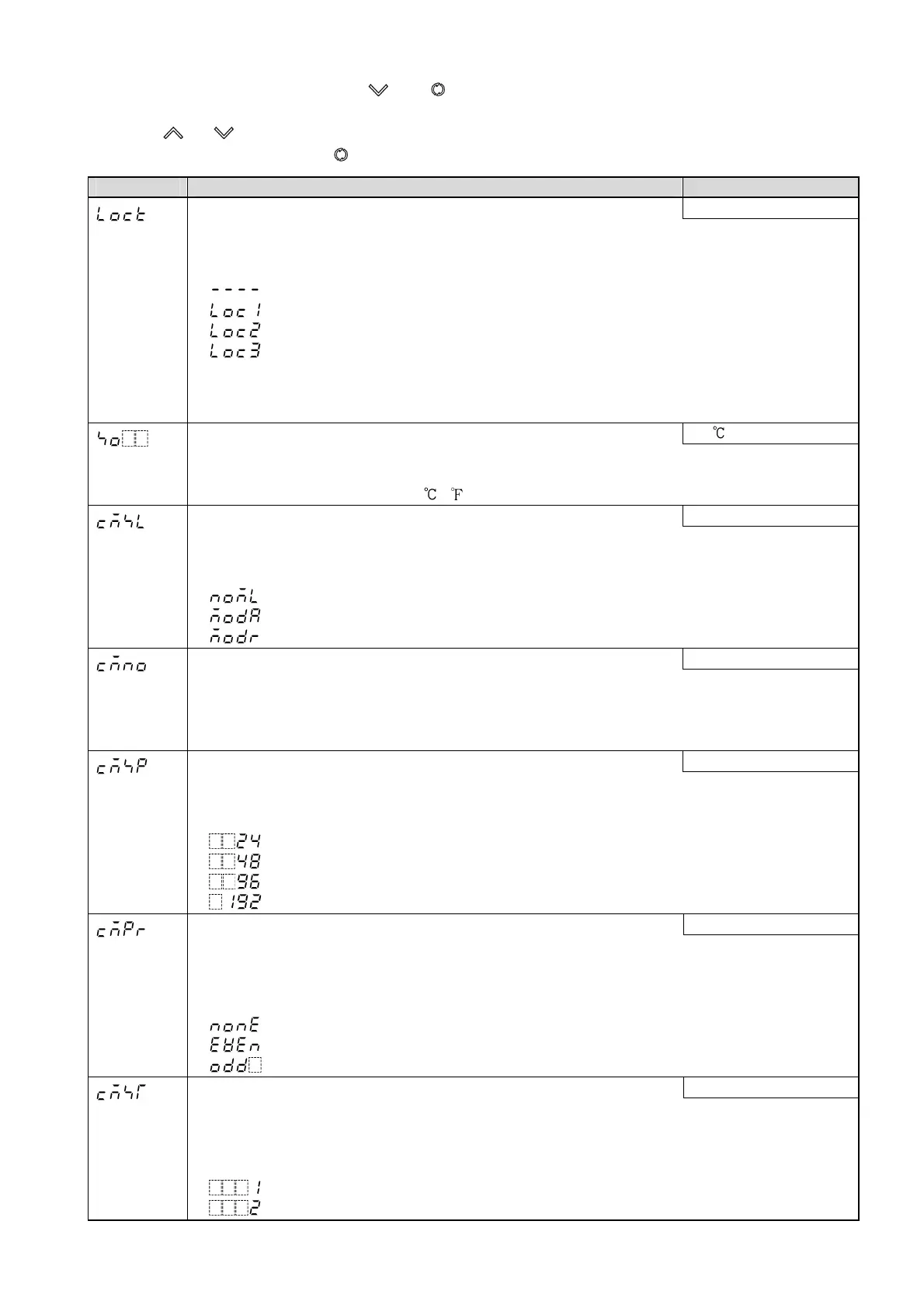
Character Name, Function, Setting range Default value
Set value lock Unlock
• Locks the set values to prevent setting errors.
The setting item to be locked depends on the selection.
• Selection range:
(Unlock): All set values can be changed.
(Lock 1): None of the set values can be changed.
(Lock 2): Only SV (desired value) can be changed.
(Lock 3): All set values can be changed.
However, do not change any setting item in Setup mode.
Changed values revert to their previous value after power is turned
off because they are not saved in the non-volatile memory.
Sensor correction 0.0
• Sets the correction value for the sensor.
PV= Current actual temperature + Sensor correction value
• Setting range: –100.0 to 100.0 ( ), or –1000 to 1000
Communication protocol Shinko protocol
• Selects the communication protocol.
• Available only when the C5 option is applied.
• Selection range:
: Shinko protocol
: Modbus ASCII mode
: Modbus RTU mode
Instrument number 0
• Sets the instrument number individually to each instrument when communicating
by connecting plural instruments in serial communication.
• Available only when the C5 option is ordered.
• Setting range: 0 to 95
Communication speed 9600 bps
• Selects a communication speed equal to that of the host computer.
• Available only when the C5 option is ordered.
• Selection range:
: 2400 bps
: 4800 bps
: 9600 bps
: 19200 bps
Parity Even parity
• Selects the parity.
• Not available if the C5 option is not ordered or if Shinko protocol is selected
in [Communication protocol].
• Selection range:
: No parity
: Even parity
: Odd parity
Stop bit 1 bit
• Selects the stop bit.
• Not available if the C5 option is not ordered or if Shinko protocol is selected
in [Communication protocol].
• Setting range:
: 1 bit
: 2 bits


 To Next Page
 Loading...









