40
Software
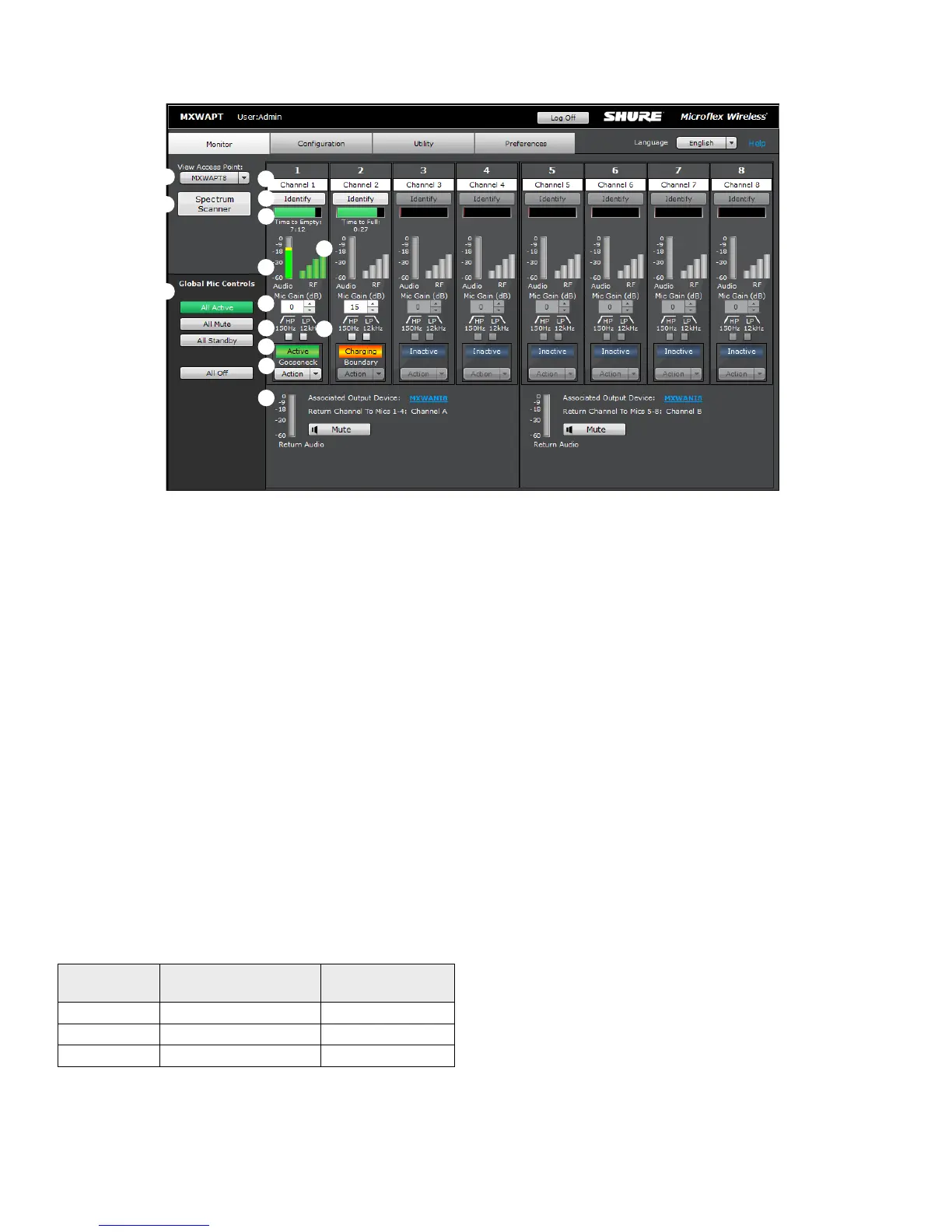
① Access Point Selection
Determines which Access Point is displayed on the tab.
② Spectrum Meter
Opens the Spectrum Scanner window. See Scanning Available RF
Spectrum section for more details.
③ Global Mic Control
Controls the status of all transmitters in the configuration.
④ Channel Name
Channel names are customizable and apply to any Linked transmitter.
The name persists even if a transmitter is re-Linked.
⑤ Identify Button
When clicked, this commands the transmitter to beep and its LED to
flash.
⑥ Battery Status
In the charger: Displays the remaining time until the transmitter battery
is fully charged.
Out of the charger: Displays the remaining battery runtime of the
transmitter.
⑦ RF Signal Strength
Indicates the signal strength of the transmitter. When the bars are grey,
the transmitter is out of range.
⑧ Audio Input Meter
Indicates the average input signal level.
Color
Audio Signal Level
(dBFS)
Description
Red 0 to -9 Overload
Yellow -9 to -18 Normal peaks
Green -18 to -60 Signal Present
⑨ Mic Gain
Adjusts transmitter gain from -25 dB to +15 dB gain in 1 dB steps.
⑩ High-Pass Filter
Engages a 12 dB-per-octave filter below 150 Hz for attenuating
undesired low frequencies, sometimes caused by table vibrations or air-
conditioning rumble.
⑪ Low-Pass Filter
Engages a 6 dB-per-octave filter above 12 kHz for attenuating
undesired high frequencies, sometimes caused by sibilant vocals or
paper rustling.
⑫ Transmitter State
Displays the operating status of the MXW transmitter:
• Active: On and passing audio to the network.
• Mute: On but the audio is muted.
• Standby: On but in a 'sleep' state with audio muted. Standby
conserves battery charge and enables a change to the transmitter's
status from the control software.
• Inactive: Off or out-of-range. A transmitter in this state cannot be
remotely controlled by the software.
• Charging: Battery is charging.
• External: On and passing audio to an external controller that controls
the mute/active behavior.
⑬ Action
Change the transmitter state by selecting from the drop-down window:
• Active
• Mute
• Standby
⑭ Transmitter Type
Displays the transmitter type and provides a Power Off selection from
the drop-down window.
⑮ Bodypack Audio Input Source
There are two input sources available on the MXW1 bodypack: the
internal, omnidirectional microphone or the external TQG input for
lavalier or headset microphones. Select the input source preference:
• Auto: The internal mic is used until the MXW1 detects a connection
at the TQG input. The transmitter automatically selects the external
source whenever available.
• Internal: Audio source is always from the internal microphone.
• External: Audio source is always from a connected microphone.
(Internal mic is off.)
⑯ Return Channels
Monitor the signal level and mute/unmute the audio of the return
channel.
Monitor Tab
①
②
④
⑤
③
⑩
⑪
⑥
⑦
⑧
⑨
⑫
⑬
⑮














 To Next Page