46
Software
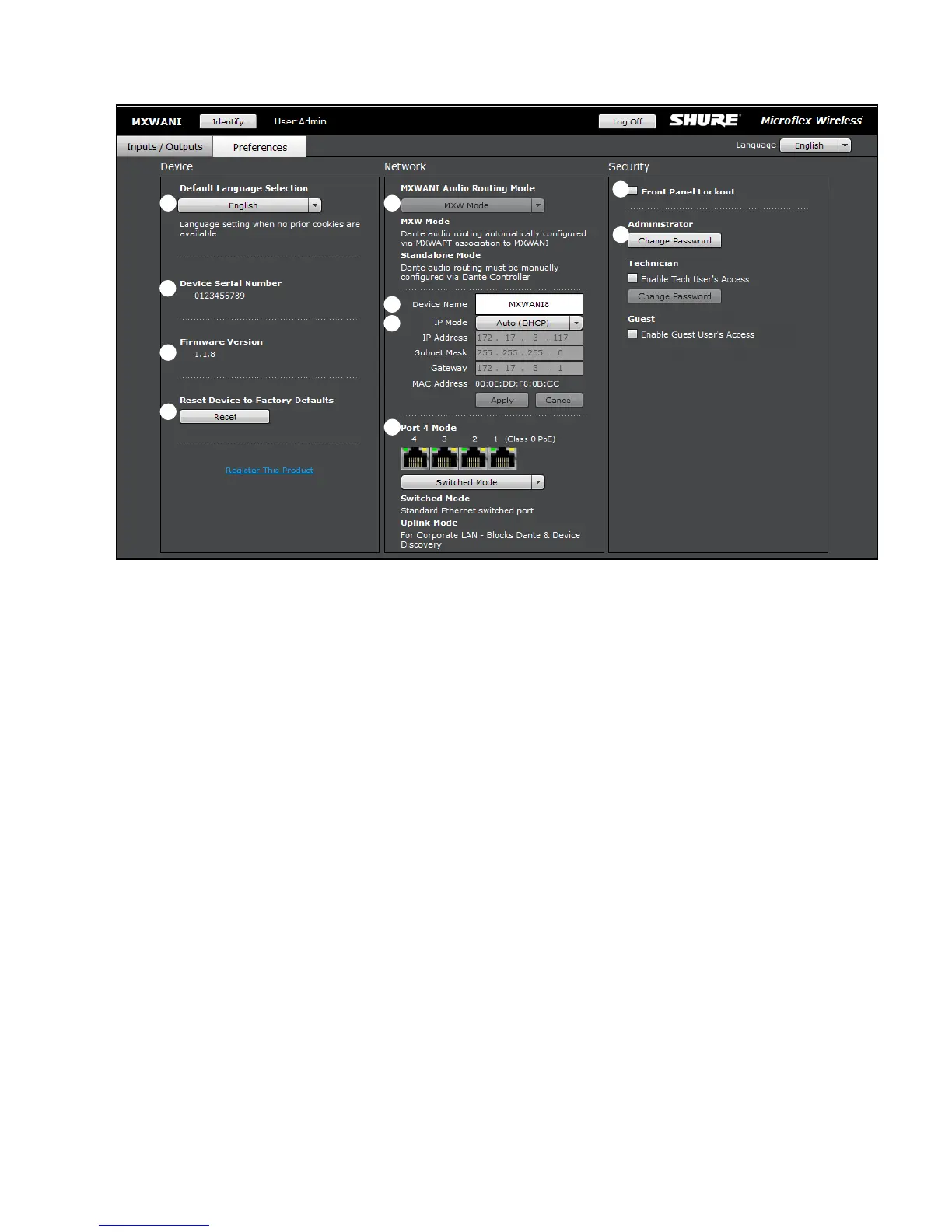
① Language
Selects the language for the control software when the ANI is in
Standalone Mode. In Standalone Network mode, this is defined in the
MXW System control software.
② Device Serial Number
Displays the devices serial number.
③ Firmware Version
Displays the current firmware version of the device.
④ Reset Button
Reboots the device with factory default settings.
⑤ Register This Product Link
Click to register the device at www.shure.com to receive product and
software updates.
⑥ Audio Routing Mode
• MXW Mode: Enables automatic channel routing when the device
is a part of an MXW group (assigned from the MXW System control
software).
• Standalone Mode: Channels must be routed manually with Dante
Controller software.
⑦ Device Name
Device names can be customized with up to 31 characters, except '=','.'
or '@'.
⑧ Addressing Mode
Auto: IP settings are Link-Local or automatically accepted from a DHCP
server.
Manual: IP settings (IP Address, Subnet Mask, and Gateway) are static
and are entered manually.
⑨ MAC Address
Unique identifier assigned to each network interface.
⑩ Port 4 Mode
Configures the Port 4 of the network interface:
• Switched Mode (default): Full Ethernet support on port 4.
• Uplink Mode: Only control data is transported. Multicast traffic for
Dante digital audio and the Shure Web Device Discovery application is
restricted.
⑪ Front Panel Lockout
Disables the front panel controls on the hardware. Channels can still be
selected for monitoring at the headphone jack.
⑫ Password
The default password for the device is 'admin'.
• Admin (default): Full editing rights. The Admin can enable or disable a
Tech-level logon.
• Tech: Rights are limited to the Inputs/Outputs page (hardware functions
only).
• Guest: Monitoring only.
Preferences Tab
①
②
⑤
③
⑩
⑪
⑥
⑦
⑧
⑫














 To Next Page