42
Software
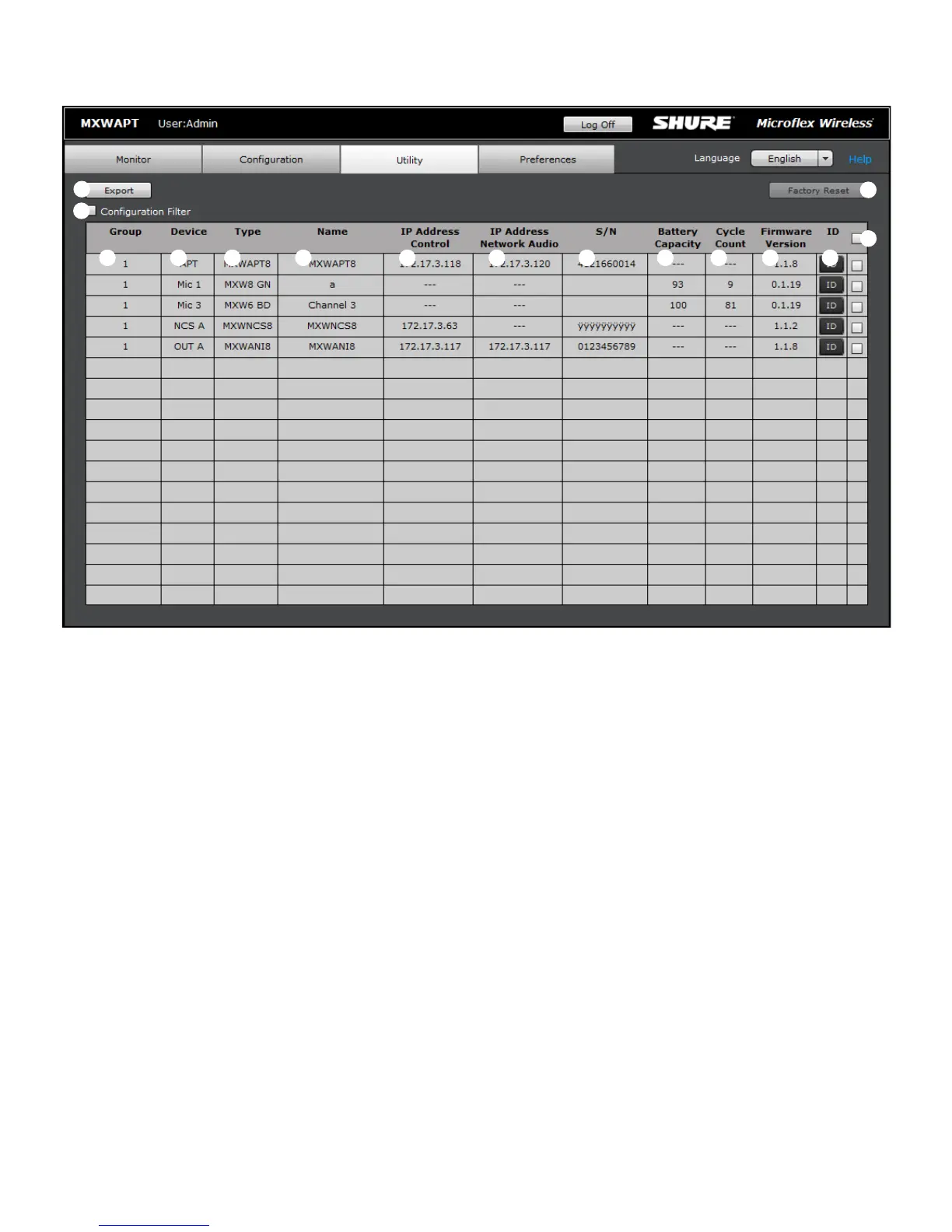
① Export Button
Exports MXW device data to a text file.
② Configuration Filter
When checked, the table displays data for only the devices that belong
to the Configuration or are open for association. Uncheck the filter to
view all MXW devices on the subnet.
③ Group
Indicates the device's status in a Group:
• 1 - 10: Device is associated to that Group in the Configuration
• Open: Device is not associated to any Group
• None: Microphone is Linked to an Access Point that has been
removed from a Group (deselected from the Group row in the
Configuration tab)
• Standalone: Audio Network Interface is set to Standalone mode,
which restricts association to a Group
• Unknown: Microphone is Linked to an APT that is powered off or
connected to a different network
• Other: Device is associated to a Group in a different Configuration
④ Device
The device type or microphone channel.
⑤ Type
The device model number.
⑥ Name
Displays device name as defined in the Configuration tab or channel
name as defined in the Monitor tab.
Utility Tab
⑦ IP Address Control
Displays the IP Address of the control network interface (Shure control
data).
⑧ IP Address Network Audio
Displays the IP Address of the Network Audio network interface (Dante
digital audio data).
⑨ S/N
Displays the device's serial number.
⑩ Battery Capacity
The microphone battery's percentage of charge capacity as compared
to a new battery.
⑪ Cycle Count
Number of charge cycles logged by the battery.
⑫ Firmware Version
Displays the device's firmware version.
⑬ ID Button
Sends a signal to the device to flash its LEDs for easy identification.
⑭ Multiple Device Selection
Selects multiple devices at a time for resetting to factory default
settings.
⑮ Factory Reset Button
Reset the selected device(s) to factory default settings.
①
②
④
⑤
③
⑩
⑪
⑥ ⑦
⑧ ⑨
⑫
⑬
⑮
⑭














 To Next Page