Mounting and connecting
3.3 Connecting the HMI device
Basic Panels 2nd Generation
Operating Instructions, 10/2016, A5E33293231-AB
33
Connecting the controller
If the HMI device contains an operating system and an executable project, connect the HMI
device to the controller.
Note
Note the following when connecting the controller to a panel:
Route the data lines parallel to the equipotential bonding conductors
Connect the shields of the data lines to the ground
You can operate a maximum of four controllers at the same time.
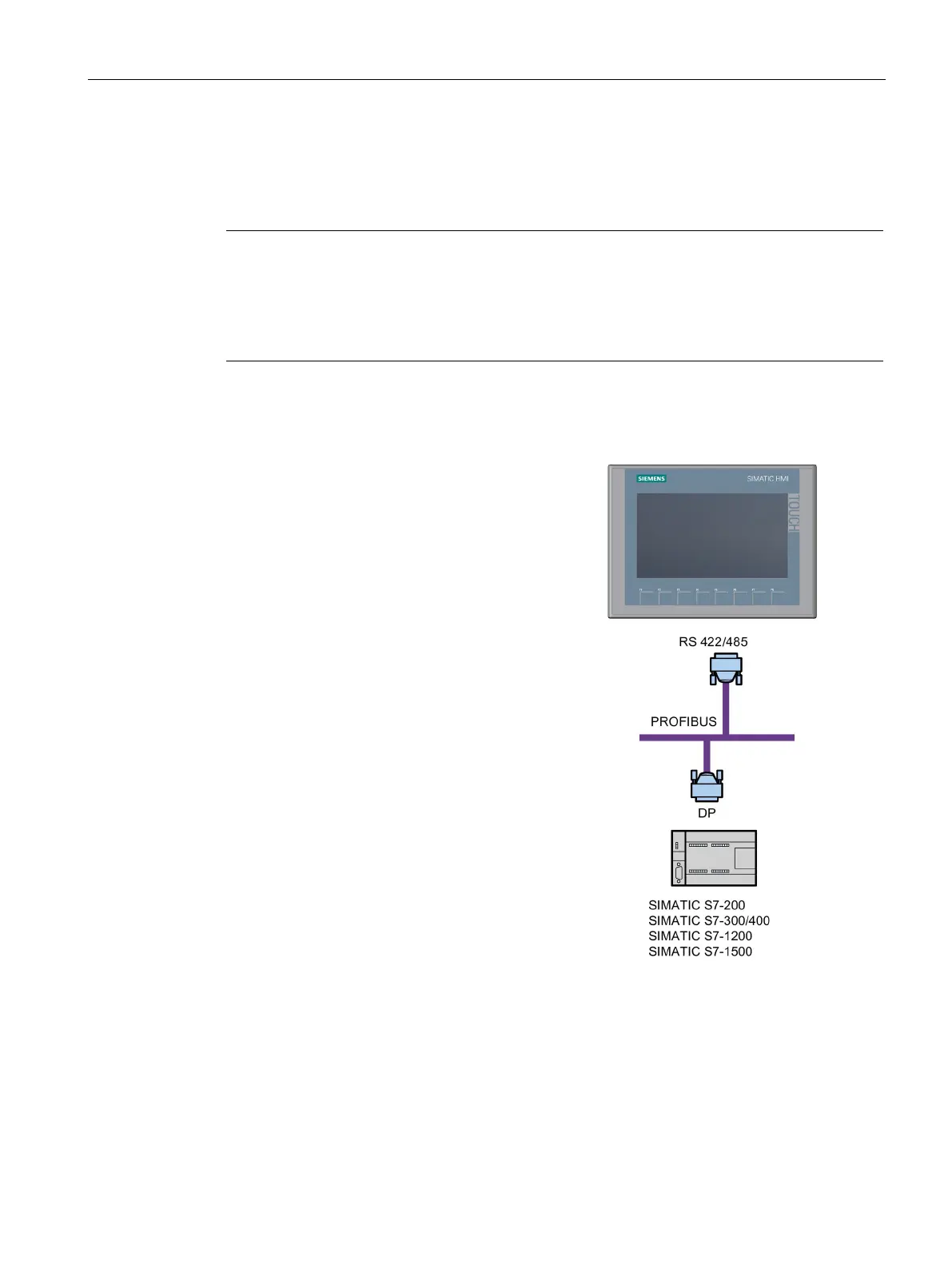
Connecting a controller to a Basic Panel DP
You can connect Basic Panels DP via the
RS
422/RS 485 interface to the following
SIMATIC S7-200
SIMATIC S7-300/400
SIMATIC S7-1200
SIMATIC S7-1500
WinAC
SIMOTION
You can connect Basic Panels DP to the
following controllers:
Modicon Modbus RTU
Allen Bradley DF1
Mitsubishi FX
Omron Host Link



 To Next Page