Configuring the Computing Unit in BIOS Setup
Release 04/02
5-12
Panel PC 670 Computing Unit, Equipment Manual
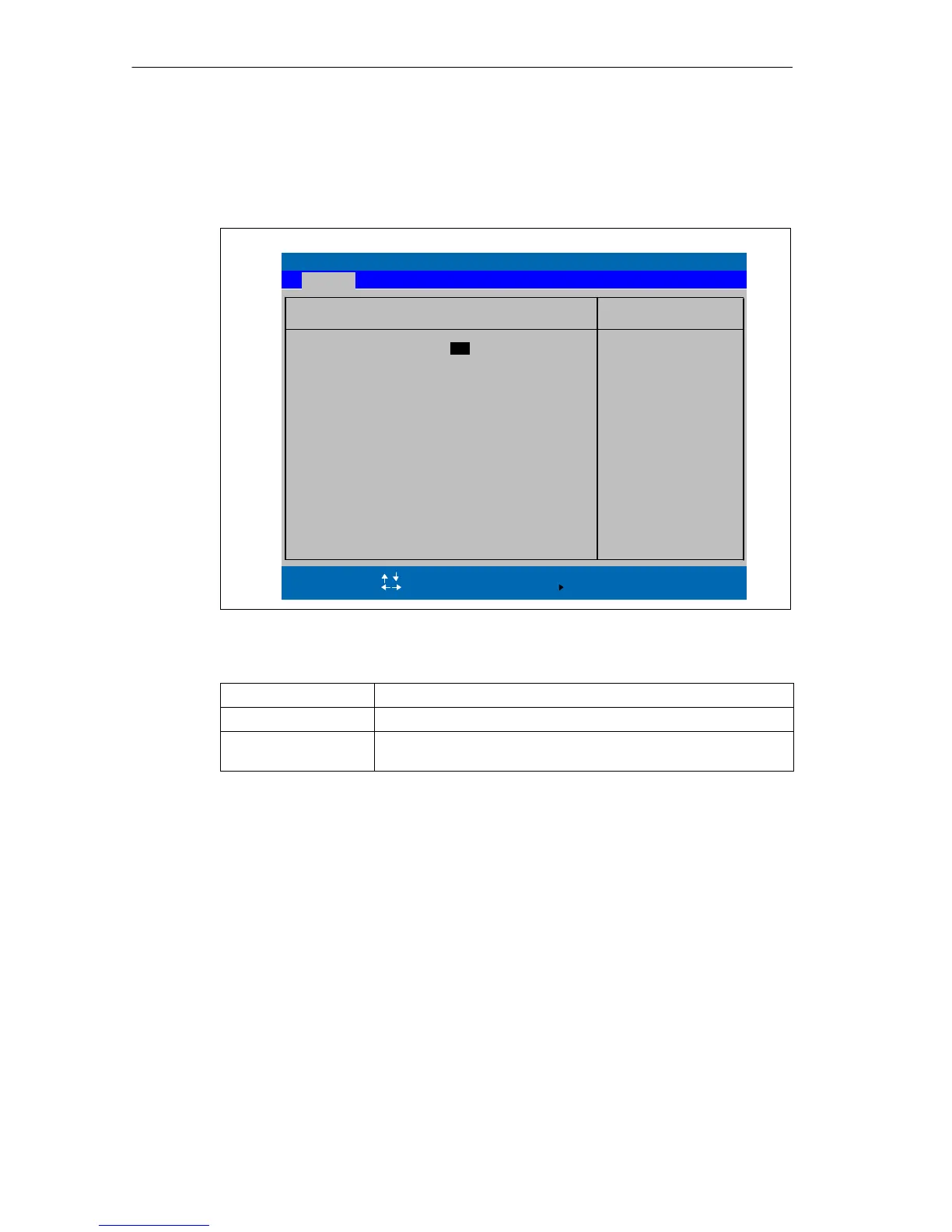
Submenu ”Keyboard Features”
The following submenu appears if you select the “Keyboard Features” field in the
main menu:
PhoenixBIOS Setup Utility
Item Specific Help
NumLock:
ESC Exit
Selects Power-On state
for NumLock on next boot
Select Item
Select Menu
+ / –
Select
Change Values
Sub-Menu
F9
F10
Setup Defaults
Save and Exit
Key Click: [Disabled]
Keyboard auto-repeat rate:
Enter
Help
F1
Main
[ On ]
Keyboard Features
Keyboard auto-repeat delay:
[30/sec]
[1/2 sec]
Figure 5-7 ”Keyboard Features”Submenu
Numlock
Switches Numlock on or off following power on
Key Click A keystroke can be heard
Keyboard auto-repeat
rate
Increase in automatic key repeat rate








 To Next Page