Installation and Startup
Rev. 7 August 2021 35 41110485
Note: The FX30S must be powered on and connected to the Windows computer via the USB cable.
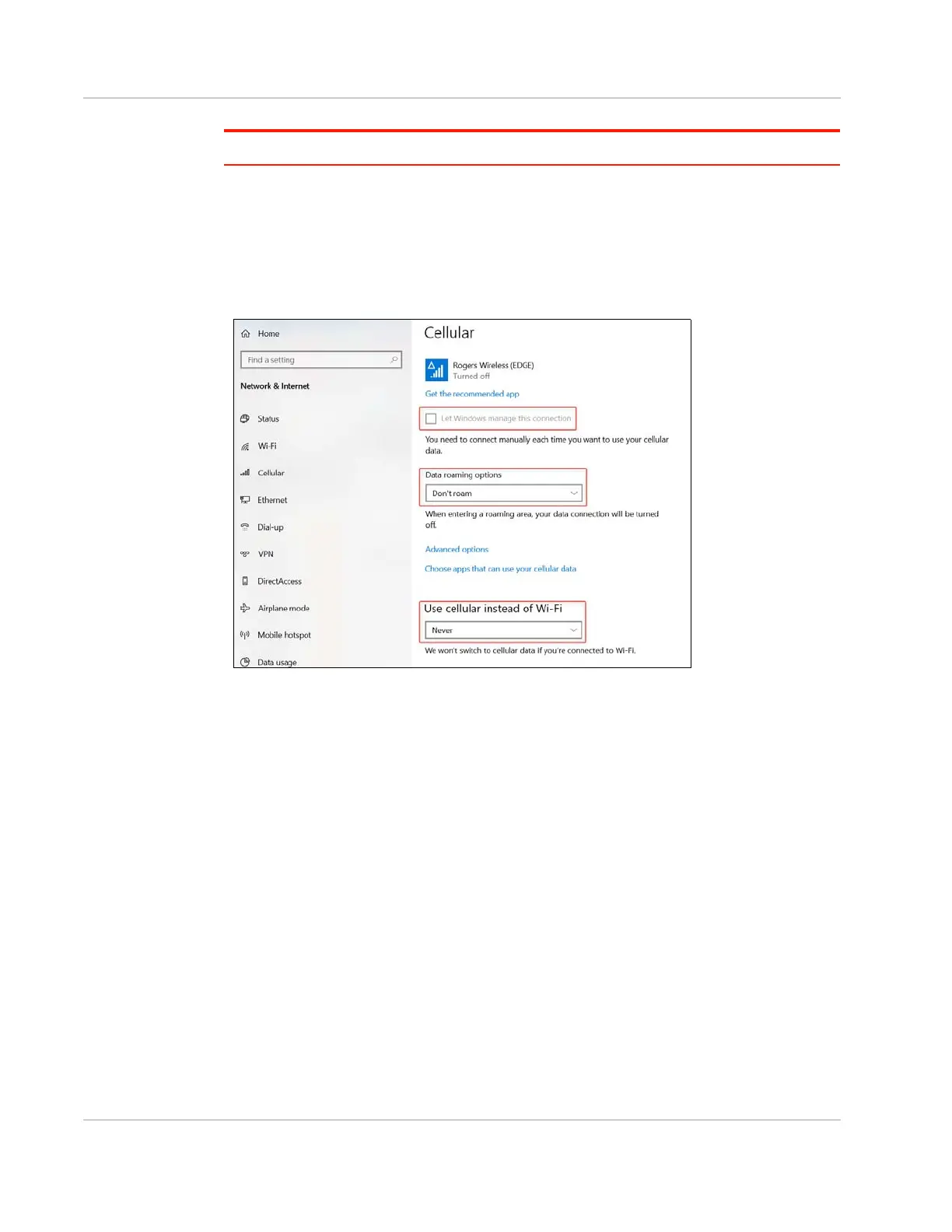
To disable the Windows cellular connection:
1. In the Windows Network settings, go to Cellular.
2. Disable Let Windows manage this connection.
3. Under Data roaming options, select Don’t roam.
4. Under Use cellular instead of Wi-Fi, select Never.
Figure 2-25: Windows Network > Cellular settings
Useful AT Commands
The radio module for the FX30S is the Sierra Wireless AirPrime
®
WP8548 or WP7702.
Useful radio module AT commands include:
• Test AT command interface: AT should answer OK
• Get device information: ATI
• Get SIM status: AT+CPIN?
• Enter SIM PIN code: AT+CPIN=XXXX
• Configure APN: AT+CGDCONT=1,"IP","xxxxxx.xxx"
• Check APN configuration: AT+CGDCONT?
• Check signal quality: AT+CSQ
• Check network registration: AT+CREG?
• Check GPRS network registration: AT+CGREG?
• Check operator selected: AT+COPS?
• Check for PDP context status: AT+CGACT?
• Check for modem status: AT!GSTATUS?
• Open a LWM2M session to connect AirVantage: AT+WDSS=1,1















 To Next Page