Installation and Startup
Rev. 7 August 2021 17 41110485
Mounting on a DIN Rail
To mount the FX30S in a DIN rail:
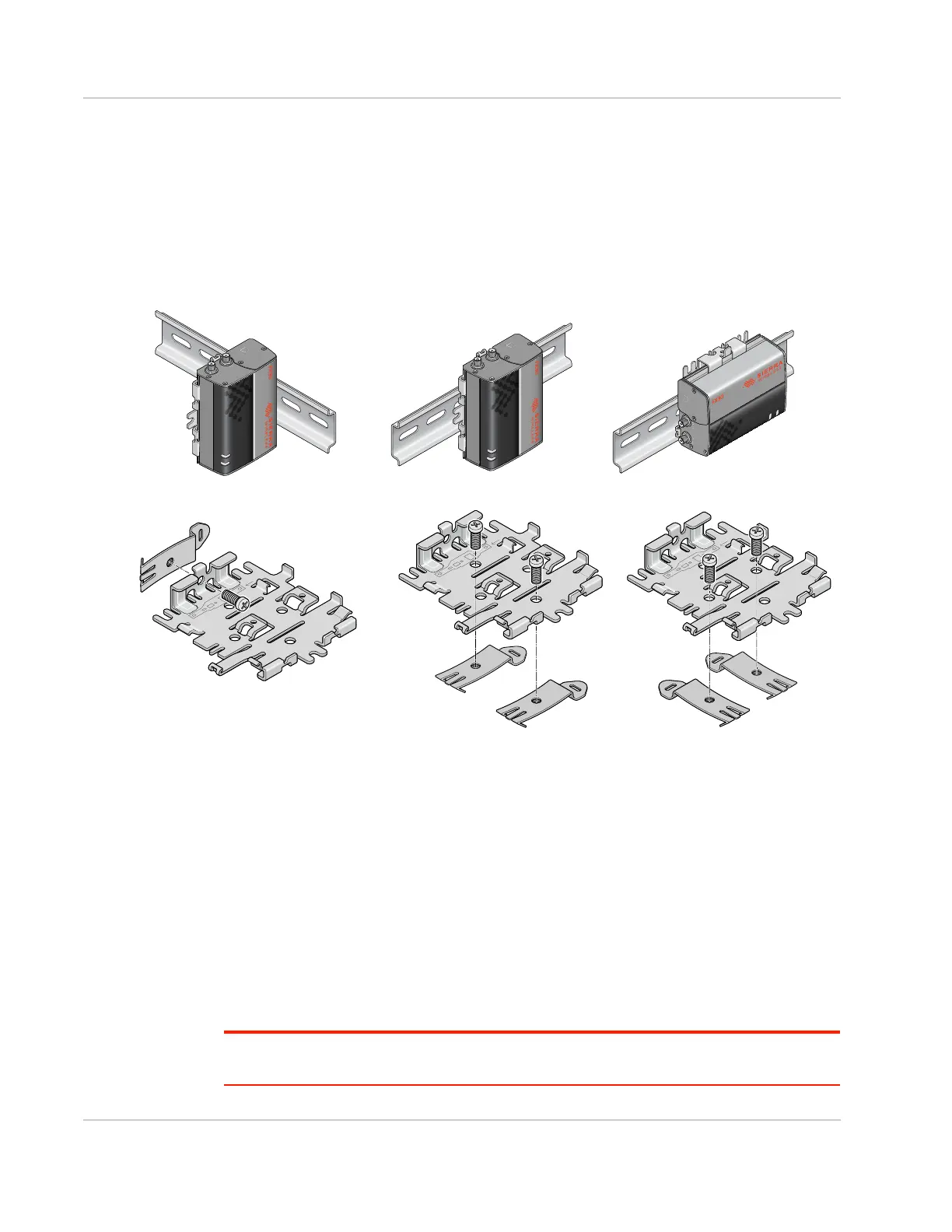
1. Attach the DIN rail clips to the bracket as shown in Figure 2-8.
If you are mounting the FX30S on its edge, attach one DIN rail clip to the side of the
bracket.
If you are mounting the FX30S horizontally or vertically, attach two DIN rail clips to the
bottom of the bracket.
Figure 2-8: Attaching the DIN rail clips
2. Slide or snap the FX30S onto the bracket, as shown in Figure 2-4.
3. If the DIN rails are in a high vibration environment, see Optional—Mounting in a High
Vibration Environment on page 15.
4. Attach the FX30S to the DIN Rail. See Figure 2-8.
Replacing Existing Fastrack Supreme or Fastrack
Xtend Device
If you are mounting the FX30S in a location where you previously had a Fastrack
Supreme or a Fastrack Xtend mounted, attach the compatibility bar to the bracket. The
compatibility bar is available from Sierra Wireless.
Note: Adding the compatibility bar does not change the height of the gateway and mounting
bracket. See Figure 3-4 on page 50.
For this orientation, attach one DIN
rail clip to the side of the bracket.
For these orientations, attach two DIN rail clips to the bottom of the bracket.















 To Next Page