Introduction to the FX30S
Rev. 7 August 2021 9 41110485
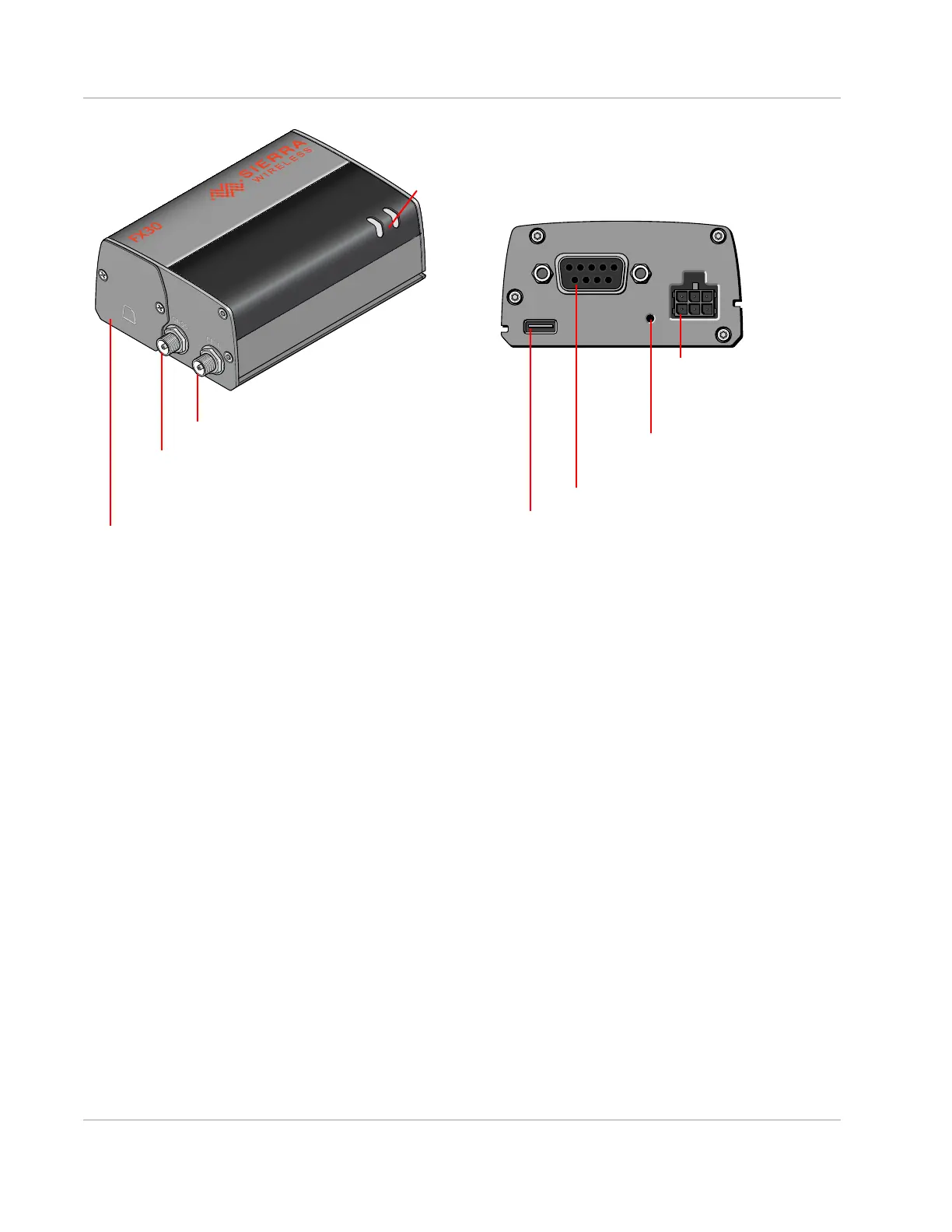
Figure 1-1: FX30S Connectors, LEDs and SIM Card Holder
Power Modes
FX30S has three power modes:
• Off
• Ultra Low Power
• Active
For more information on power modes and power consumption, see Power Modes on
page 51 and Power Consumption on page 53.
Accessories
The following items come with the FX30S gateway:
• DC power cable
• Mounting bracket
You can order the following items separately from Sierra Wireless:
• Universal AC power adapter
· Voltage input: 100– 240 VAC
· Current output: 1.5 A
• Compatibility bar (useful if you are replacing a Fastrack Supreme or a Fastrack Xtend)
• Range of GNSS and cellular antennas
· Puck antenna (Cell & GNSS; part number 6001128) is recommended
Power Connector
(See Power Connector
on page 22.)
SIM card/IoT card holder
(See Install SIM card and IoT card on page 12.)
Cellular Antenna Connector
USB 2.0 Micro-B Port
(See Connect the Antennas on page 19.)
(See Connect the Data Cables on page 21.)
RS232/RS-485 Serial Port
GNSS Antenna Connector
LEDs (See LED Behavior on page 31.)
Push Button
(See External Push Button
on page 78.)















 To Next Page