50
MANUAL FOCUS
In situations where autofocus or focus
lock is not effective, you can focus
manually.
1
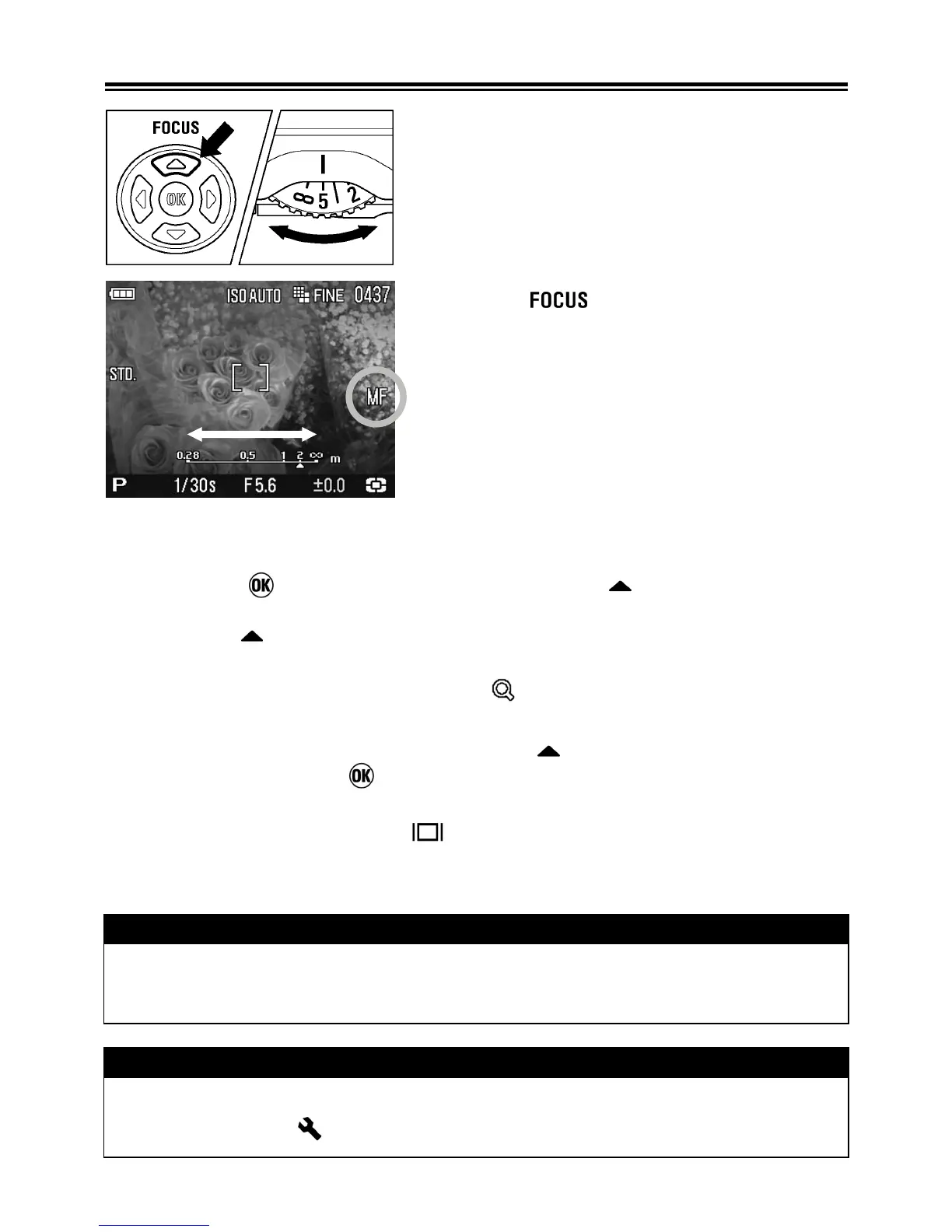
Set the focus mode to MF mode by
pressing
button several times.
(MF icon and “the scale bar” will be
displayed on the color LCD monitor).
2
Turn the MF Dial on the camera body
until you get a clear sharp image.
FOCUSING WITH MAGNIFICATION DISPLAY
Pressing the button and then pressing the button while in MF
mode will magnify the display, making it easer to focus precisely. (By
pressing the button, it is possible to switch to magnification display or
normal display.)
• Whilst the display is enlarged, the is displayed on the color LCD
monitor. Press the shutter button “half-way” to return to the original display.
• To quit magnification display, press the button to return to normal
display, then press the button.
• The enlarged display will be magnified from the selected focusing point of
the LCD monitor by pressing
button. It is possible to set the enlarged
area to be the same as the focusing point selection. See P. 4 9 for
information regarding focusing point.
WARNING!!
• The graduation on the MF Dial and the scale bar may differ from the
actual distance. Please use it as a guide only.
TIP
• It is possible to change the indicator of the scale bar. Select m (meter)
or ft (feet) from [ Camera Settings](P.26)→[MF Scale Units].



 To Next Page