SigTEL Compact Installation and Configuration Manual
SigTEL Approved Document No. DAU0000091 Rev 5 Page 34 of 36
Emergency Voice
Communication System
Enhanced Features
As the firmware for the SigTEL Compact range of panels has been developed, new enhanced features have been
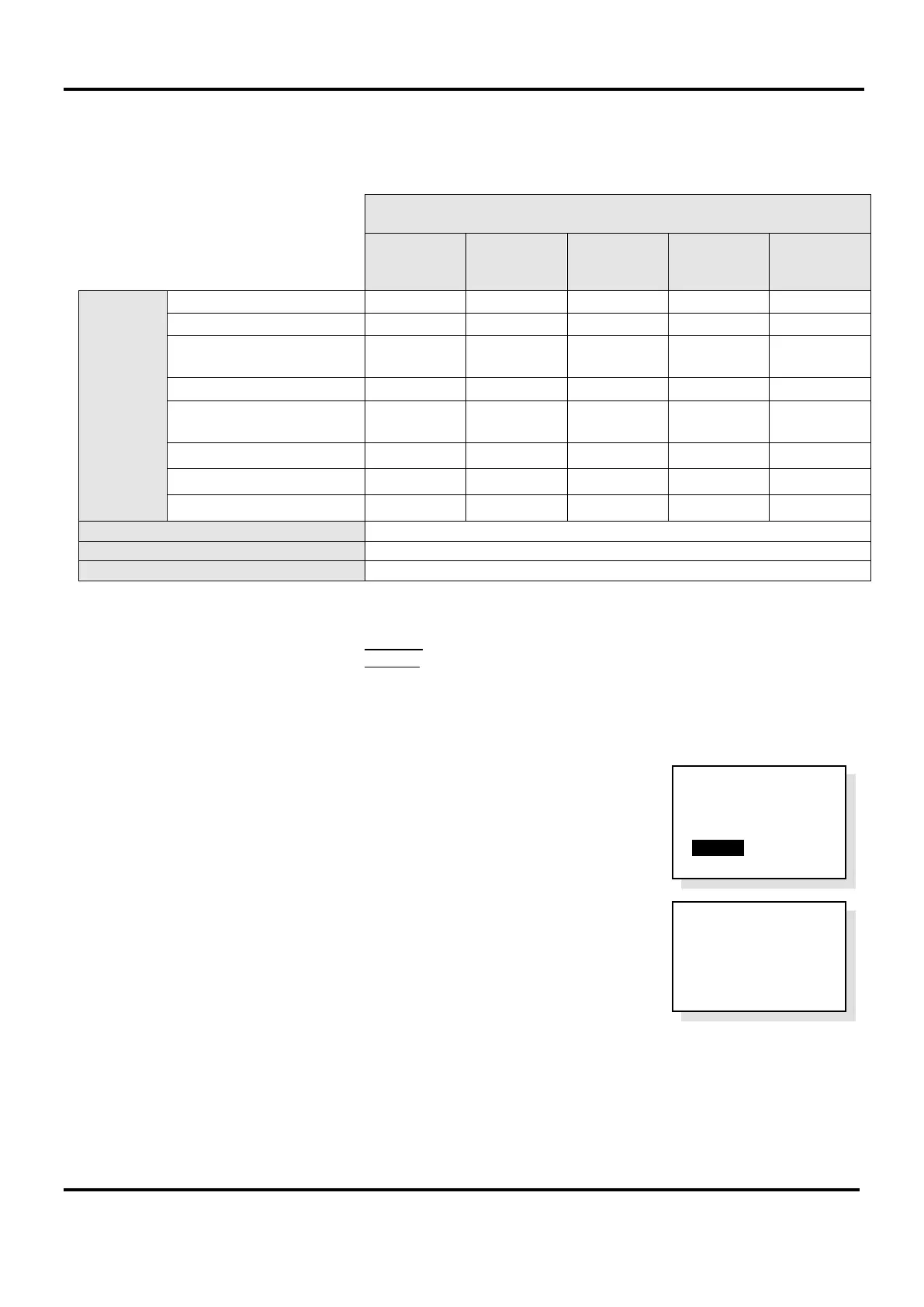
added. The enhanced features and corresponding firmware versions are listed in Table 1, below:
Firmware Version
V 2.2.1 V 2.5.14 V 2.6.14 V 3.1.17
V 4.1.2
(or above)
Enhanced
Features
Selectable Time for
‘Auto-Clear Recent Calls’
Auto-Answer
*
*
**
Button Detection
DPTA Interface
PC Tools Support for EVCS
OP3 activates on system use
Installation & Configuration Manual
Quick Start Installation Guide
Table 1 – Enhanced Features for SigTEL Compact
* In default mode Auto-Answer feature is disabled.
** In default mode Auto-Answer feature is enabled.
To find out which firmware version is installed on the EVCS follow the steps below:
1. At the MCU, with the handset on-hook, press FUNCTION button.
2. The ‘User Opts’ menu is displayed (see right).
3. Press the down cursor ▼ on the keypad to highlight the ‘About...’ option and
press CALL/ACCEPT button. The firmware version is displayed (typical display
shown right).
Note: Compatibility issues may arise if adding/replacing a panel with the latest firmware onto a networked system
with earlier firmware. Some features of the new firmware may be disabled/unavailable to ensure smooth compatibility
with the panels with earlier firmware. If the latest features are required, the other panels on the network must be
replaced. Should there be any technical problems with SigTEL Compact, contact the technical support department
for assistance.
EVCS
v 4 . 1 . 2
Exch No 1
Controller 1
User Opts
Clr Rcnt Calls
Reset System
> About...


 To Next Page