EasyManua.ls Logo

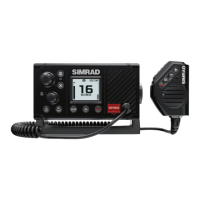
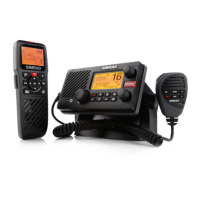
Simrad RS90S - User Manual

Simrad RS90S
134 pages
Print Icon
To Next Page IconTo Next Page
Loading...
ENGLISH
RS90S Blackbox VHF
User Manual
simrad-yachting.com

Table of Contents

Other manuals for Simrad RS90S

Questions and Answers

  • E
    Emma FlowersJul 31, 2025
    How to troubleshoot Simrad RS90S that will not power up?
    • L
      laurenparkJul 31, 2025
      If your Simrad Radio won't power up, it might be due to a blown fuse or lack of voltage reaching the transceiver. Start by inspecting the power cable for any cuts, breaks, or squashed sections. Replace the 10 Amp fuse. Also, check the battery voltage, ensuring it's at least 10.5V.
  • E
    Eric BarnettAug 5, 2025
    Why is the battery symbol displayed on my Simrad Radio?
    • P
      Phillip MorrisonAug 5, 2025
      If the battery symbol is displayed on your Simrad Radio, it indicates that the power supply is too low. Verify the battery voltage, ensuring it's at least 10.5 V ± 0.5 V DC. Also, check the alternator on the vessel.
  • B
    Bradley HaasAug 9, 2025
    What to do if Simrad RS90S Radio transceiver blows the fuse when switched on?
    • D
      Derrick NelsonAug 9, 2025
      If your Simrad Radio transceiver blows the fuse immediately when you turn it on, the power wires might be reversed. Ensure that the red wire is connected to the positive battery terminal and the black wire is connected to the negative battery terminal.
  • T
    Taylor GoodwinAug 14, 2025
    What to do if GPS alarm sounds on Simrad RS90S Radio and LCD shows 'Please check GPS link!'?
    • R
      ryanfowlerAug 14, 2025
      If your Simrad Radio GPS alarm sounds and the LCD displays 'Please check GPS link!' with the NO GPS symbol, it means GPS data has been lost. Check that the GPS cable is physically connected and verify the polarity of the GPS cable. Also, check the baud rate setting of the GPS, if applicable, it should be 4800, and parity should be set to NONE.
  • C
    Chad CortezAug 17, 2025
    Why does my Simrad RS90S speaker make popping noises when the engine is running?
    • M
      Monica Jenkins MDAug 18, 2025
      If your Simrad Radio speaker makes popping or whining noises when the vessel’s engine is running, electrical noise might be interfering with the transceiver. Try re-routing the power cables away from the engine. You can also add a noise suppressor to the power cable or use resistive spark plug wires and/or an alternator whine filter.
  • M
    Misty WilliamsAug 21, 2025
    Why are Simrad RS90S Radio transmissions always on low power?
    • L
      Leslie ThomasAug 22, 2025
      If transmissions on your Simrad Radio are always on low power, even when high (Hi) power is selected, the antenna may be faulty. Test the transceiver with a different antenna. Have the antenna checked out.
  • M
    Marvin BarrAug 26, 2025
    How to fix no sound from Simrad RS90S external speaker?
    • K
      Kenneth SnyderAug 26, 2025
      If there is no sound from the external speaker of your Simrad Radio, ensure that the external speaker is enabled in the Setup menu. Also, check that the external speaker cable is physically connected and verify the soldering of the external speaker cable.

Summary

Manual Information

Notes on MMSI and DSC

Explanation of Marine Mobile Service Identity (MMSI) and Digital Selective Calling (DSC).

Getting Started

System Power Management

Procedures for powering the system on and off, including single/multiple handset scenarios.

Radio Modes and Channel Management

Changing Channels

Explanation of channel banks and how to change channels.

Radio Settings and Controls

Adjusting Squelch

Adjusts radio sensitivity to minimize background noise.

Setting Transmission Power

Explains High (25W) and Low (1W) power settings.

Operating Procedures

Making a Routine Radio Call

Steps for making a ship-to-ship or ship-to-shore call.

Calling a Buddy via DSC

How to call another vessel using its MMSI via DSC.

Making Distress Calls

Procedures for making emergency calls on Channel 16/9 and via DSC.

Hailer and Fog Horn Functions

How to use the hailer and fog horn features via a PA speaker.

Waypoint Management

Adding a New Waypoint

Steps to create and save a new waypoint.

Editing and Deleting Waypoints

Procedures for modifying and removing existing waypoints.

Waypoint Navigation

How to select a waypoint for navigation or find the nearest one.

Waypoint Data Transmission

How to send waypoint data to a chart plotter.

DSC Procedures

Introduction to Digital Selective Calling

Explains DSC, its purpose, and the call process.

DSC Distress Call Handling

Procedures for initiating, continuing, and receiving DSC distress calls.

Routine DSC Call Handling

Procedures for sending individual, group, all-ships, and relay calls.

Buddy Tracking and Test Calls

Setting up buddy tracking and sending DSC test calls.

Receiving DSC Calls

Overview of different types of DSC calls that can be received.

Receiving Specific DSC Call Types

How to handle individual, all-ships, group, and geographic DSC calls.

ATIS System

AIS Procedures and Information

Accessing AIS Displays

How to view AIS data like MMSI list, PPI, and T/CPA.

Installation Guide

Installation Checklist

Lists items included in the RS90S radio package.

Positioning the Transceiver

Guidelines for positioning the RS90S VHF radio transceiver.

Installing the Transceiver Unit

Step-by-step instructions for mounting the transceiver unit.

Transceiver Connectors

Details for external connectors (VHF antenna, NMEA 2000) and internal connectors.

External GPS Antenna Installation

Instructions for installing the external GPS antenna.

System Setup

General Radio Setup

Notes on radio setup, including MMSI entry and NMEA 2000 network connection.

Wireless Handset Registration

Procedure to subscribe wireless handsets to the transceiver.

Buddy List Management

How to set up the buddy list for DSC calls and tracking.

DSC Setup and MMSI Management

Entering individual MMSI and introduction to group MMSI.

Channel Charts by Region

Simrad RS90S Specifications

General IconGeneral
TypeVHF Radio
Power Output25 W / 1 W
DSCYes
AISYes
NMEA 2000Yes
NMEA 0183Yes
DSC ClassD
ModulationFM
Power Supply12V DC
Waterproof RatingIPX7
ChannelsInternational
GPSYes
Number of Channels55
Weight1.2 kg

Related product manuals