If thread breaks during embroidery
99
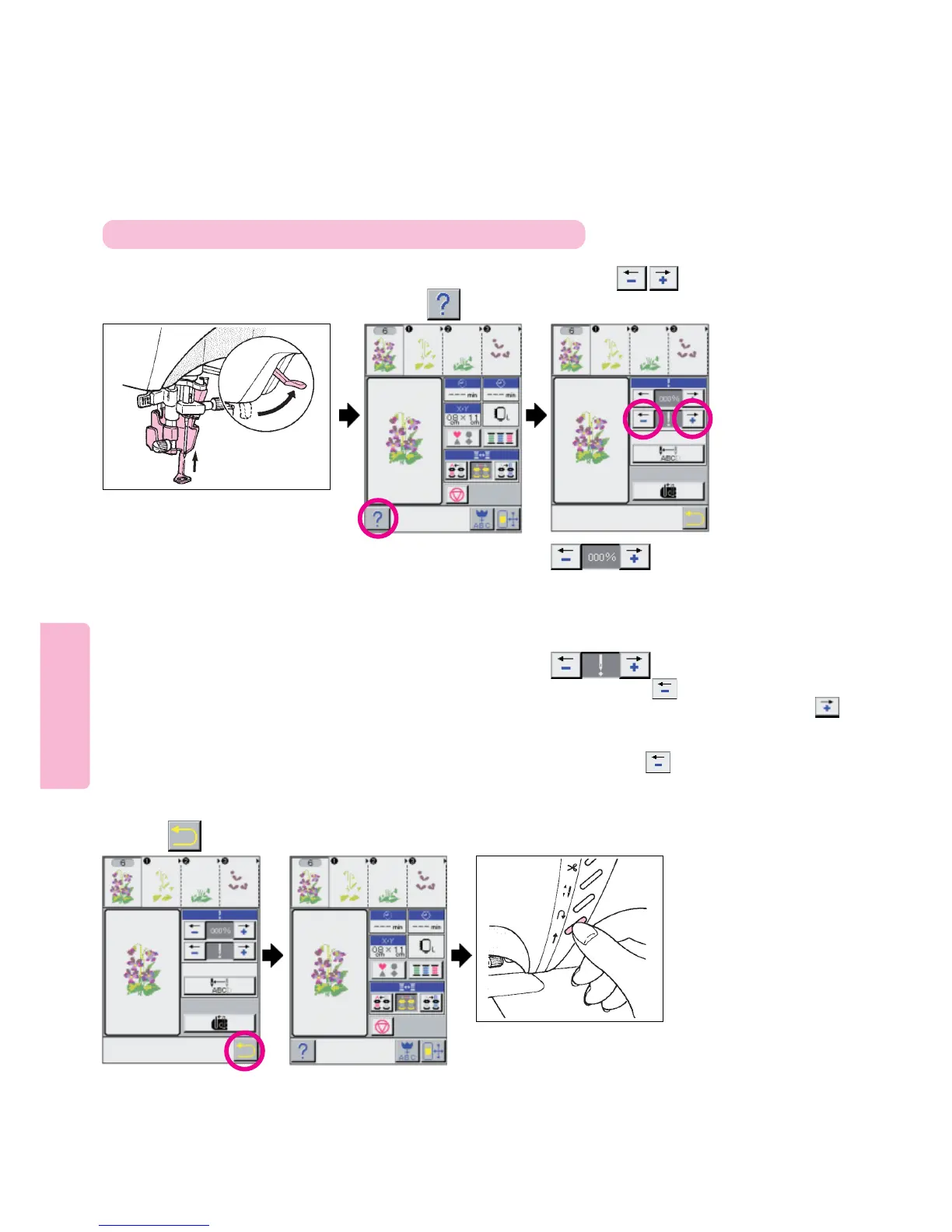
Stop machine and raise needle
and embroidery foot.
Press pictos to
return needle several stitches
before needle breakage point.
Screen returns to
previous screen.
When needle thread has broken,
re-thread sewing machine.
When bobbin thread has broken, follow
steps described below:
[1] Cut needle thread and remove
embroidery frame from machine.
[2] Re-set bobbin thread and re-install
embroidery frame.
123
45
Lower embroidery foot
and start the machine.
6
To re-start embroidery from position at which thread has broken
Press pictogram.
Press pictogram.
This pictogram is used to return/advance needle by
ratio of the number of stitches with respect to total
number of stitches of pattern.
Indication of color parts on the opper screen
changes according to %.
Every press on pictogram returns the needle
in increments of 10 stitches. Every press on
pictogram moves the needle forward in increments
of 1 stitch. (The number of stitches corresponding
to one press on pictogram can be changed.
See page 117)



 To Next Page