EasyManua.ls Logo

Singer XL-6000 - 1) Stitching Procedure

Singer XL-6000
136 pages
Print Icon
To Next Page IconTo Next Page
To Previous Page IconTo Previous Page
Loading...
23
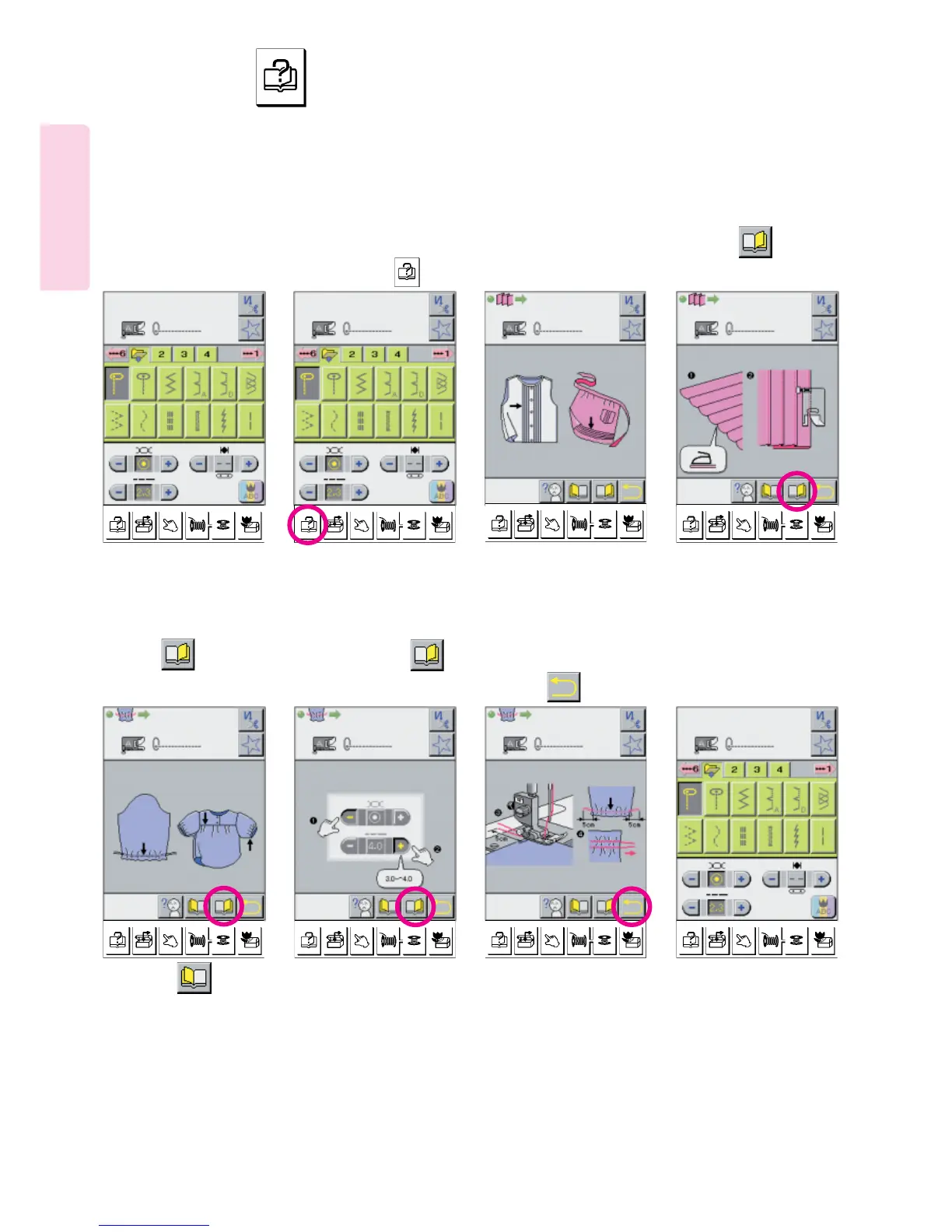
(1) Stitching procedure
1234
586
Select a stitch pattern.
7
* Your Computerized sewing machine shows basic operations (stitching procedure, use of sewing machine, tips and problems)
under the Advise Section of the LCD Screen. This allows a quick way of finding information without the necessity of referring to
the Instruction Manual.
Advice that tells stitching
styles that can be sewn
with pattern shown on
screen.
Press picto, and
screen will appear as
shown below:
Press picto, and
screen will appear as
shown below:
Every press on
picto will activate the
next screen.
To return to utility
pattern screen,
press picto.
* A press on pictogram
will activate previous screen.
Press advice key.
How to use key

Table of Contents