21
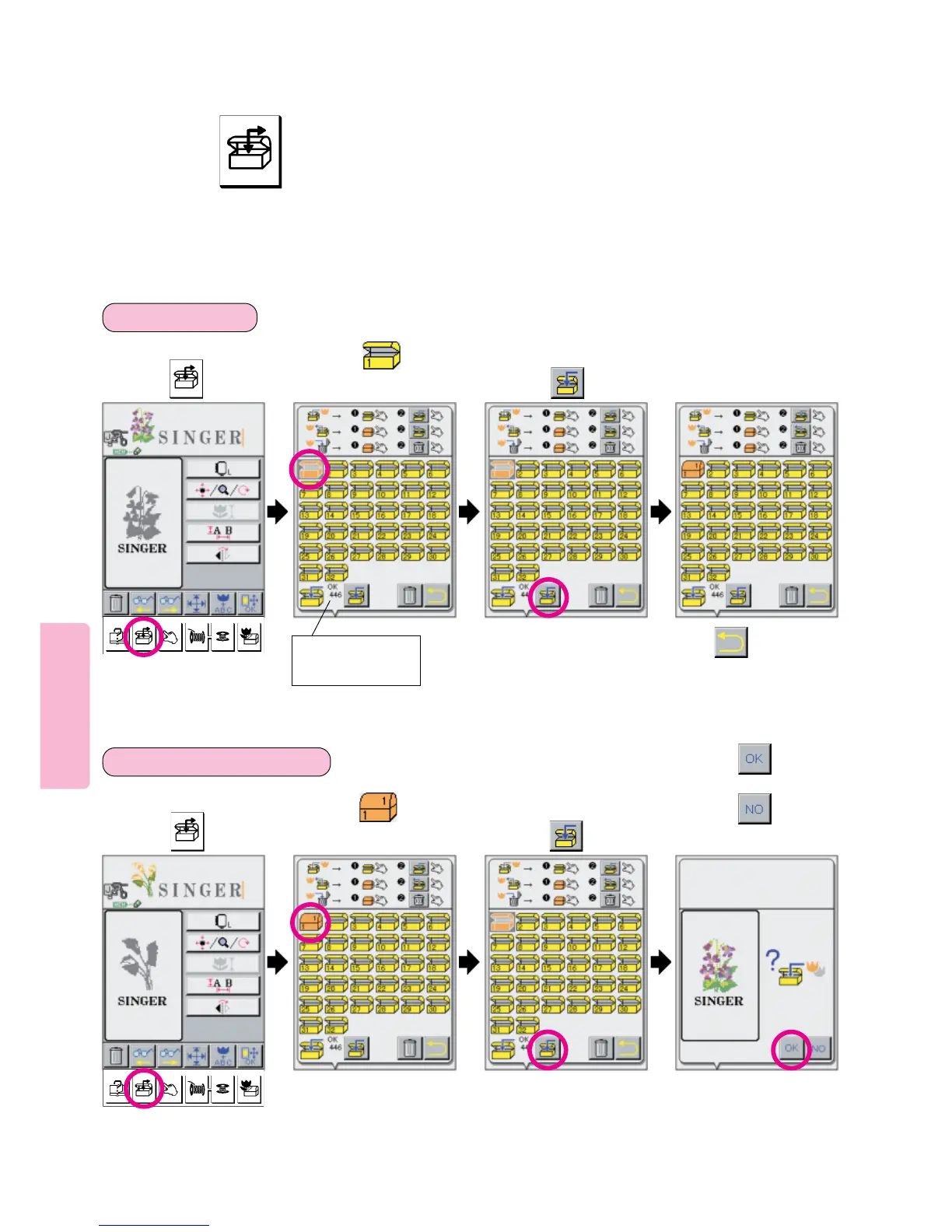
Storing combined patterns or letters in memory
How to use key.
* There are 32 Pattern Cases within which you can store data.
* Data on as many as 120 different patterns can be “stored in” and “taken out from” each pattern case.
* Maximum number of patterns that can be stored in pattern cases may be less than 120 and maximum number of pattern
cases that can be used may vary according to amount of data contained in each pattern.
* Do not turn off power to machine while saving message appears on LCD screen.
97
34
To save a pattern:
1
Press in
which a pattern is to
be saved.
Press in
which a pattern to be
overwritten is stored.
234
To overwrite a pattern:
Press , and
screen will return to
previous one.
Remaining capacity
of memory is
indicated.
Press key. Press pictogram.
Press key. Press pictogram.
Press if you wish to
overwrite pattern illustrated.
Press if you do not
wish pattern overwritten.





 To Next Page