24
Press in
which a pattern to be
overwritten is stored.
59
Saving / Clearing / Opening patterns
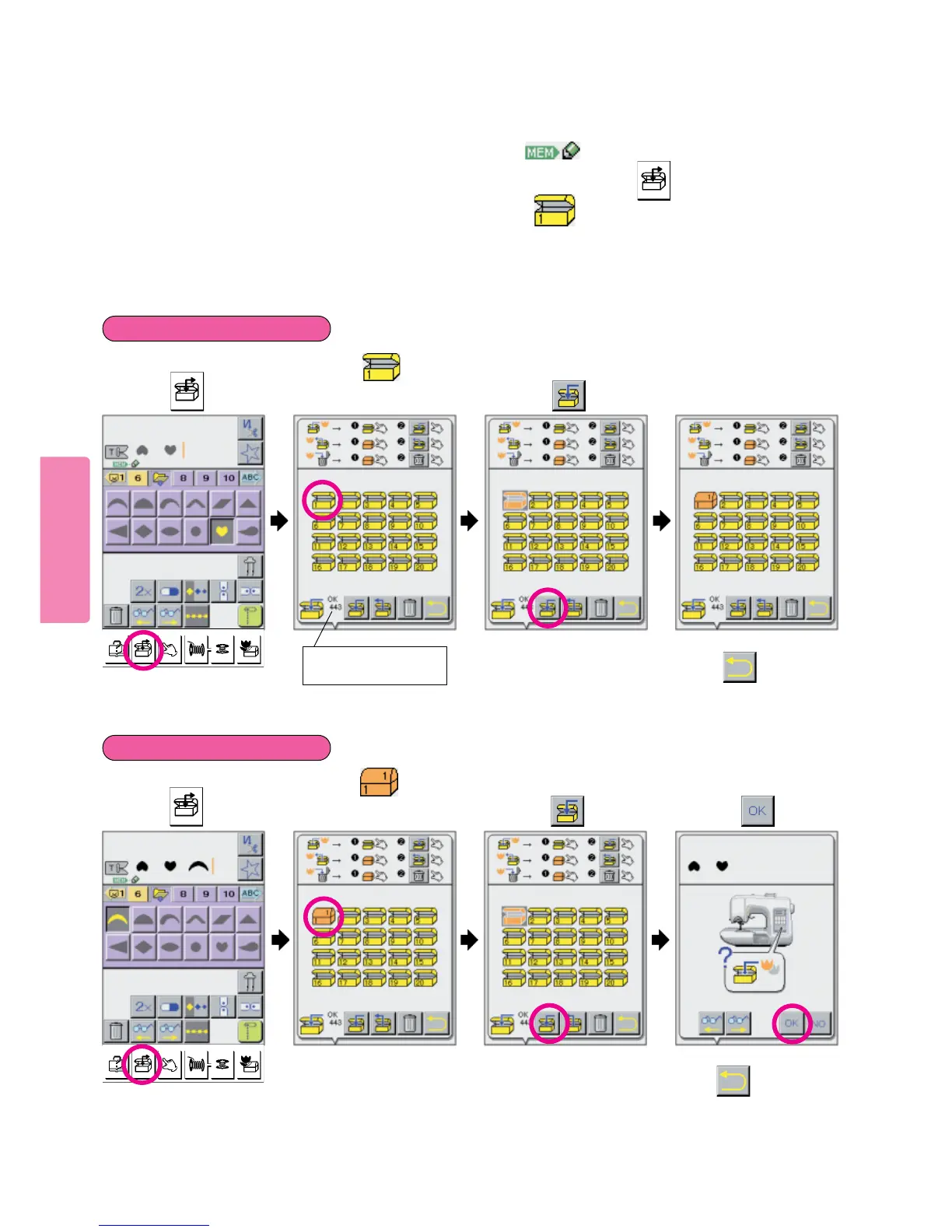
When a pattern is shown on upper part of LCD screen, it will be stored in (as many as 120 different patterns). Howev-
er, they will be automatically cleared by turning power off. If you want to save pattern, press Key. With this step of opera-
tion, you can file frequently used patterns.
As many as 120 different patterns (memory capacity) can be saved in one .
Do not turn off power to machine while Helpful Message indicating machine is filing or loading appears on LCD screen.
234
Press in
which a pattern is to
be saved.
3
Press pictogram.
Press pictogram
and screen will return to
previous one.
Press pictogram.
To save a pattern:
To overwrite a pattern:
1
Press key.
1
Press key.
5
Remaining capacity of
memory is indicated.
Press pictogram,
and screen will return to
previous one.
5
Press pictogram.



 To Next Page