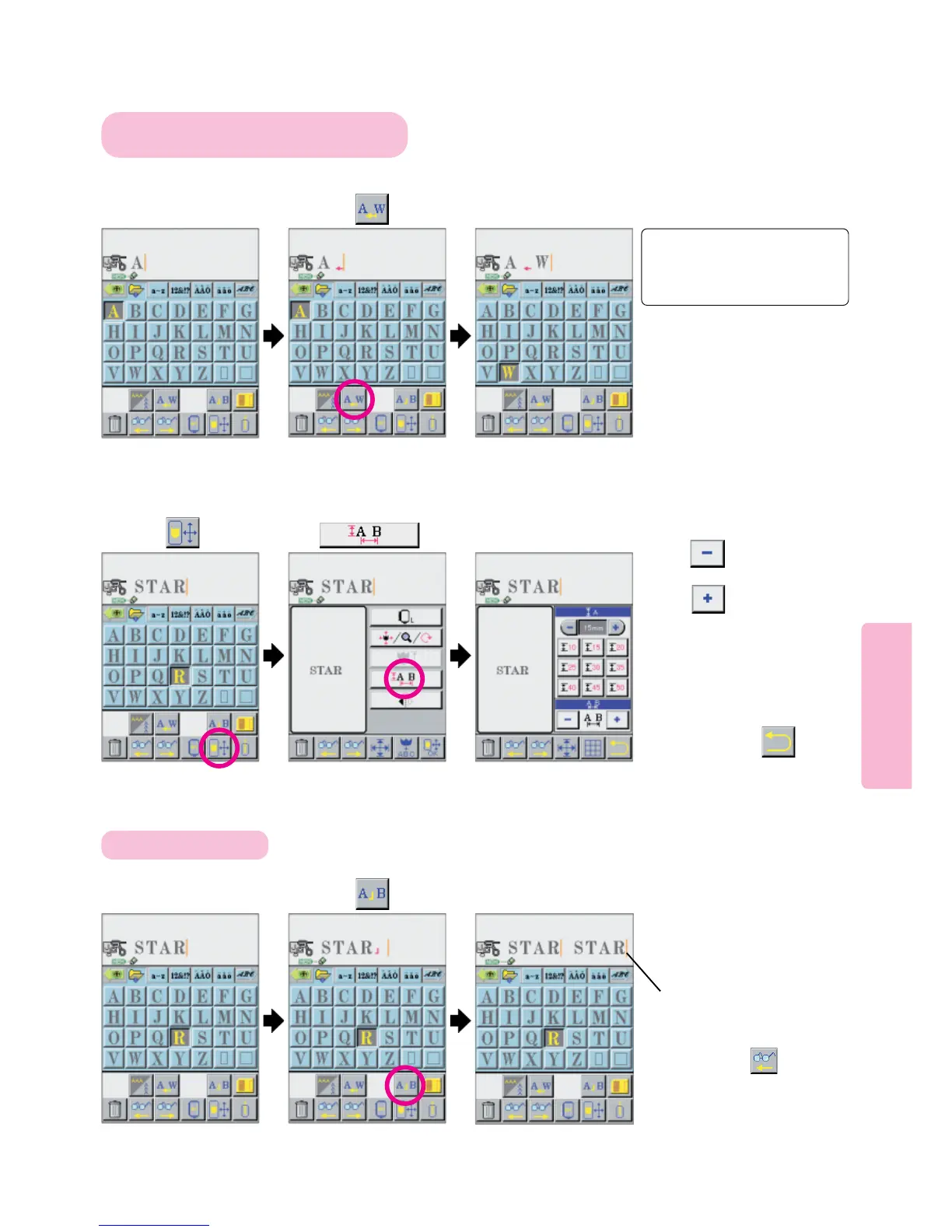
Press pictogram.
80
The space between “kern letters” stored in memory of machine can be
decreased within embroidery frame .
123
Changing space and interval between letters and dividing letters
Select first letter of
Kern Combination.
12
To change spacing between letters on layout screen
3
To decrease space between “Kern Letters”
Letters stored in memory of machine can be edited by dividing characters into several groups.
To change the spacing between “kern letter
combinations” such as A F L P T W Y
To divide letters
123
“STAR” and “STAR” can
be separately edited.
Press picto to decrease
space between letters.
Press picto to increase
space between letters.
After completion of space
changing, press
Cursor
To add a new pattern between
two existing patterns, move
cursor to pattern inserting
position using picto and
select pattern to be added.
* Letter display on layout screen
is given for reference. It will be
different from actual embroidery
result.
Select second letter
of Kern Combination.
Press
Select a desired word. Select another word.
Press pictogram.
Press pictogram.



 To Next Page