83
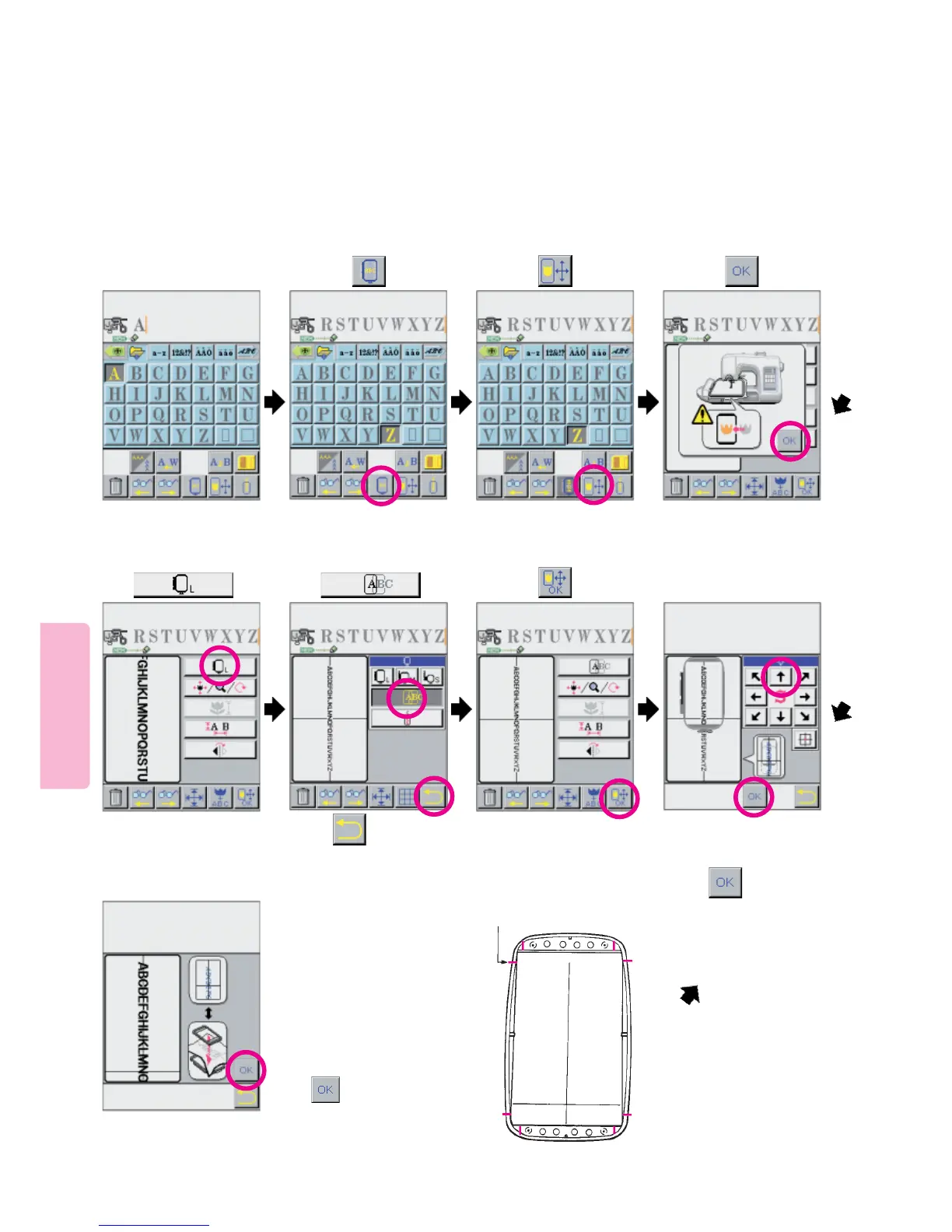
Multiple Hoop Embroidery [Example 1]
1
* Referring to the LCD Display
place fabric in Embroidery Frame
so that horizontal and Vertical
Marker lines on fabric are placed
inside Oval Markers indicated on
Embroidry Frame. Note: The
Oval Markers indicate the sewing
area.
2
* This embroidering method is used to divide embroider letterns that stretch beyond a single embroidery frame
into several parts and sew them precisely matching one group of letters to the other.
Example) To embroider a string of letters laid out on upper part of LCD screen
3
Oval Markers
Select desired letters.
9
Designate location of
letters to be sewn first.
685
4
7
Upon completion of the
procedure,
press
Install embroidery frame
on machine.
Adjust so that location of letters
to be sewn first is positioned at
center of embroidery frame.
Press
Press
Press
Press pictogram. Press pictogram. Press pictogram.
Press
Press
See top of next page for Preparation of Fabric Instructions





 To Next Page