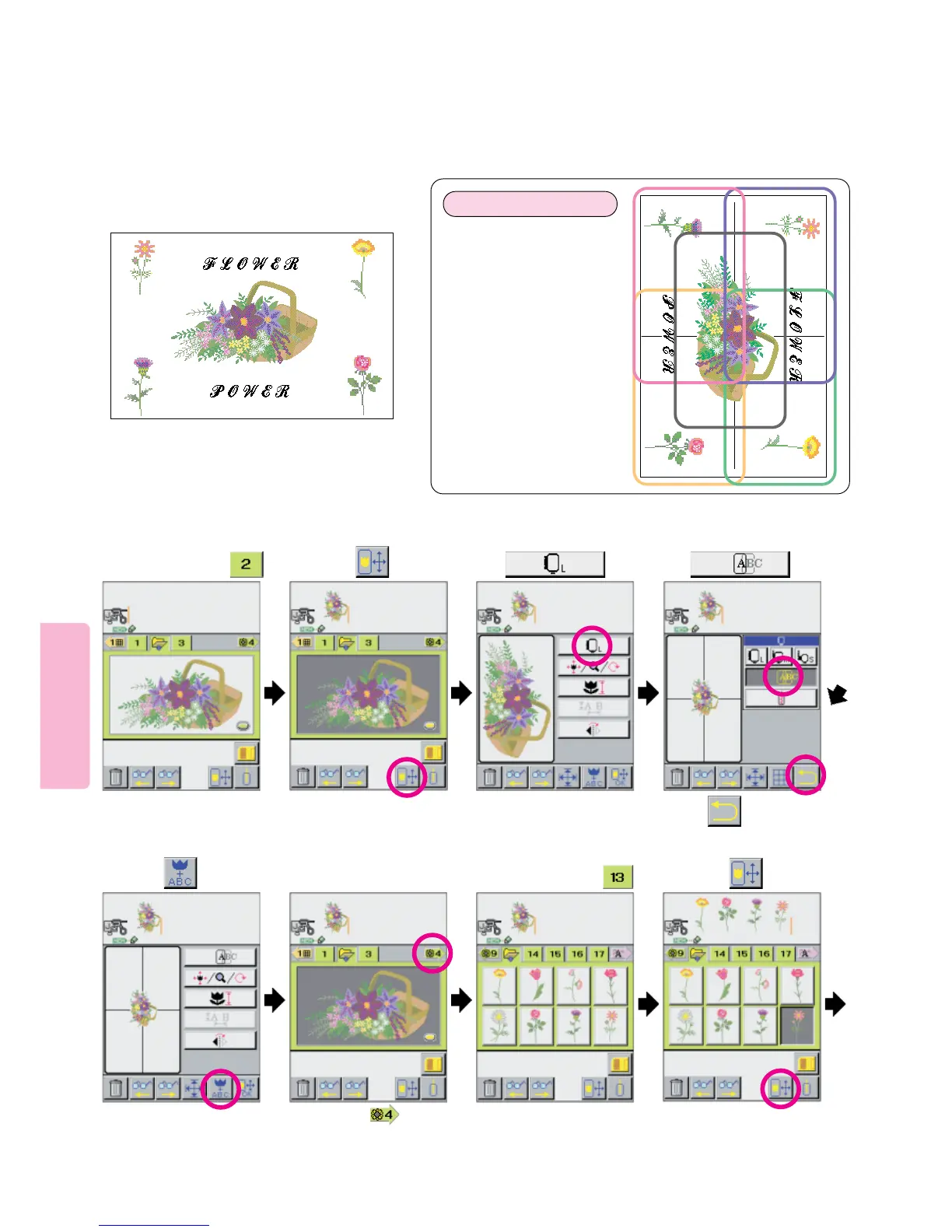
Multiple hoop embroidery may also be easily sewn by joining 4 or more adjacent hoopings. The following instructions and
example illustrates how to bring together all the elements to create a 250 x 450 mm design. The particular example uses built- in
Floral Designs and built-in lettering. However, in actuality a Multiple Hoop Design can be virtually limitless in size and can be
make up of built-in letters, built-in floral, borders and data from optional embroidery cards and unique date created in a Computer
with the optional Professional Sew-Ware Version 2.0.
Example)
2
45
1
91
Multiple Hoop Embroidery [Example2]
1423
Select pattern of .
Press
Press
Press pictogram.
5 6
Press arrow ( ) in
repetition until screen
appears.
Press pictogram.
Press
78
Select pattern of .
Press pictogram .
Preparation of fabric
1. Draw cross lines so that
the lines make right angles
in the center of fabric.
2. Plan design keeping in
mind number of hoopings
required.
In this case, 5 hoopings are
required.
3





 To Next Page