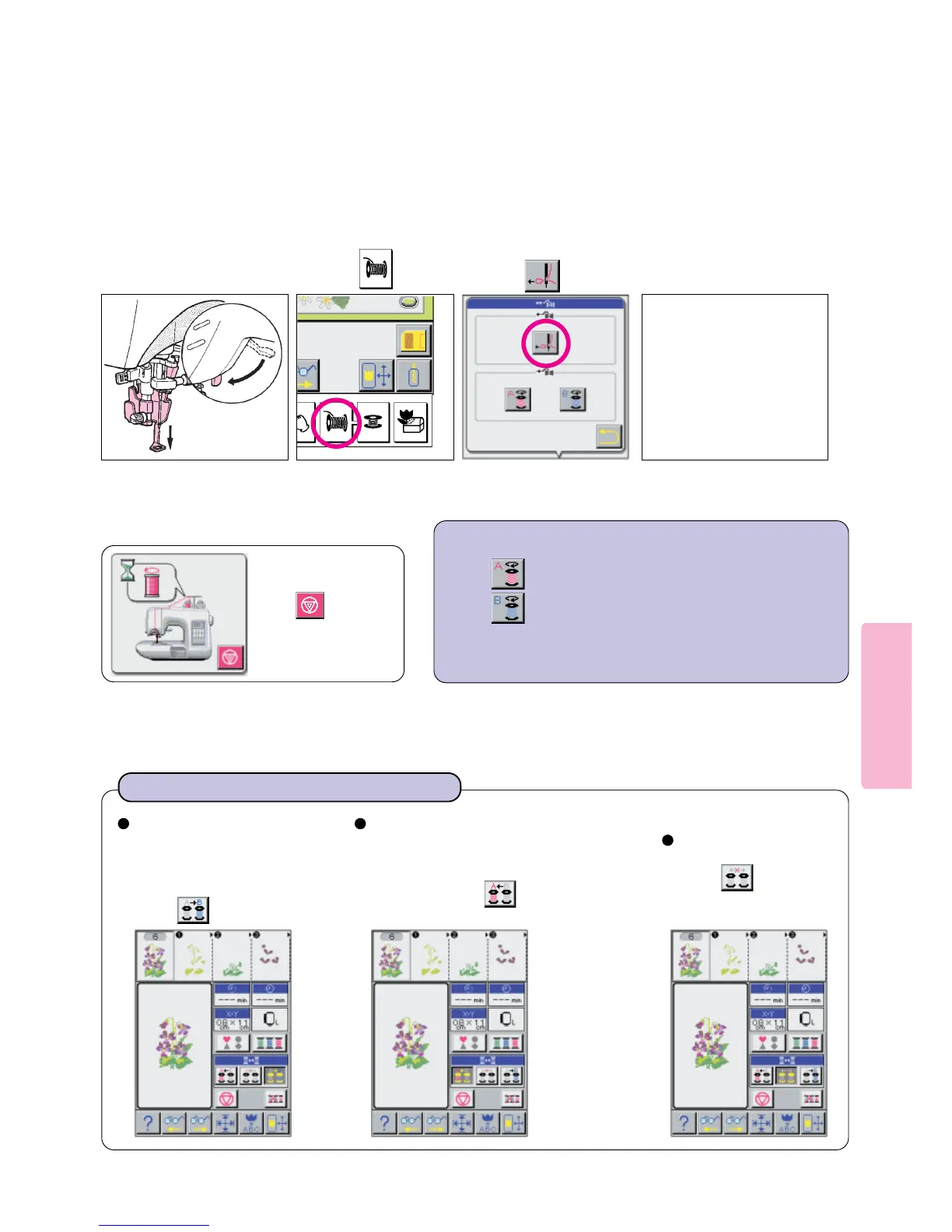
Press pictogram to rewind thread to left thread spool.
Press pictogram to rewind thread to right thread spool.
64
67
Lower presser foot lifter. Press key.
* Align mark on handwheel with
mark on machine head.
Place next color (step)
thread on Right Spool
“B”. Stage thread
through Step 5 (including
cutting the thread with
Thread Cutter Blade.)
If it is desired to manu-
ally perform threading,
press pictogram.
Fully Automatic Thread Exchange
8
Press pictogram.
* Press rewind switch only after confirming that embroidery sewing
step is fully complete and thread is cut.
9
For Semi-Automatic Operation
If you want to stop
rewinding manually
press pictogram.
At the time of threading both
spools or before sewing is
complete with first color “A”,
to acheive Fully Automatic
Thread Exchange, you must
press pictogram.
After machine has exchanged Spool “A”
for Spool “B” and has proceeded to sew,
remove used Spool A and replace it with
next color (step). Stage thread through
Step 5 and press pictogram for
Auto Thread Exchange.





 To Next Page