70
123
Press
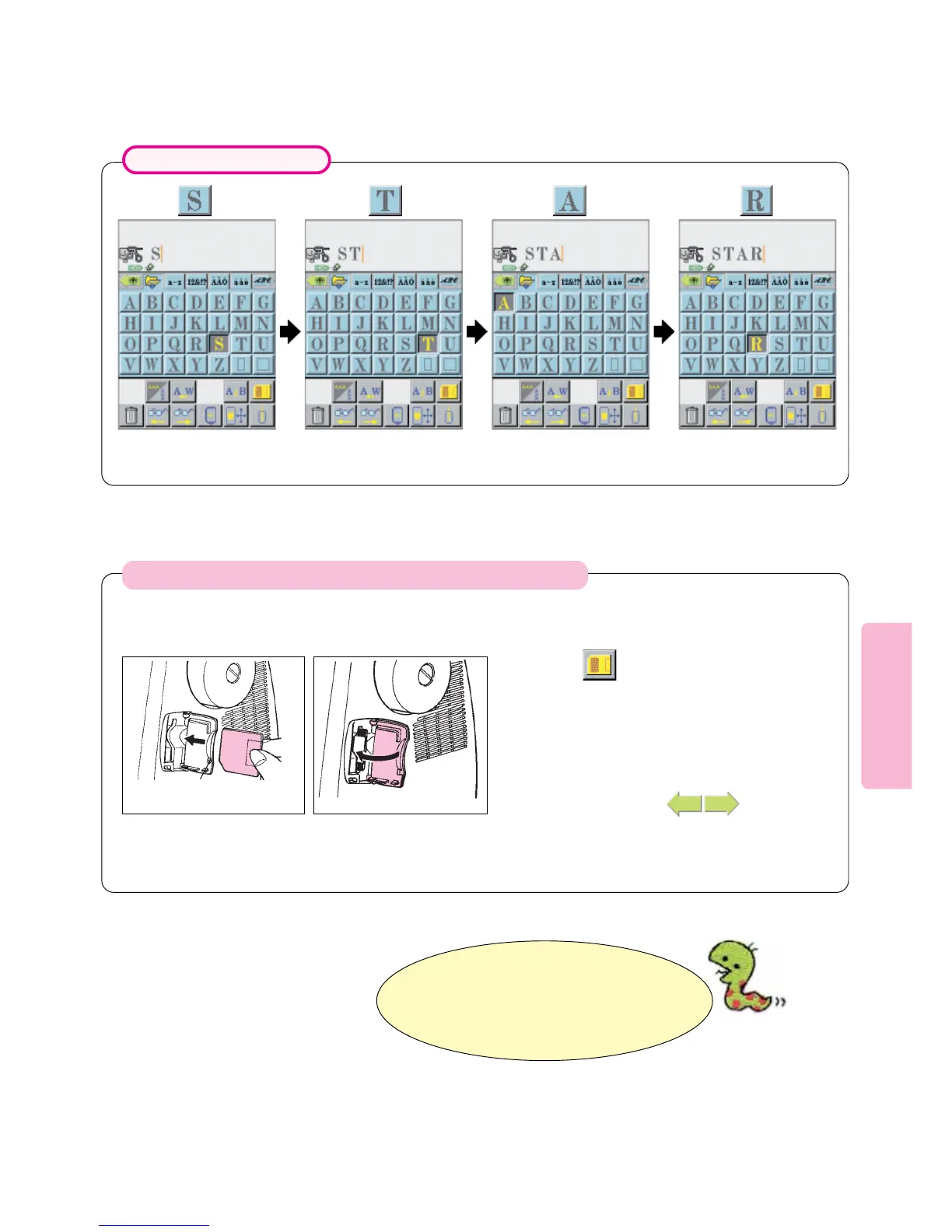
“S” appears on LCD screen. “STAR” appears on LCD
screen.
Example: Selecting “STAR”
Press Press
Patterns stored in embroidery card will appear
on LCD screen.
Check contents with
In the case where Sew-Ware Embroidery Card (optional) is used:
Open Embroidery Card
Slot Cover and load
embroidery card into slot.
Holding embroidery card with
its notch positioned in the
lower left, insert it into card
slot until it will go no further.
Be sure to close cover. If cover
is left opened, embroidery card
will be disabled.
12
Close cover.
3
Press pictogram.
4
Press
Hold embroidery card with its
notch positioned lower left.
* Various kinds of optional Sew-Ware
Embroidery Cards are available for the
machine. Contact your Certified Singer
Dealer for more information.





 To Next Page