Sirona Dental Systems GmbH 5 Foot Switch
41 63 189 D 3311
D 3311.201.01.10.02
13
IRKPMWL
5
Foot Switch
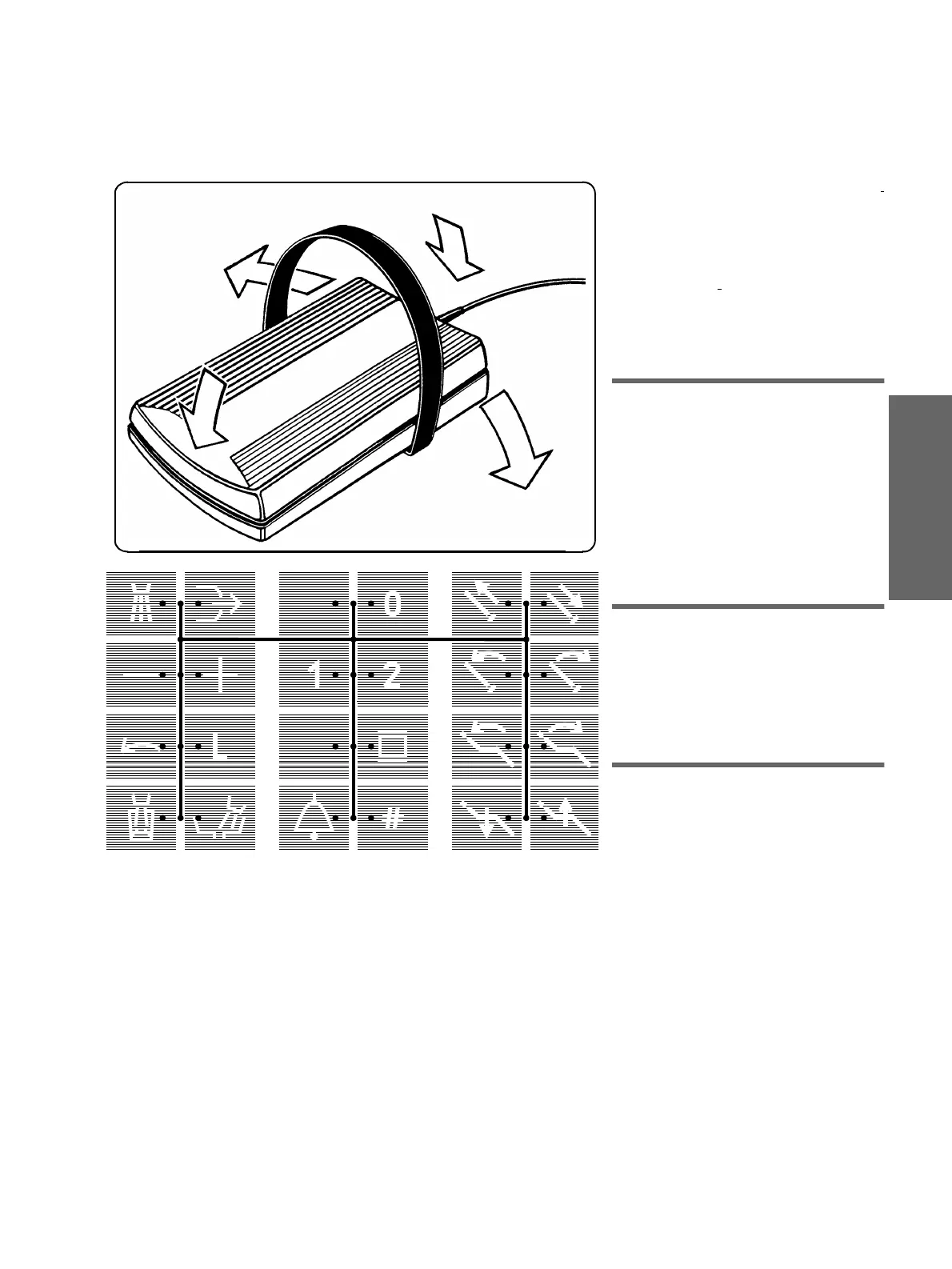
All functions can be selected
with the foot
switch
or
manually by pressing the keys
on the control panel of the dentist unit.
The functions can
only
be selected
manu-
ally
on the assistant unit.
When selecting
with the foot switch
,
place your entire foot down flat on the sur-
face of the foot switch pedal.
The yellow diode on the display of the den-
tist unit indicates the position of the cursor.
5.1 Preselecting Functions
Actuate the foot switch (factory setting)* in
pos.
A:
Cursor diode jumps
upward
↑
B:
Cursor diode jumps
downward
↓
.
When the yellow cursor diode lights up
between the top two rows of keys, the key-
pad can be selected by
swiveling the sur-
face of the pedal CCW
(
C
←
) or
CW
(
→
D
).
The path of the cursor is marked by lines.
5.2 Triggering Functions
If the yellow cursor diode lights up between
two adjacent keys, the corresponding func-
tion can be triggered by
swiveling
the sur-
face of the pedal
CCW
(
C
←
) or
CW
(
→
D
).
The green diode corresponding to the
selected function then lights up.
5.3 Move the dentist unit up
or away.
The
neutral program
0
is displayed. The
cursor is located between the
headrest in
/
out
keys.
When the foot switch is actuated at
A
* the
dentist unit moves in the direction of the
operator (if repositioned, in the direction of
the foot end of the patient). After the foot
switch is released, the dentist unit stops
moving, the cursor jumps between chair
program
1
and
2
and, if preselected in
Mode
, the
SIROLUX FANTASTIC
unit
lamp is switched on automatically
(Mode item 12.17).
A chair program can be executed
immediately.
A*
C
D
B*
A/B
S















 To Next Page