52
Model MMV Rev. 10/11
Operation
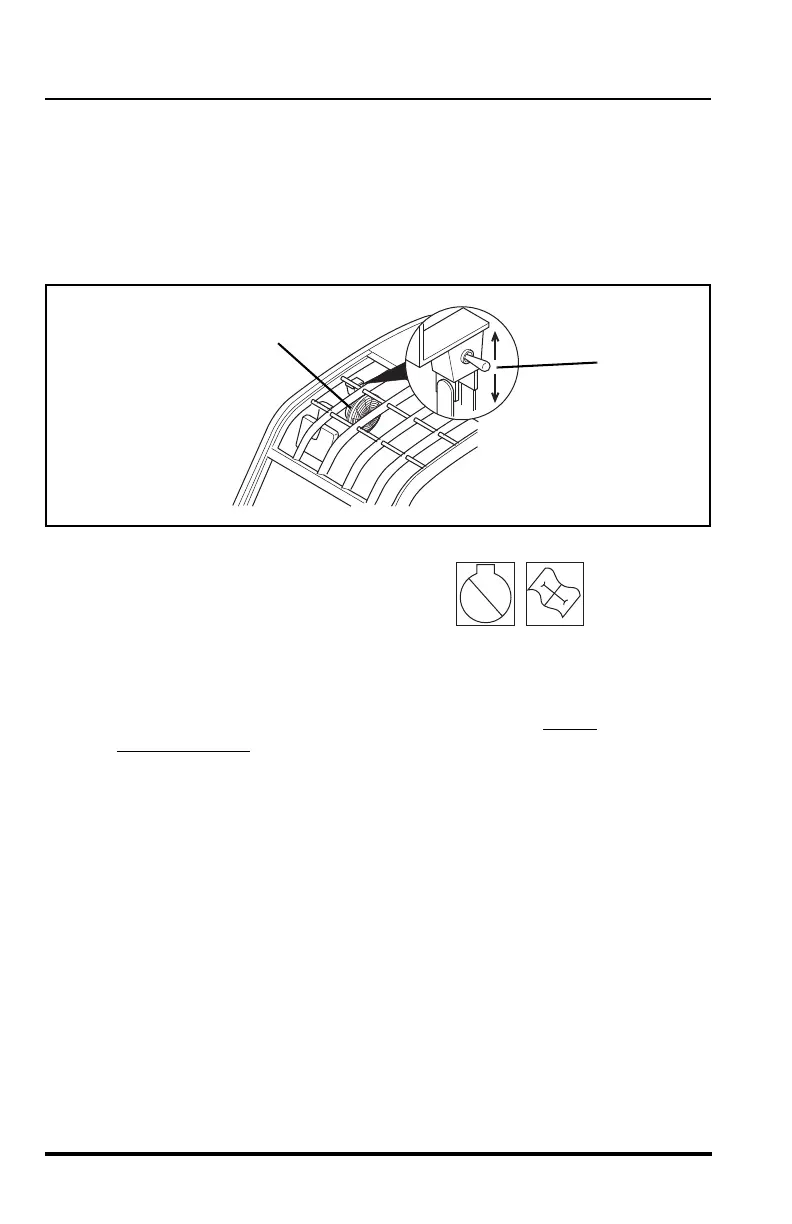
Cab Circulation Fan
The cab circulation fan (1) is located at the top right side of the cab just
above the operators seat. The fan has a three position toggle switch (2)
located on the fan mount. The fan can be operated at HIGH speed (switch
down) or LOW speed (switch up). The fan can be swiveled to direct the flow
in the desired direction.
Engine Function Indicator Lights
The engine function indicator lights
(3) are located in the switch bank on
the left side of the front dash. The
light indicates any faults that arise in the engine during operation.
The light contains a RED light (4) and a AMBER light (5).
If the RED light (4) comes ON during operation, STOP
the engine
IMMEDIATELY
and diagnose the fault by activating the ECM
diagnostic system. Activate the system with the accelerator pedal.
Activate the system and read the code as indicated by the RED
light (4). Contact your local Cummins dealer for an explanation of
these codes or refer to the Cummins Engine Owners Manual or call
the Cummins Customer Assistance Center at 1-800-343-7357.
If the AMBER light (5) comes ON during operation, the engine
diagnostic system has detected a fault within the engine. Stop the
engine and diagnose the fault by activating the ECM diagnostic
system.


 To Next Page