EasyManua.ls Logo

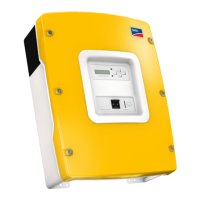
SMA SI 5048 - User Manual

SMA SI 5048
212 pages
Print Icon
To Next Page IconTo Next Page
Loading...
SI5048-TEN093630 | TBE-SI5048 | Version 3.0
EN
Off-grid Inverter
SUNNY ISLAND 5048
Technical Description

Table of Contents

Questions and Answers

  • I
    Isaac MahoneyAug 20, 2025
    What to do if my SMA Inverter battery is discharging even though the generator is running?
    • T
      Tracy KerrAug 20, 2025
      If the generator is running but the battery is still discharging, it could be because the power produced by the generator isn't reaching the Sunny Island. Check the voltage and frequency values. Alternatively, the consumer power might exceed the generator power, so check for any error messages to identify the cause.
  • K
    Kara BirdAug 22, 2025
    Why is my SMA SI 5048 Inverter not connecting to the running generator?
    • B
      Barbara CarlsonAug 22, 2025
      There could be several reasons why your Sunny Island isn't connecting to the generator. First, check the generator fuse. If that's fine, see if the power allowed to be fed back into the generator during the permissible time has been exceeded. If it has, set the '540.02 GnAck' parameter to Ackn. If the generator control relay (GnReq) is open, ensure the generator is set to autostart, if required. Also, if a GenMan is used, check the return signal (DigIn) as the generator can only be started using GenMan.
  • E
    Edward ScottAug 25, 2025
    What to do if VAC-Low error (output voltage too low) occurs when SMA Sunny Island is started?
    • U
      uarnoldAug 25, 2025
      If you're getting a VAC-Low error when starting your Sunny Island, there might be a permanent short-circuit in the stand-alone grid. Check the AC output connections. It could also mean that the loads connected to the stand-alone grid are too heavy. Try switching off some of the loads and restarting the Sunny Island.
  • M
    Michael OchoaAug 26, 2025
    What to do if it is not possible to change parameters of SMA SI 5048?
    • K
      Kimberly KhanAug 26, 2025
      If you're unable to change parameters on your Sunny Island, first verify that you've entered the installer password correctly and are in 'Installer Level'. Also, note that if you're in the '100-Meters' or '300-Diagnose' menu, you can only read the data values. Some parameters can only be changed in standby mode, so stop the Sunny Island.
  • A
    Aaron BarberAug 27, 2025
    Why does my SMA Sunny Island connect to the running generator only for a short time?
    • E
      Elizabeth WallAug 27, 2025
      If your Sunny Island connects to the generator only briefly, the voltage and frequency limits might be too strict. Change the voltage and/or frequency limits while observing the technical data for your generator.
  • T
    Travis BryanAug 29, 2025
    What to do if MMC operation failed message appears on the SMA SI 5048 Inverter display?
    • C
      Cindy GreenAug 29, 2025
      If you see an 'MMC operation failed' message, it means an action using the SD card has failed. Check the card on your PC/laptop and use a new SD card if necessary.
  • S
    Sharon PhillipsAug 31, 2025
    Why does my SMA SI 5048 display stay dark and show nothing?
    • G
      George ParkerAug 31, 2025
      If the display of your Sunny Island is dark, first ensure the DC circuit breaker on the Sunny Island is set to 'On'. If it is, check the external battery fuse. To restart the Sunny Island, see section 9.5 'Reactivating the Device Following Automatic Shutdown'.
  • Y
    yhuffSep 2, 2025
    What to do if my SMA Sunny Island stays on even though the DC circuit breaker is set to Off?
    • J
      Jason WilcoxSep 2, 2025
      If your Sunny Island remains on even after setting the DC circuit breaker to Off, switch off all AC loads and disconnect them from the Sunny Island.
  • S
    susanbruceSep 4, 2025
    What to do if my SMA Inverter continuously switches off after Low Battery Mode (LBM) when restarting the device?
    • S
      Shelia SotoSep 4, 2025
      Start the generator manually, if required.
  • K
    Karen RamirezSep 6, 2025
    What to do if my SMA Inverter QCG does not run?
    • R
      Richard WebbSep 6, 2025
      Switch off the Sunny Island and restart it.

Summary

The Sunny Island 5048

Safety Precautions

Important Notes Regarding Operation

Highlights critical safety instructions and warnings for operating the Sunny Island.

Potential Hazards

Details potential dangers like electric shock, burns, and device destruction.

Mounting the Device

Selecting the Mounting Location

Provides guidelines for choosing a safe and suitable location for mounting the device.

Mounting the Sunny Island with a Wall Mounting Bracket

Step-by-step instructions for mounting the Sunny Island using a wall bracket.

Electrical Connection

Connection to ground

Details the requirements and procedures for grounding the Sunny Island correctly.

DC connection

Instructions and precautions for making the DC connections to the Sunny Island.

AC Connection

Explains how to connect the Sunny Island to AC power sources (Loads/Sunny Boys, Generator/Grid).

Initial Commissioning

Requirements

Lists the prerequisites and important steps before starting the commissioning process.

Starting the Quick Configuration Guide (QCG)

Step-by-step guide to starting and using the Quick Configuration Guide for setup.

Commissioning the battery current sensor

Procedure for setting up and calibrating the battery current sensor.

Activation and Deactivation

Activation

Detailed steps for activating the Sunny Island and starting the QCG.

Stopping the Sunny Island (Standby)

Instructions on how to put the Sunny Island into standby mode.

Switch off

Procedure for completely switching off the Sunny Island.

Disconnect the device from voltage sources

Steps to safely disconnect the Sunny Island from all voltage sources.

Operation

Changing Parameters

Instructions on how to view and modify device parameters.

Entering the installer password

Procedure for entering the installer password to access advanced settings.

Display of Warnings and Failures

Details how warnings and failures are displayed, including error codes and indicators.

Archiving Data on an SD Card

Additional Functions

Load Shedding

Details the load shedding function to protect batteries from deep discharge.

Overload and Short-Circuit Behavior

Explains how the Sunny Island handles overload and short-circuit conditions.

Device Faults and Autostart

Describes how the device handles faults and the autostart functionality.

Battery management

Charge control

Explains the IUoU charge control procedure and phases.

Connecting External Sources

Generator

Guidance on connecting and managing generators as an external energy source.

Grid

Explanation of how the Sunny Island operates with the main power grid and stand-alone grid.

Stand-Alone Grid Operation

Describes the operation when the main grid is disconnected and the Sunny Island powers the grid.

Multicluster Operation

Communication between the Sunny Island

How to connect multiple Sunny Islands to form a multicluster system via communication cables.

Initial Commissioning of the Multicluster System

Steps for the initial setup and configuration of a multicluster system.

Switching a Multicluster System On and Off

Procedure for activating and deactivating the entire multicluster system.

Firmware Update

Procedure for updating firmware across all devices in a multicluster system.

PV Inverters in the Stand-Alone Grid System

Setting Stand-Alone Grid Operation

How to configure PV inverters for stand-alone grid operation.

Parameter lists

Adjustable parameters

Detailed lists of all adjustable parameters for various system settings.

Diagnosis (300#)

Events, Warnings and Failures (History)

Troubleshooting

Error Confirmation

Procedure for confirming and resolving errors to return the Sunny Island to operation.

Error Categories

Classification of failures into five levels based on severity and required interaction.

Warnings and Fault Indications

Lists of specific warnings and fault codes for different categories (INV, BAT, EXT, GEN, GRD, RLY, SYS, AUX).

Troubleshooting

Common questions and answers for troubleshooting practical issues with the Sunny Island.

Procedure During Emergency Charge Mode

Step-by-step guide for activating and managing emergency battery charging.

Technical Data

SMA SI 5048 Specifications

General IconGeneral
ModelSMA SI 5048
Rated Power5000 W
Max. Apparent AC Power5000 VA
AC Nominal Voltage230 V
Battery Voltage48 V
Operating Temperature Range-25°C to +60°C
Protection ClassIP65
Number of MPP Trackers2
TypeInverter
AC Voltage Range180 V - 280 V

Related product manuals