CHAPTER 2
INSTALLING YOUR INTERACTIVE WHITEBOARD SYSTEM
12 smarttech.com/kb/170782
To fine-tune the image, you might need to repeat all steps described in the installation document
in smaller increments.
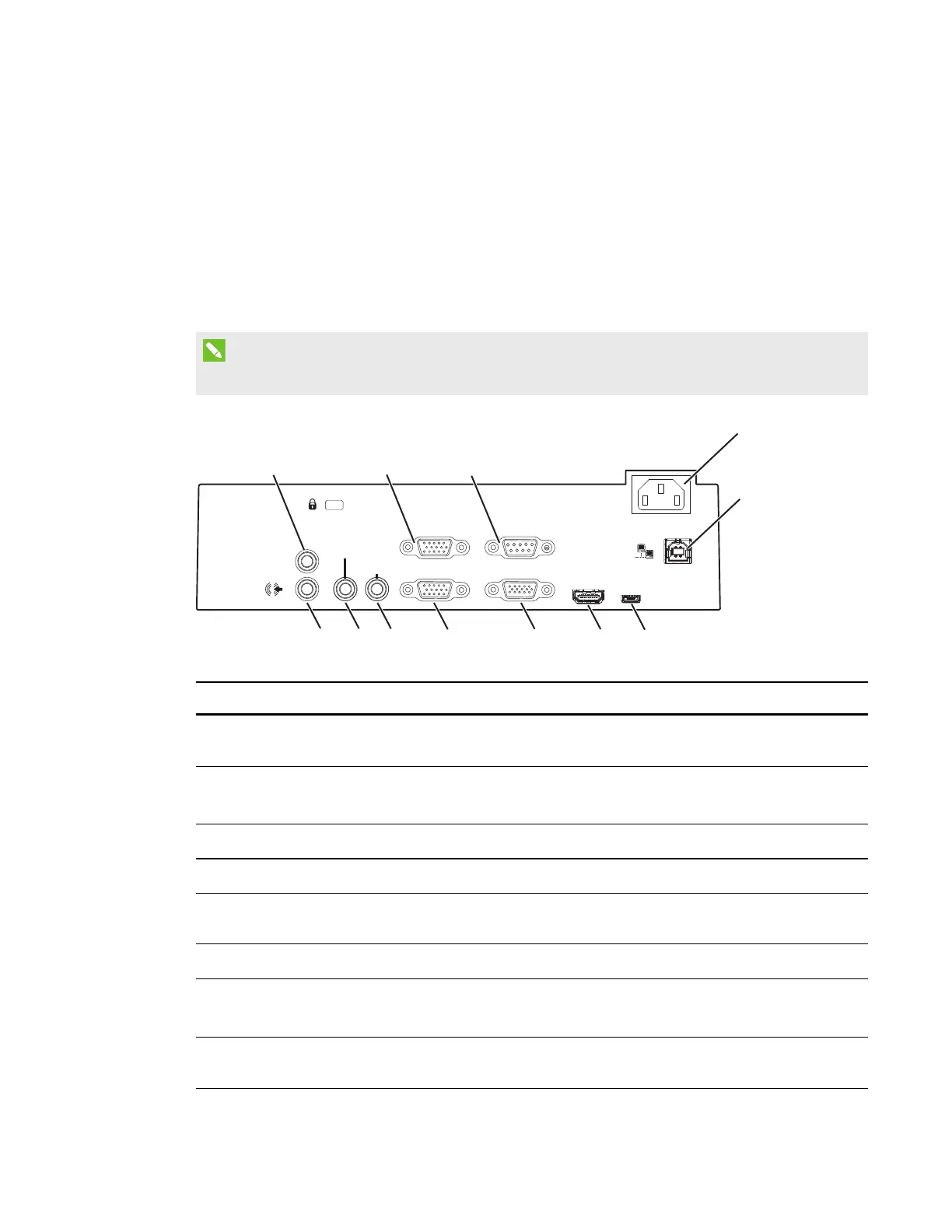
Projector connection diagram
You can connect a variety of peripheral devices to your projector, including DVD/Blu-ray players,
document cameras, and other high-definition sources, as well as peripheral device outputs such as
a secondary display or powered speakers.
NOTE
You might need to purchase third-party adapters to connect certain peripheral devices.
HDMI
AC Power
VGA OutComputer 1
Computer 2 RS232
Service
Line Out
Composite
Video
Composite
Audio
4
5
3
2
1
6
7
8
9
10
11
12
No. Connector Connect to:
1
3.5 mm phone jack audio variable
output
External speakers (optional, not included)
2
DB15F RGB VGA video input (VGA
In)
Computer standard definition media (audio and
video) source (not included)
3
DB9F RS-232 control port RS-232 control for external control systems
4 Power
Mains power supply
5
RJ45 (Cat 5) Network (for web page management access)
network connection only
6
USB B (for service access only) Do not use (for service access only)
7
HDMIin
Computer high-definition multimedia (audio and
video) source (not included)
8
DB15F RGB VGA video output
(VGAOut)
Secondary display (not included)



 To Next Page