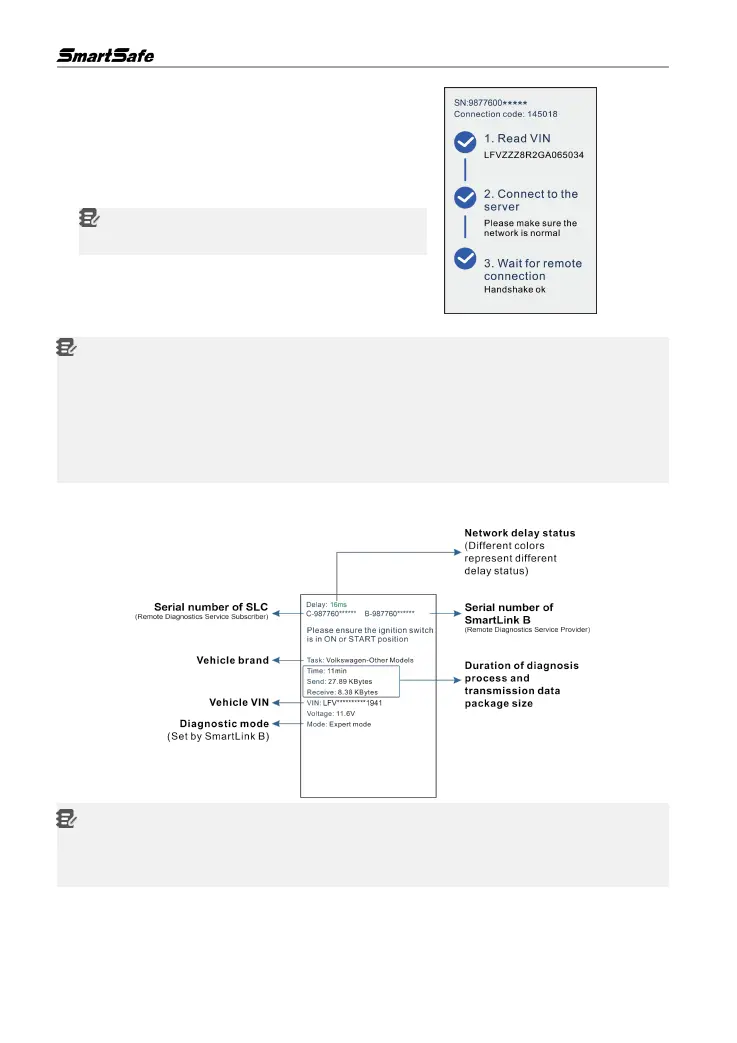
4) After a successful network connection, tap Remote
Diagnostic Mode, the system will automatically
generate a random connection code and read the
vehicle VIN information, and then connect to the remote
diagnosis server.
Notes: If the vehicle VIN decoding fails , it does not
affect the remote diagnostic session .
5) Turn the ignition on .
Notes:
After receiving the order, the remote diagnostics service provider master technician will accept
the order and contact you via phone or E-mail address. Please make sure that you can be
reached via the contact information provided by you.
you select the designated service technician when posting your remote order, please notify
him/her of the connection code. The service technician will use it to directly retrieve your order
and check the details of your order.
6) After a successful connection to remote diagnostics service provider is established , the
following message will be displayed on the SLC screen .
Notes:
Please do not disconnect the vehicle or network connection during a remote diagnostic process.
Please make sure that you are well connected with the internet when performing a remote
online reprogramming process.
7) Unplug the network cable when a diagnostic session is completed.



 To Next Page