SEMI-AUTOMATIC
22
6.2 AUTOMATIC test
In stand-by mode (device off and battery installed), the AED performs automatic diagnostic tests:
• Daily (basic tests with minimum battery consumption)
• Monthly (in-depth test with moderate battery consumption)
• Bi-annually (full test with substantial battery consumption)
The automatic self-tests do not require any manual operation by the operator; the outcome can be checked with the
control LEDs on the device’s keyboard (Please see paragraph 6.4).
6.3 ON test
SMARTY Saver Plus performs a diagnostic self-test every time it is switched on.
This test is performed in order to check the proper operation of the device before use, is automatic and takes a few
seconds.
When the on button is pushed, SMARTY Saver Plus will emit an acoustic signal, confirming it is on, and the control LED
will go off.
If no errors are found following the test, the device will be ready to be used and will provide the operator with the first
instructions to initiate the intervention.
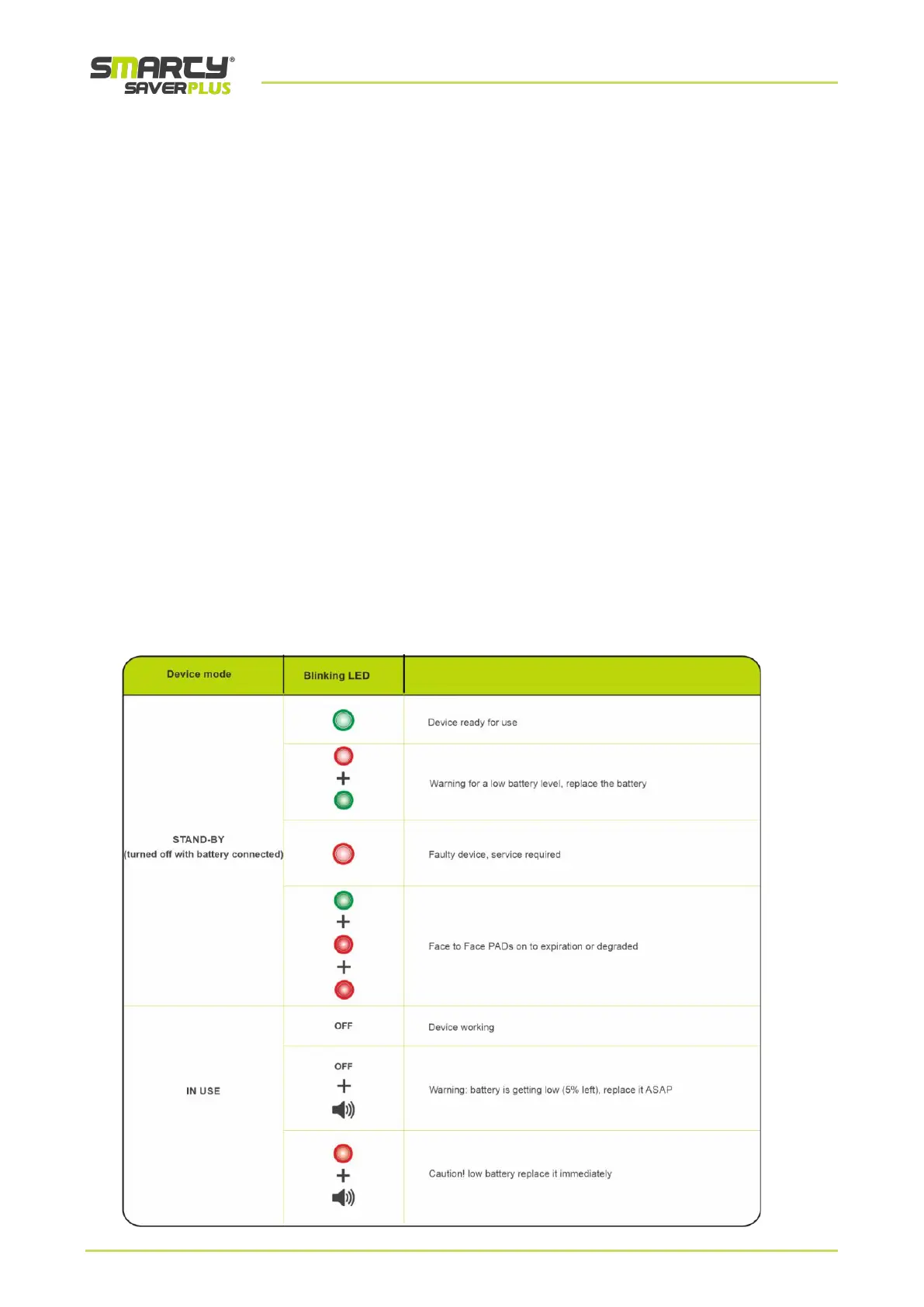
6.4 Control LEDs
The control LEDs are placed on the keyboard of the SMARTY Saver Plus.
Based on the various colours of the control LED, the operator can independently deduce the operation status of the
defibrillator and of its main accessories.
The table below shows the control LED blinking codes:



 To Next Page