SEMI-AUTOMATIC
33
9.5 Guide to identifying faults
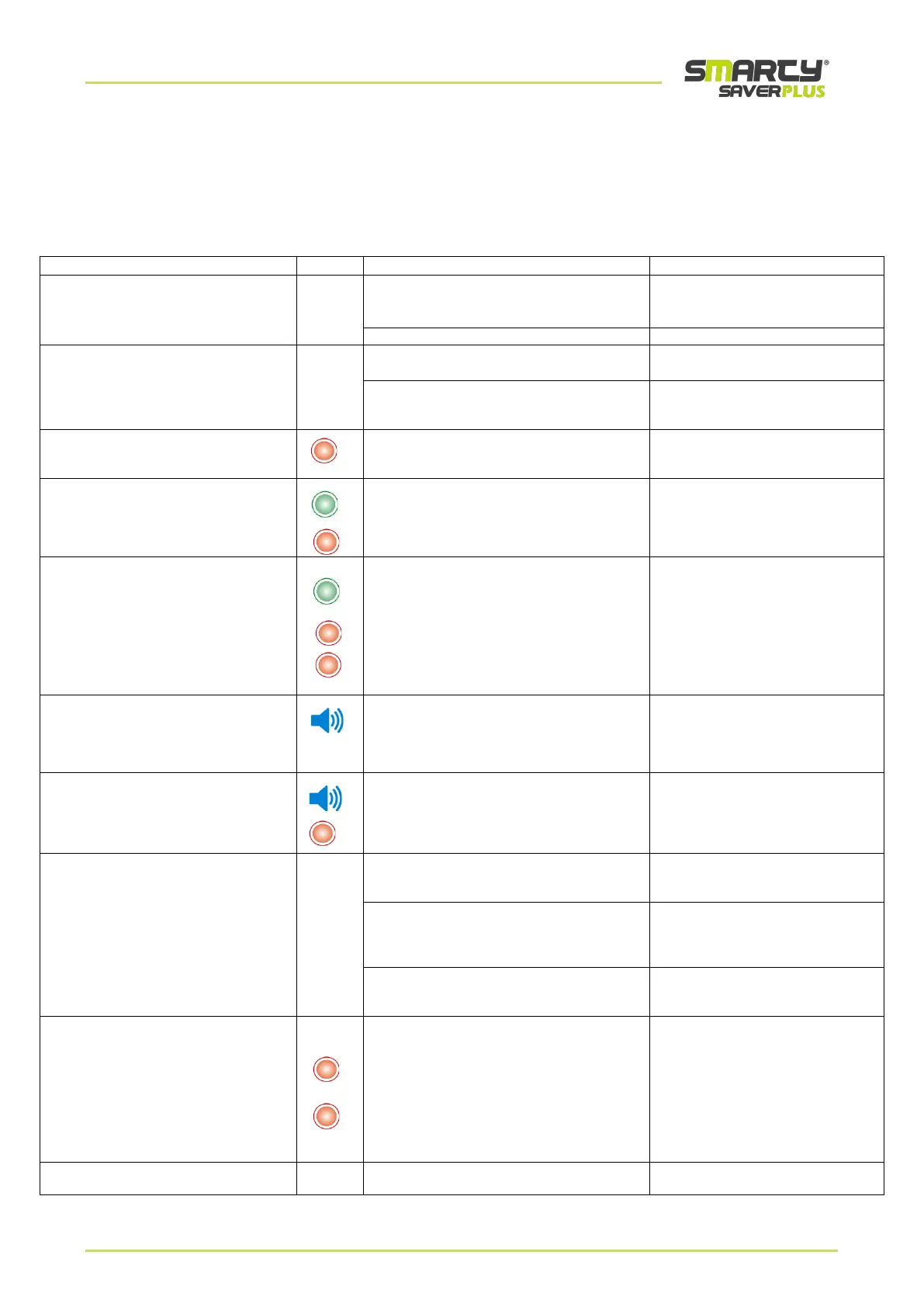
The table below lists the device’s statuses, the possible causes and the possible corrective actions that will resolve issues
that have emerged.
For more details regarding the implementation of corrective actions, please refer to the specific sections of this user
manual. If the fault persists, please contact technical support.
The device, with the battery installed,
does not switch on
Both control LEDs are off
The battery is completely empty or faulty
Replace the battery.
If the problem persists, please call
technical support
The device is not working
Please contact technical support
In stand-by mode, the control LED
is off.
The control LED is broken
Please contact technical support
The battery is completely empty or faulty
Replace the battery.
If the problem persists, please call
technical support
In stand-by mode, the control LED
blinks RED.
A critical error of the device was found
during the daily self-test.
Please contact technical support
and give them
the error code.
In stand-by mode, the control LED
blinks
alternatively GREEN/RED.
Battery empty
Level <1%
The device could switch off during use.
(please see paragraph 5.1)
Please replace the battery
immediately
In stand-by, the control LEDs blink
alternatively
once GREEN and twice RED.
The Face-to-Face pads are
about to expire or are worn
Check the expiration date on the
Pads package
In operation mode, the device emits
the voice message
“Batteries low”
Battery low.
Battery level 5%.
It is possible to use the device
(please see paragraph 5.1)
Please prepare to replace
the battery
In operation mode, the device emits
the voice message
“Batteries empty, please replace them”
The battery is empty.
Level <1%
The device could switch off during use.
(please see paragraph 5.1)
Please replace the battery
immediately
In operation mode, after the pads have
been placed on the patient’s chest,
the device continues to communicate:
“Place the Pads”
The Pads’ connector has not been inserted
correctly
or has been removed
Please insert the Pads’ connector
correctly
in the dedicated compartment
The Pads have been placed incorrectly
Please place the Pads correctly on
the patient’s naked chest. If
needed, remove chest hair with a
razor
Please control that the Pads are
intact and their expiry date; replace
them, if needed
When inserting the battery, the AED
asks you to push the shock button to
launch the activation test. When the
button is pushed, the test is not
launched. For approximately 60
seconds, the AED asks you to push
the button and then switches off
automatically, while the RED LED
blinks.
The shock button is not working
Try switching off the device and
repeating the test.
If the problem persists, please
contact technical support
The device switches on, but no voice
messages are emitted
The device’s speaker is not working
Please contact technical support



 To Next Page