5.12.1 PRINTING THE CYCLE AND APPLIANCE PARAMETERS
If the printer accessory has been installed, it is possible to force printing of the data relating:
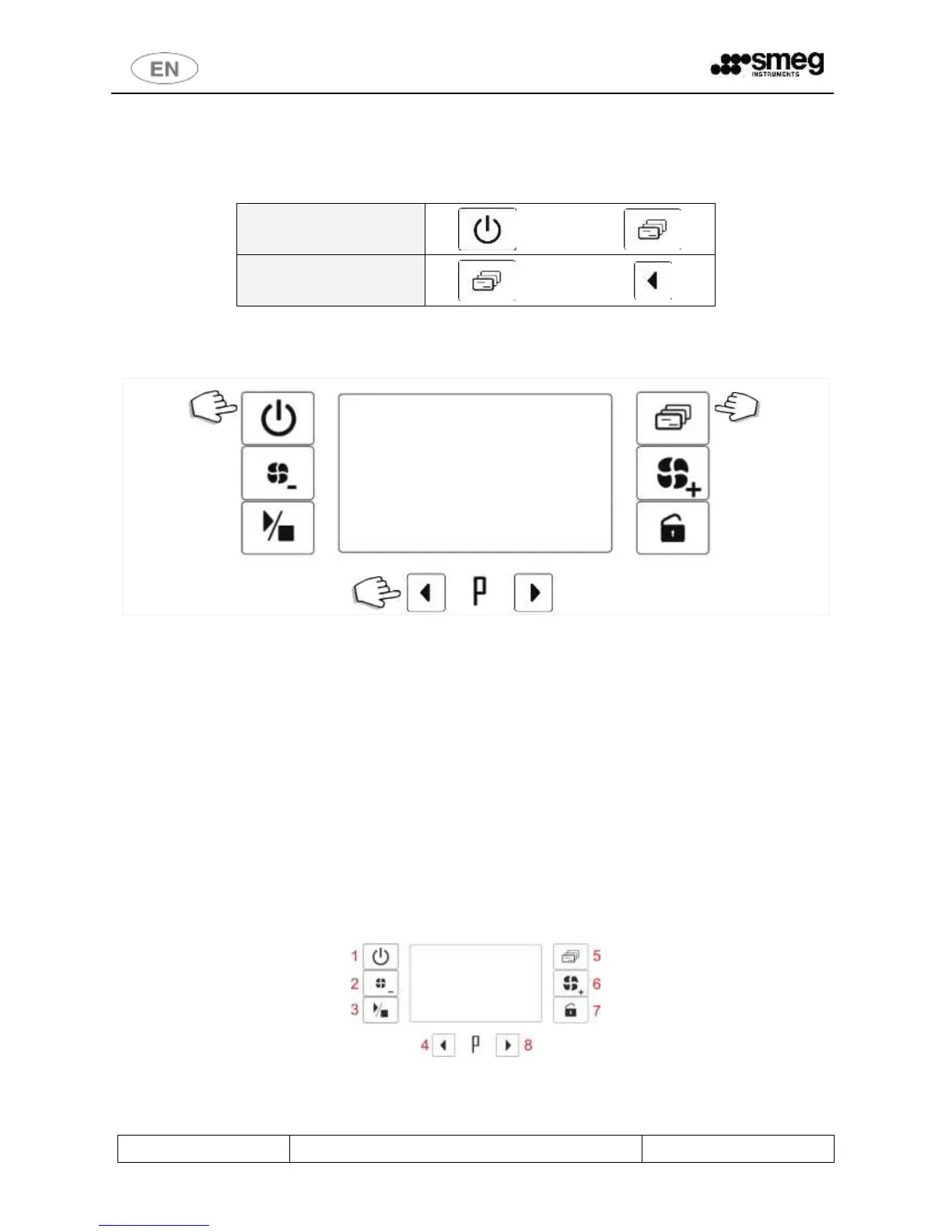
1. To the last cycle performed: by pressing the 1 On/Off and 2 Functions keys simultaneously.
2. To the setup parameters, by pressing the 3 Functions and 4 LH Selection keys simultaneously.
fig. 28 – Standard procedure for forcing printing.
Last cycle data: use “On/Off”+”Functions” keys; Parameters: use “Functions”+”LH Selection” keys.”.
6 SETUP MODE - “FUNCTIONS”
The appliance has setup procedures for modifying its operating parameters.
The setup mode is accessed by pressing the “Functions” button and requires a password.
For reasons of security and responsibility, 4 levels of password are available for access to more and more complex
functions:
1. USER Level (1111)
2. SUPERUSER Level (provided by the installation engineer)
3. ENGINEER Level
4. FACTORY Level
6.1 ACCESSING THE SETUP MODE / ENTERING THE PASSWORD
a. Hold the Functions button (5) down for 5 seconds. 4 dashes appear on the display.
b. Use the Selection buttons (4-8) to modify the individual characters of the password.
c. Short press the Functions button (5) to move on to the next character


 To Next Page