83
A
P
P
1
A
P
P
1
Previous outgoing ID
IP address of phone and snom's web address
ABS Address book search (OCS accounts only)
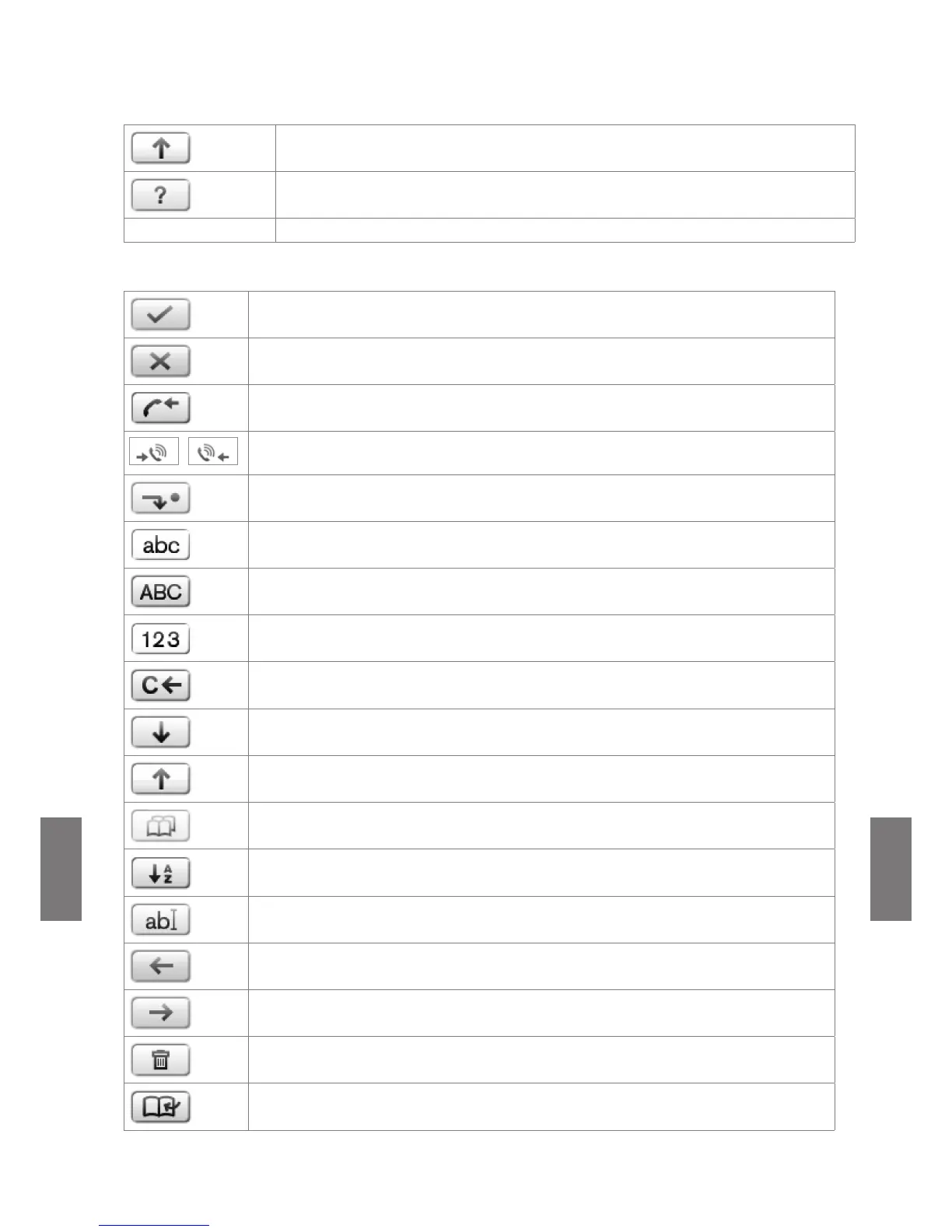
2. Context-sensitive symbols:
Confirming a selection or an action
Terminating/canceling an action and return to the previous screen
When the phone is in a call, another incoming call waiting is shown on-screen. If
you wish to to show the connected call on-screen instead, press this function key.
When the phone is in a call with more than one incoming call waiting, the latest
arrival is shown on-screen. Press these keys to show other calls waiting on-screen.
Transfer incoming call (blind transfer)
Switching input mode to small letters
Switching input mode to capital letters
Switching input mode to numerals
Deleting the character to the left of the cursor
Moving down lists in various contexts
Moving up lists in various contexts
Available directories, contact lists, etc.
Sorting Directory entries
Editing mode for selected Directory entry
Moving the cursor to the left when entering/editing directory entries
Moving the cursor to the right when entering/editing directory entries
Deleting selected directory entry
Adding current caller's number to Directory [Save] [Merken]



 To Next Page