58
snom 821 User Manual Configuring the Function Keys
Configuring the function keys
See "Opening the web interface" on page 31 on how to open the phone’s web interface. See "User
mode/administrator mode" on page 33 for an explanation of administrator and user mode. See "How
the web interface works" on page 31 on the mechanics of navigating in the windows and changing the
settings.
Any changes you make will not take effect until you press "Apply" and "Save". For more information,
see "How the web interface works" on page 31.
Function keys on snom phones
Every phone has a limited number of hard keys. Phone users, however, have a myriad of different
priorities and preferences when asked which functions they use most often and which functionalities
they would like to access quickly. snom has therefore designed the function keys to be programmable,
even the preprogrammed "hard keys" whose default function is printed on the casing.
There are four types of programmable function keys:
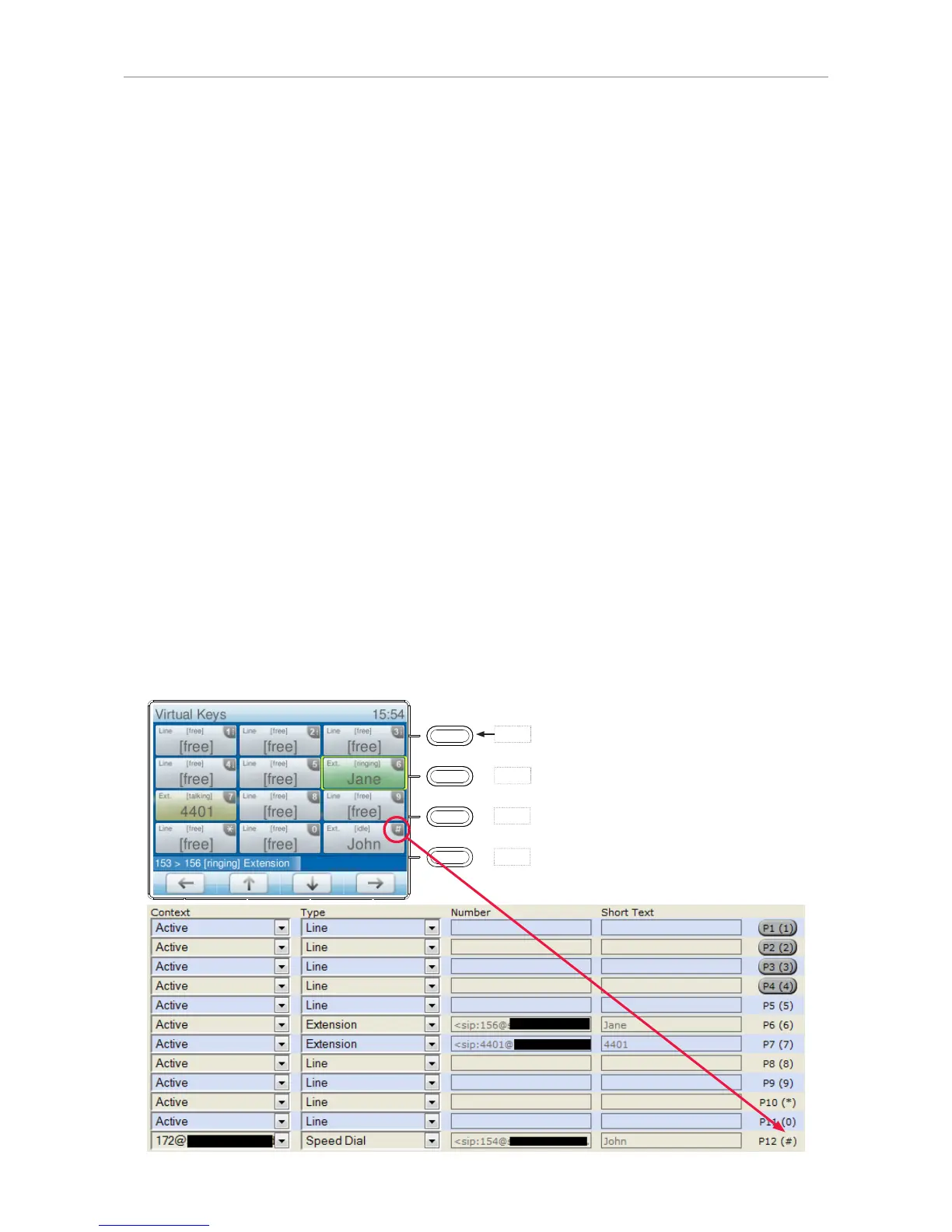
Freely programmable function keys P1 - P12
All available functionalities, including key events, can be programmed onto the freely programmable
function keys. These are the four keys with LEDs P1 - P4 to the right of the display plus eight virtual
function keys P5 - P12 that are accessed by pressing key P1 for two seconds.
P4
Show virtual function keys on the
display:
Press key P1 for two seconds
When the virtual function keys are
on-screen, pressing a key‘s number
(1-0) or character (* and #) will
activate/execute its function.
P1
P2
P3
P4



 To Next Page