en
11
5�4 Ethernet connection
All inverters and devices with an Ethernet interface can be operated within a LAN network
together with MaxWeb xp.
The inverters connected to MaxWeb xp by means of the Ethernet interface assume the
gateway function for the other devices. Behind the gateway inverters the MaxComm net-
work consists of RS485 connections.
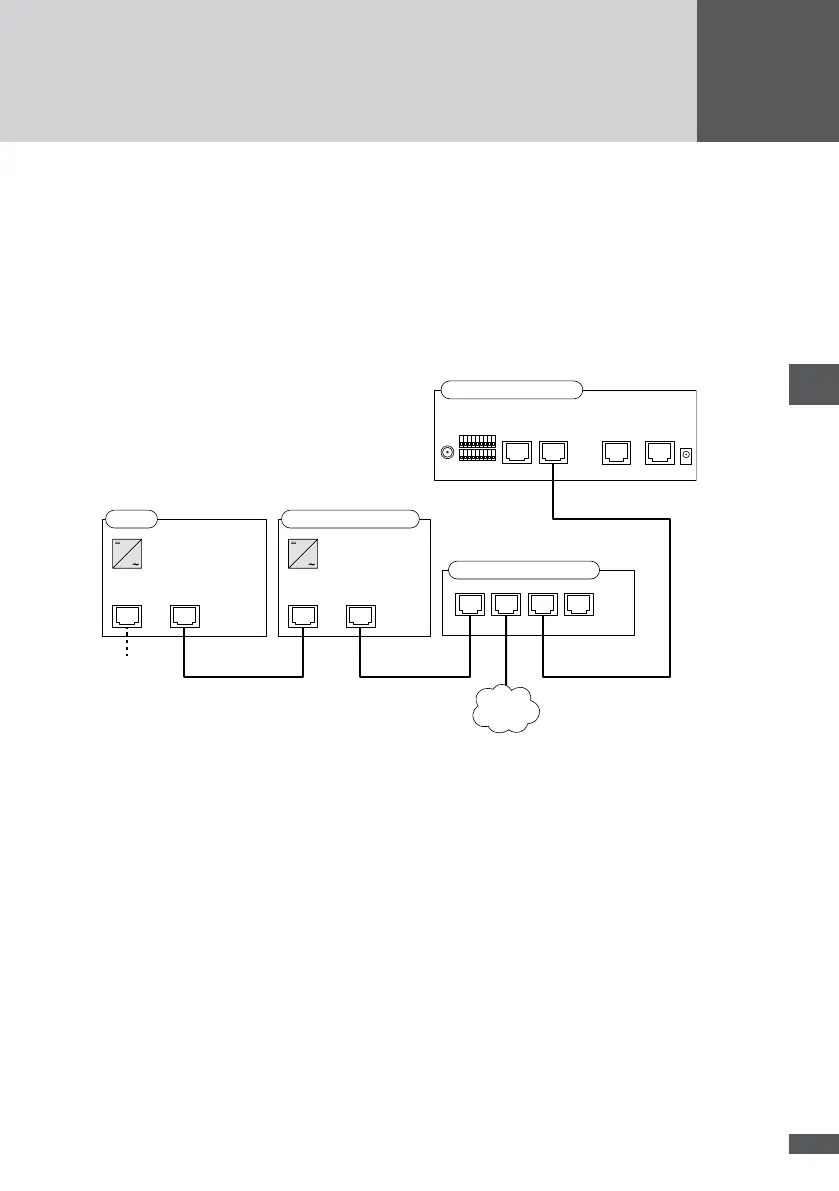
The following gure shows the recommended connection option with MaxWeb xp
Ethernet:
RS485/LANRS485
SM S/MT/TS/TS-SV
RS485
RS485
Ethernet
Modem
ISDN
Ethernet EthernetRS485 (+15 Vdc)Display
Ethernet-Switch
LAN
RS485RS485
SM C
Please observe the following items, if you are using this mode of operation:
MaxWeb xp does not allow for simultaneous connection of Ethernet and RS485
connections.
You must congure the gateway inverters for the Ethernet connection. You can nd
information on the aforementioned in the device documentations.
The TCP port must be identical for all gateway inverters.
Each device within the MaxComm network must be equipped with an unambiguous
device address (the gateway inverters as well).
The MaxWeb xp connection option must be set to the Ethernet interface.
The automatic DHCP network connection is not supported by MaxWeb xp. For this
reason, the devices in the MaxComm network need a static IP address.
Depending on the devices used and the design of the MaxComm network, additional
network infeeds are required.



 To Next Page