en
37
8�3 Conguration
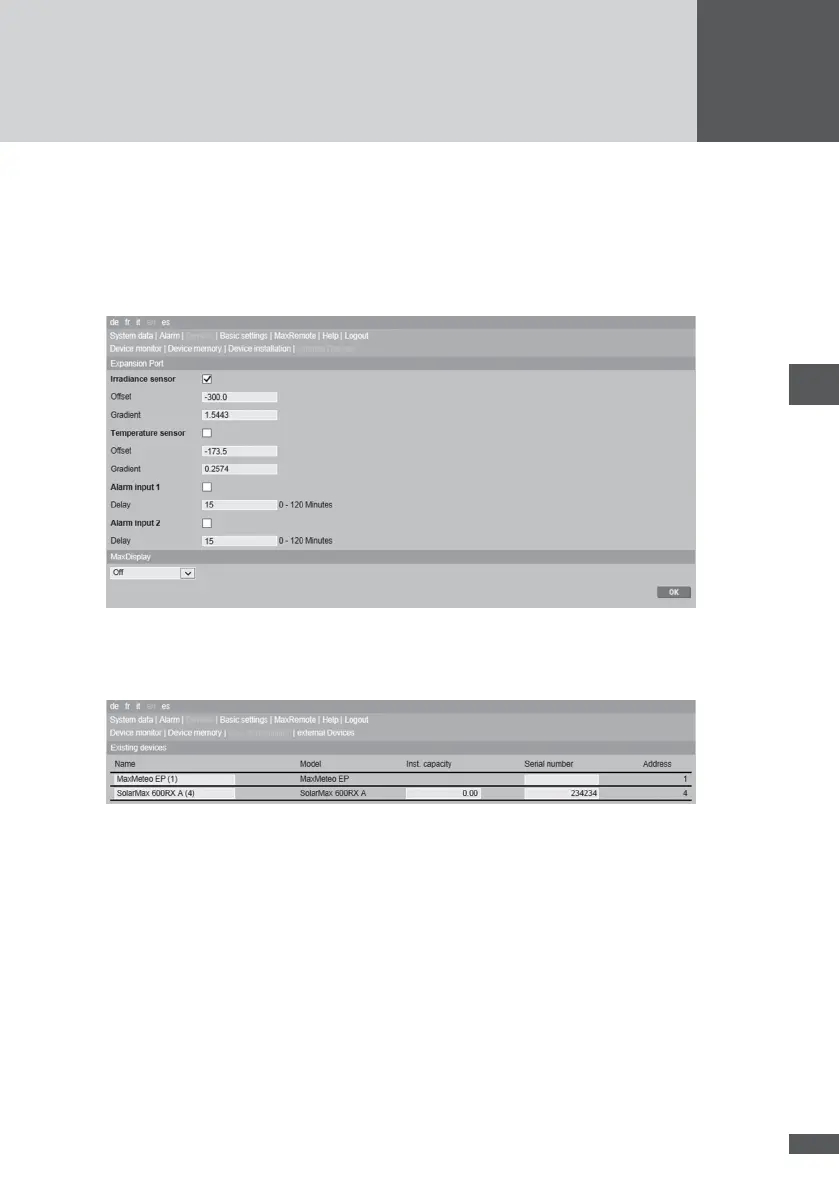
Congure the expansion port for your data logger in the menu Devices - External devices.
Further information can be found in the electronic help le for your MaxWeb xp.
1. Activate the necessary sensors in MaxWeb xp under Devices / External devices, and
enter for each one the offset and the gradient as described above.
2. Click OK to save your entry.
3. Under Devices / Install Devices MaxMeteo is now listed as a device. If necessary you
can change the name of the device.
8�4 Inputs for external alarm sensors
Connect switching contacts as external alarm sensors to the terminals A and B of the
expansion port. The alarm sensors can be used for monitoring the function of a fan or an
AC isolating switch, for example.
An activated switching contact that is closed continuously during the delay time will
trigger an alarm. The alarm is congured under Alarm settings. Alarm signals are trans-
ferred as “External alarm 1” and “External alarm 2”.
The external alarm inputs are unsuitable for personal protection or safety-relevant appli-
cations. Sputnik Engineering cannot accept liability for missing, late or incorrectly trans-
ferred alarm signals.



 To Next Page