en
9
5�2 Wiring
Use commercially available RJ45 network cables, also referred to as RJ45 patch cables,
for wiring the MaxComm network. These cables are available in different lengths from
IT retailers. Alternatively you may assemble the cables yourself using suitable tools. We
recommend using single-screened category 5 cables (CAT 5e).
DANGER!
Fatal electric shock hazard!
For the connection to a network it may be necessary to open the inverter.
Components within the inverter are charged with a high voltage.
Never open an inverter while it is in operation.
Open the inverters as described in the device documentation or installa-
tion manual.
The string inverters of the S and MT series do not have to be opened for
the connection to a network.
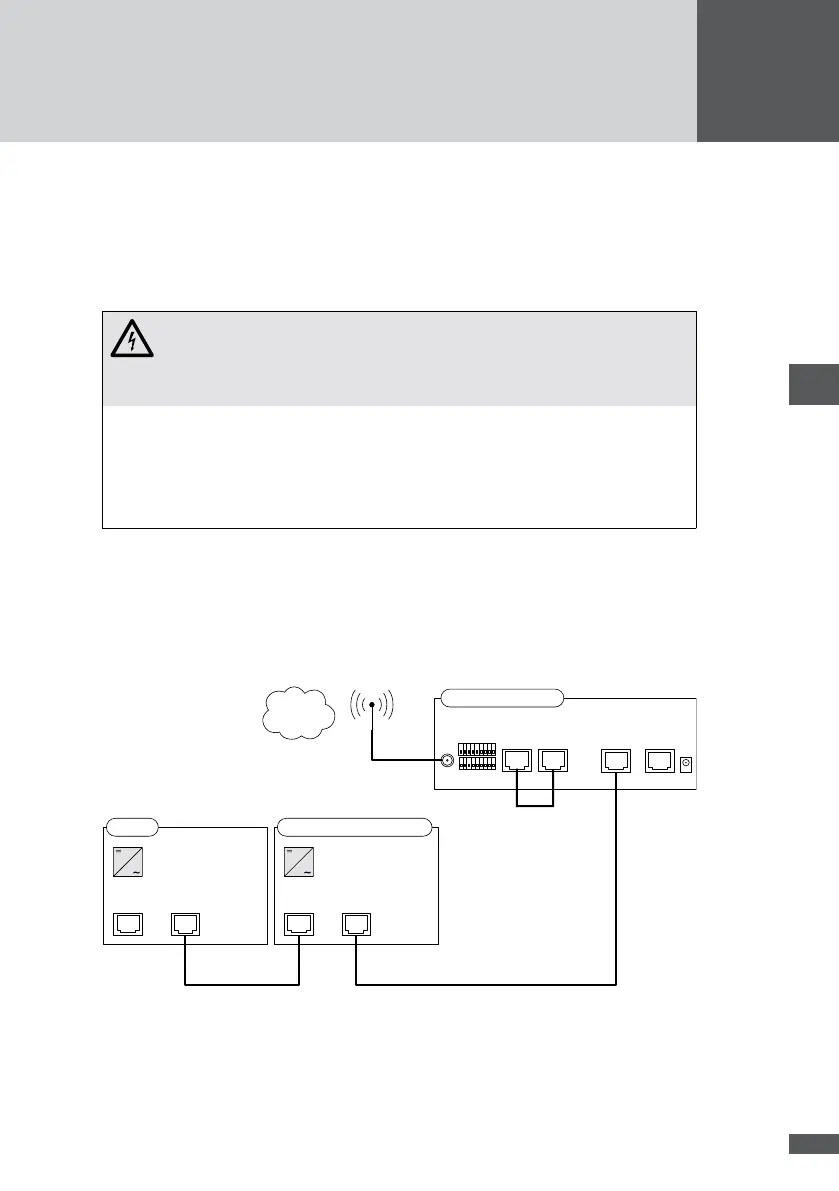
The two gures below show the recommended connection options for MaxWeb GPRS.
Other topologies are not recommended owing to the high data volumes and corresponding
high connection costs.
Connection option with bridge between the “Modem ISDN” and “Ethernet” connec-
tions (the bridge is included in the delivery package):
RS485RS485
SM C
RS485/LANRS485
SM S/MT/TS/TS-SV
RS485
RS485
Ethernet
Modem
ISDN
MaxWeb xp GPRS
RS485 RS485
WWW
GPRS



 To Next Page