13
4. ALL SERVO ON Mode
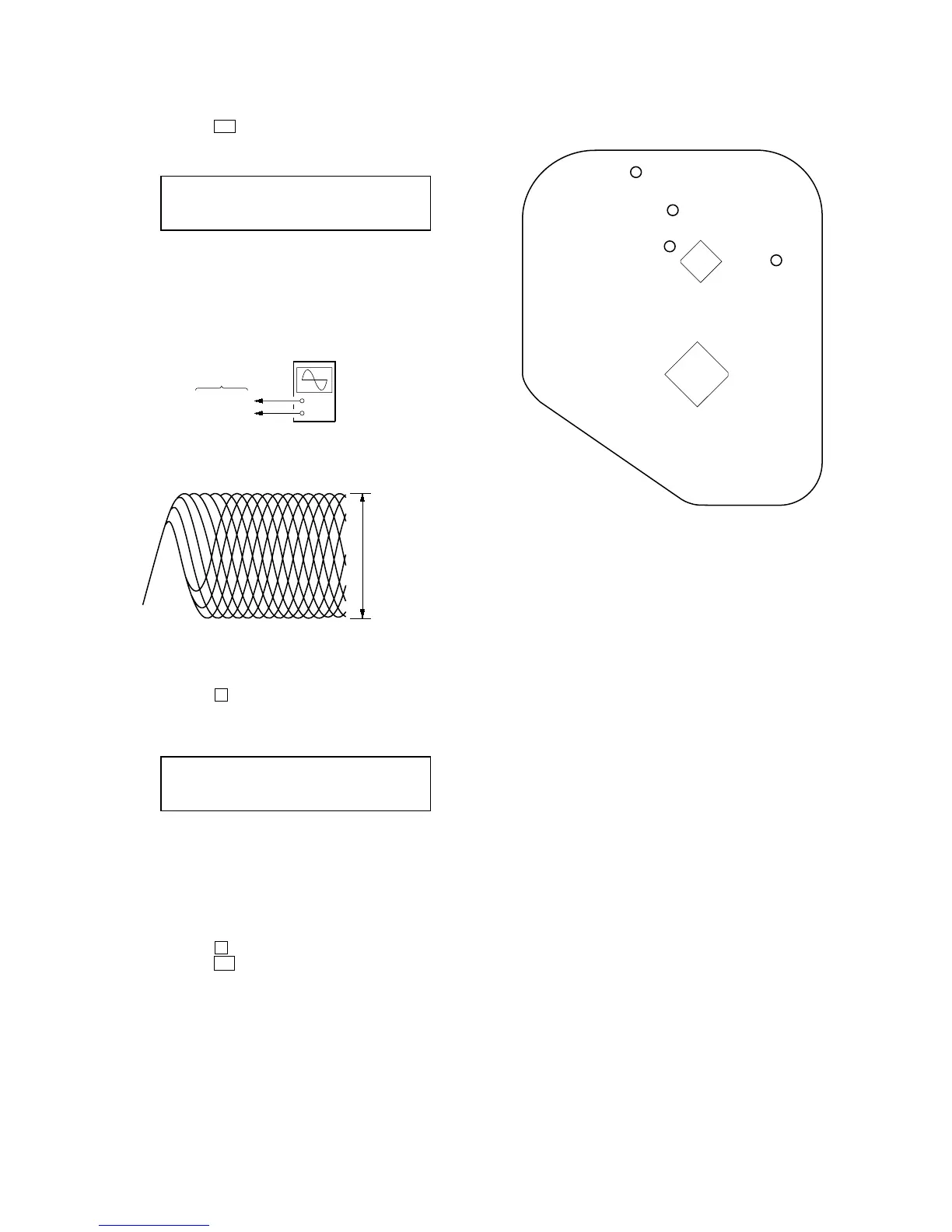
1. Press the u button to enter the ALL SERVO ON mode and
display as below. (All servo ON)
2. Connect an oscilloscope to TP (RF) and TP (VC) on the CD
board.
Connection:
3. Confirm the RF level of waveform satisfy specified value as
follows.
Specified value:
RF level: 1 ± 0.3 Vp-p
5. LPC OFF Mode
1. Press the
x button to enter the LPC OFF mode and display
as below. (LPC OFF)
2. Confirm the RF level of waveform is the same as the RF level
in “4. ALL SERVO ON mode”.
If the RF level is down from the RF level in “4. ALL SERVO
ON mode”, measure again after clean the object lens by an
applicator with lens cleaning liquid.
6. Releasing the CD Test Mode
1. Press the x (CD) button to stop rotate the disc.
2. Press the ?/1 button to release the CD test mode and turn the
power OFF.
Display
P L
* * * *
STEREO
+
–
BD board
TP (RF)
TP (VC)
oscilloscope
(DC range)
VOLT/DIV: 200 m



 To Next Page