HCD-SLK10D/SLK20D
17
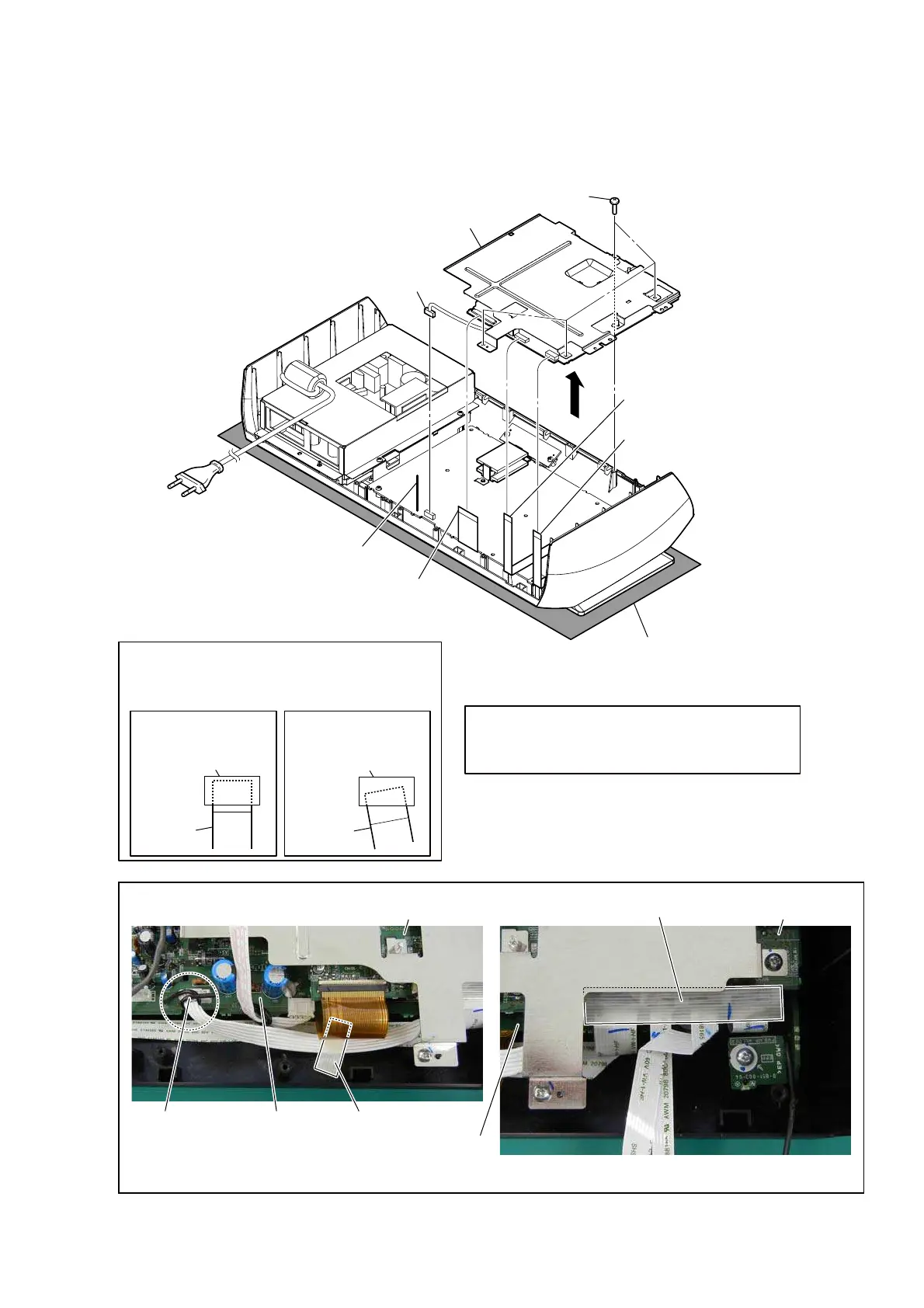
2-12. DISPLAY BOARD BLOCK
4 four screws
(BVTP2.6)
2 connector
(CN900)
3 LCD flexible board
(CN406)
1 Lift up the lead pin.
lead pin MAIN board
MAIN board
tape
tape
– Rear bottom view –
Note 1:
Please spread a sheet under a unit
not to injure front panel.
5
6 wire (flat type) (9 core)
(CN606)
7 wire (flat type) (11 core)
(CN408)
8 DISPLAY board block
DISPLAY board
‡
:
ire
V
etti
QJ
DISPLAY board
–
)
ro
Q
t
S
a
Q
e
O
i
QQ
er view –
Note 2:
When you install the wire (flat type), please
install them correctly.
There is a possibility that this machine damages
when not correctly installing it.
Insert is straight
to the interior.
connector
Insert is incline.
wire
(flat type)
wire
(flat type)
connector
OK NG
Note 3:
Do not insert
the wire (flat type)
in the same amount of
connector by mistake. Refer to
“2-21. HOW TO BEND
WIRE (FLAT TYPE)”
(page 24) and “5-1. FLAME
PRINTED WIRING BOARDS”
(page 31) for details.


 To Next Page